


Bristol_Jonesey
-
Posts
1,344 -
Joined
-
Last visited
-
Days Won
2
Everything posted by Bristol_Jonesey
-

Sonar bug? Drag/drop Midi stops audio engine?
Bristol_Jonesey replied to Salvatore Sorice's topic in Cakewalk Sonar
Just PM'd you -
Sonar bug? Drag/drop Midi stops audio engine?
Bristol_Jonesey replied to Salvatore Sorice's topic in Cakewalk Sonar
Done it both ways. Audio engine never switches off -
Sonar bug? Drag/drop Midi stops audio engine?
Bristol_Jonesey replied to Salvatore Sorice's topic in Cakewalk Sonar
Still not happening here David. I can drag/drop to desktop even with the transport running. Sure it glitches momentarily (to be expected) but the audio engine never switches off -
Sonar bug? Drag/drop Midi stops audio engine?
Bristol_Jonesey replied to Salvatore Sorice's topic in Cakewalk Sonar
Yes, exactly the same. I've been testing this on a Dell XPS170 Win 11 laptop -
Sonar bug? Drag/drop Midi stops audio engine?
Bristol_Jonesey replied to Salvatore Sorice's topic in Cakewalk Sonar
No, I'm not seeing this (as I mentioned earlier). I can drag Midi clips to my desktop with total impunity. -
New Sonar, just so I have this right...
Bristol_Jonesey replied to Timothy Connelly's topic in Cakewalk Sonar
Hardly. I said CbB might well fall foul of OS updates. Which is totally beyond Cake/Bandlab control. Especially for a piece of software no longer supported. Solution? Don't EVER update your OS. Hope this helps. -
New Sonar, just so I have this right...
Bristol_Jonesey replied to Timothy Connelly's topic in Cakewalk Sonar
CbB will no longer receive updates apart from essential maintenance Sonar has had many updates since its release and is steadily improving way beyond what CbB is/was offering CbB will eventually fall foul of incompatible OS updates, Sonar will not -
Do you REALLY want to print out almost 4 reams of paper? For something that will be out of date come the next update?
-
Sonar bug? Drag/drop Midi stops audio engine?
Bristol_Jonesey replied to Salvatore Sorice's topic in Cakewalk Sonar
Works fine here -
You're funny
-
No, not ever
-
Open the project in Safe Mode and enable all other plugins apart from the one you want removed.
-
You're right clicking in the Browser yes? AFAIK, this is the only way to do this. You can't just right click it from say the Fx bin or the Pro Channel.
- 1 reply
-
- 1
-

-
Is there a way to recover a project file?
Bristol_Jonesey replied to mgustavo's topic in Cakewalk by BandLab
Restore from your last backup? -
Melodyne missing (visual) focus
Bristol_Jonesey replied to Anders Madsen's topic in Cakewalk by BandLab
To be clear, are you inserting Melodyne as a Region Fx or does it go into the Fx bin? Also, see this thread which posted on Saturday https://discuss.cakewalk.com/topic/82438-melodyne-5-essentials-blobs-not-consistantly-showing-up-using-region-effect/ -
Yes, because the 2024.07 update was a maintenance release only. There was and will be no new or enhanced features
-
Export always has a tiny gap at the start
Bristol_Jonesey replied to John T's topic in Cakewalk by BandLab
So what happens if you do your export one bar earlier than you want? -
Yes, I've noticed this several times.
-
Export always has a tiny gap at the start
Bristol_Jonesey replied to John T's topic in Cakewalk by BandLab
You might get this if your project data starts EXACTLY measure 01:01:000 If this is the case, move it out a couple of measures by going Project > Insert Time/Measures -
Good spot. Melodyne should be used as a Region Fx, not in the Fx bin Also, it's better from workflow and resources perspectives if you have a single instance of Breverb on its own bus and insert sends on the tracks that need it.
-
What happens if you drag/copy the audio to a new track?
-
Definitely Windows. Nothing to do with Sonar
-
Yes, you need to tick Simple Instrument Track in the first tick box
-
You need to set it from this screen via the Synth Rack
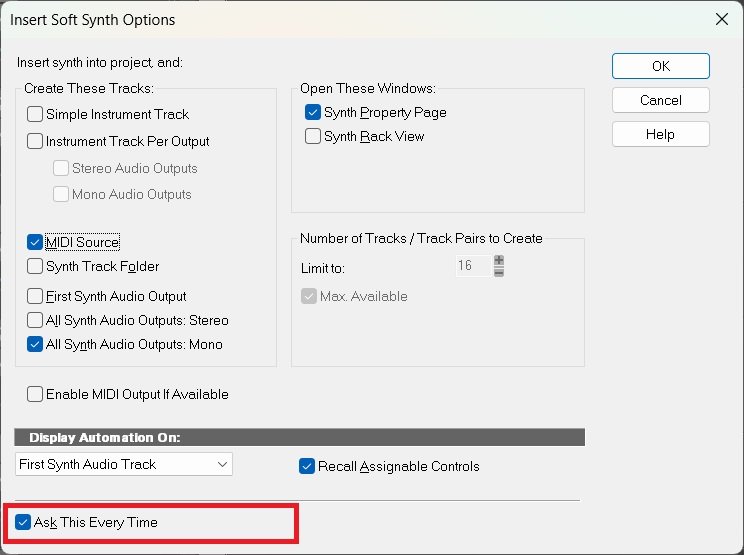
-
Can you expand on these decade old issues.

