tecknot
-
Posts
549 -
Joined
-
Last visited
Everything posted by tecknot
-
Whoa, thanks guys! I obviously didn't see that. Kind regards, tecknot
-
Your update to Melodyne 5 studio Even better! With its new vocal functions, Melodyne 5 created a sensation – winning a TEC Award into the bargain. These made many things better musically as well as simpler. A major step forward for you, too, perhaps? The arguments for updating are powerful ones: Better vocals, less time spent editing, more natural sound, because the Melodic Algorithm can now edit pitched and unpitched (noise) components separately (Sibilant Detection). Perfect control, precision-targeted de-esser function with the tool for balancing the volume ratio of pitched to unpitched components. Musically perfect intonation correction thanks to the improved weighting of pitch deviations. Adapt recordings and samples swiftly to your own songs with the Chord Track and Chord Grid. No knowledge of music theory required thanks to integrated chord recognition. Per-note dynamic editing, even in polyphonic material with the Fade Tool and Leveling Macro. Future-proof software technology, optimized for the latest DAWs and operating systems – now also native on Macs with the M1 chip. Now for only US$69 Update from Melodyne 4 studio. Instead of US$149. Offer valid until 30.06.2022. https://services.celemony.com/cgi-bin/WebObjects/LicenseApp.woa/wa/M4NLService/showUpdateInfo?serialnumber=[YOUR SERIAL NUMBER]&updateInfoID=USM5-01b&s=af51ac23&language=en&playVideo=M5film-NewInM5 https://services.celemony.com/cgi-bin/WebObjects/LicenseApp.woa/wa/M4NLService/addArticleToShopCartViaUpdateInfo?serialnumber=[YOUR SERIAL NUMBER]&updateInfoID=USM5-01b&s=af51ac23&language=en
-
Hi Dana, That little magnifying glass pops up each time you place the cursor (mouse pointer) in a specific position in the time line. There is no turning it off. It is there to horizontally zoom in and out of the clip view by holding down the left mouse button and scrolling up or down with the mouse (or scroll wheel). Kind regards, tecknot
-
Thanks, abacab. Guess I'm a little late to the party. Kind regards, tecknot
-
Just run SynthMaster 2 and you will be prompted for the update. Unfortunately, no details are available (at this time). Kind regards, tecknot
-
Hi John, You will have to update BFD 3 through the License Manager procedure. No actual link to the update. Kind regards, tecknot
-

Piano Roll Snap To Scale Colour And Project Root Key
tecknot replied to Carey's topic in Cakewalk by BandLab
Hi Carey, Yes, C and Cmin are two different keys and are not related. Kind regards, tecknot -
Cakewalk slow at adding new tracks and other things
tecknot replied to RexRed's topic in Cakewalk by BandLab
Hi Rex, What's your memory use? Maxing out on your memory can result in odd behavior from your PC, particularly slowing down. Kind regards, tecknot -
Metronome (Not sure which category this goes in)
tecknot replied to Hello Dapp's topic in Instruments & Effects
Hi Hello Dapp and welcome to the Cakewalk forums. Go Preferences>Metronome and uncheck the two boxes in the red circle indicated below: Kind regards, tecknot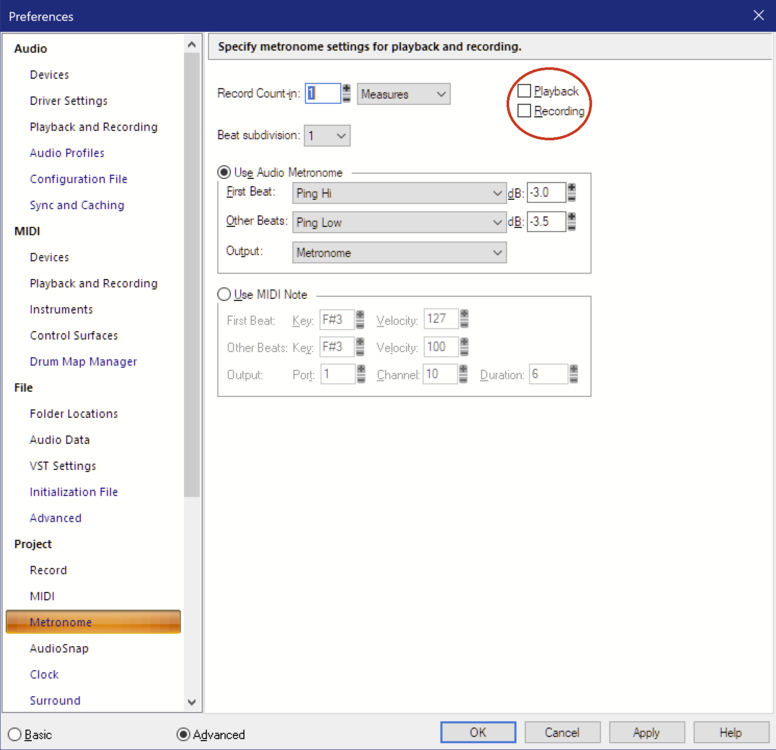
-
Problem saving Bundle File in Sonar X1 because of Audio Transients
tecknot replied to Don Zablotny's question in Q&A
Hi Don and welcome to the Cakewalk forums. Try Bounce to Track instead. And delete the original track before saving as a bundle. Kind regards, tecknot -
Hi Larry, The add says this sale "ends 1st May," in small print. Bummer. Kind regards, tecknot
-
Thanks, abacab! Kind regards, tecknot
-
Uhm, all you really need to do is just run Synthmaster 2 or Player and you will be prompted. You will not find anything on the Synthmaster (KV331) website regarding the update until you sign in and then go to downloads. Kind regards, tecknot
-
Hi Last Call, Here are a couple of links: https://www.synthmaster.com/userarea.aspx & https://www.synthmaster.com/index.aspx You must have an account, of course, in order to down load the new (full) version. Click on Downloads after you login. Kind regards, tecknot P. S. Dang! Links just don't work for me in this forum. Oh now they work.
-
KV331 Audio recently announced the latest v2.9.12 update for their SynthMaster 2 and SynthMaster 2 Player software synthesizers. [Just run SythnMaster 2/Player for update prompt.] This update brings 2 major new features: Compatibility with Native Instruments' Native Kontrol Standard (NKS): NKS allows SynthMaster 2 and SynthMaster Player to be seamlessly integrated with Native Instruments' Maschine and Komplete Kontrol hardware and software. Compatibility with VST3 format: VST3 has been a long-standing feature request from SynthMaster 2 users, and KV331 Audio finally managed to deliver it. SynthMaster 2 and SynthMaster 2 Player can now run in VST3 format as well, on Windows (64-bit Intel) and MacOS (64-bit Intel or Apple Silicon) platforms. For SynthMaster One users, an update is on the way in the coming weeks. Aside from those 2 major features, there are critical bug fixes/improvements in this release as well: New: Added Auto Assign/Remove easy parameters feature. New: Modulation matrix entries can now grow as necessary (previous limit was 64 entries). New: When a preset is loaded via MIDI Program Change, preset browser filter is now updated. New: Preset banks are now stored under Public Documents folder instead of user's Documents folder. New: Free version of SynthMaster Player now comes with 600 factory presets. New: Demo version of SynthMaster 2 now comes with 1200 factory presets. Fixed: SynthMaster Player doesn't load FX Bypass parameters correctly. Fixed: SynthMaster might stop responding to MIDI CC messages when it receives multiple CC messages. Fixed: SynthMaster has inconsistencies displaying parameter values. Fixed: Mono trigger doesn't work correctly for the very first note. Fixed: 24 db/Oct digital HP/BP/BS filters don't work correctly. Registered SynthMaster/SynthMaster Player users can simply download the latest update by checking for updates inside the plugin window(s). Kind regards, tecknot
-
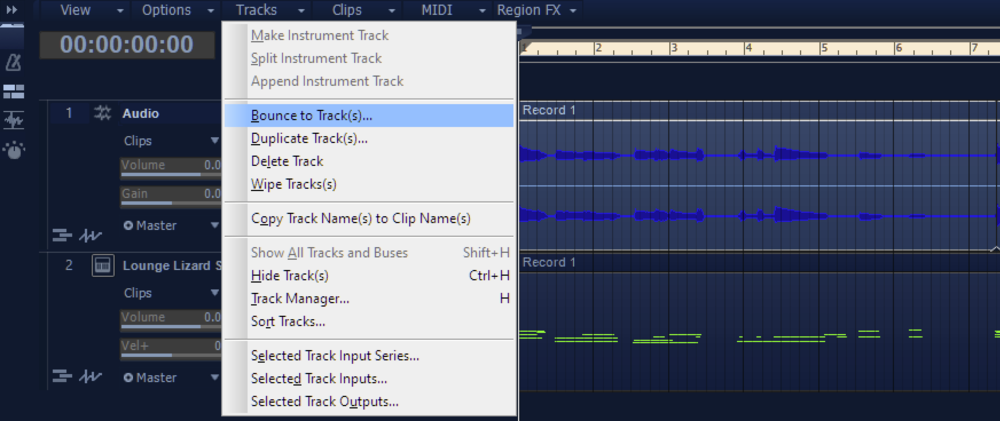
Hi DSL, What you want to do is "Bounce to Track". See the pic below: Kind regards, tecknot
-
Keyboard shortcut to go to first marker
tecknot replied to norfolkmastering's topic in Cakewalk by BandLab
Ctrl+Shift+Page Down. -
Thanks, Frank. Kind regards, tecknot
-
Hi sjoens, What if you have clips with different names bounced? Kind regards, tecknot
-
Hi Falenit and welcome to the Cakewalk forums. Have you tried penicillin? Just kidding, I kid. Kind regards, tecknot
-
Hi Bob and welcome to the Cakewalk forums. Can you translate the error message? Kind regards, tecknot
-
I'm not going to fall for this one!
-
Jive turkey!
-
Hi xouvang, Yes, just click on the Yes button and it will create a crash dump file for you. You can retrieve the dump file at: C:\Users\[USER NAME]\AppData\Roaming\Cakewalk\Cakewalk Core\MiniDumps. Kind regards, tecknot