-
Posts
3,235 -
Joined
-
Last visited








-
Unfortunately, Creative ASIO should be deleted from registry.
-

midi files not showing up in Quick start
sjoens replied to Jan van Schalkwyk's topic in Cakewalk Sonar
At least in CbB, normal (cwp), template (cwt), cakewalk (wrk), bundle (bun), riff (rmi) and MIDI (mid) files all show in QS. -
You'd have to ask them. My guess is the new GUI changed the way things are displayed and they're keeping it simple during the major revamps and will implement the little things like color options after that. When, is anyone's guess.
-
So, it no longer expands automatically when inserting new ones? Or is there a setting to alter that function?
-
Tho it would be nice, is it necessary if they're plainly labeled? Earlier SONAR versions had neither color nor label so you were completely in the dark until you realized the 1st one was always the VST3. . . as it still is.
-
I would think "Minimum" should refer to resources needed to run the core program, and "Recommended" for running the program with added accessories, like plugins.
-
Submit to whom, tho?
-
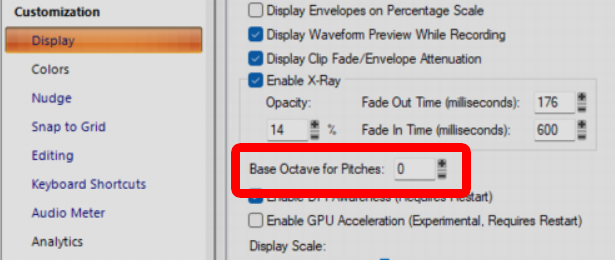
Would changing the Base Octave for Pitches in Preferences help with this? From documentation: Base Octave for Pitches. There is no industry standard for numbering octaves. By default, Cakewalk calls MIDI note 0 (the lowest possible note) C0. The Yamaha FB-01, for example, shows MIDI note 0 as C-2 (C negative 2). To match Cakewalk to that standard, set Base Octave to –2. I believe it's a global setting so doing so may have a negative affect on other projects.
-
As I keep finding, the manuals need a bit of healing themselves as there are a number of erroneous entries.
-
[CONFIRMED] No Synth Rack Option In "Views" For Icon Size?
sjoens replied to sjoens's topic in Feedback Loop
Most interesting. Checked 8.3 thru SPlat and none have this. Maybe the manual could be corrected? -
SONAR 8 had no download option. The 8.5 upgrade did but it won't work without 8 installed.
-
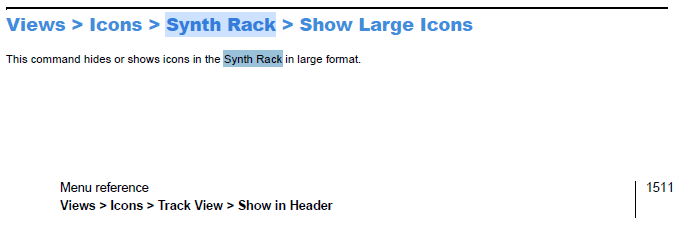
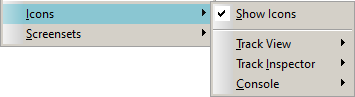
Page 1511 of 2022 CbB manual (1472 of 2024 Sonar manual) says there's a Views menu for Synth Rack Icons. But this option does not exist in my CbB Views menu. Is it in the Sonar menu? Views menu: Yes Synth Rack is open with synths in it.
-
Even Adobe Acrobat does this, tho it's a quick click of the continue for free button to remove it. It also seems to happen only the 1st time it's opened. The Subscribe button is in the same header as the doc tabs so no screen space is lost.
-
INS files are simple text files you can edit with whatever names you want for each voice. .Note Names [Ensoniq SQ1+ All Purpose Kit] 24=Dynamic Kick 1 25=Dynamic Kick 1 26=Dynamic Kick 2 27=Dynamic Kick 2 28=Thump Snare 1 29=Thump Snare 1 30=Thump Snare 2 31=Thump Snare 2 32=Closed Hi-Hat 1 33=Closed Hi-Hat 2 34=Open Hi-Hat 1 35=Open Hi-Hat 2
-
The domain is for sale, case anyone has $60K laying around shud post in the Deals forum