

Andres Medina
-
Posts
729 -
Joined
-
Last visited
Everything posted by Andres Medina
-
Not sure if this is what you want: anyway check the video... Rec.mp4
-
<SOLVED> Problem Exporting Using Tags
Andres Medina replied to William W. Saunders, Jr.'s topic in Cakewalk by BandLab
I had this problem too, and was successfully resolved in the latest update. Worth trying! -
Pasting and copying melodyne
Andres Medina replied to RICHARD HUTCHINS's topic in Instruments & Effects
If you manually deleted the clips on the track view, there is a possibility that you deleted just the visible clips, or selected clips (if you build the track on Comp mode), but the remaining clips were still there. Regarding Melodyne: remember that Melodyne creates a region effect over the clips. The managing of the track and the clips has to be done prior to applying Melodyne. To really delete all, you may try using "Delete Track" instead. All will be erased. Hope it helps! -
Pasting and copying melodyne
Andres Medina replied to RICHARD HUTCHINS's topic in Instruments & Effects
I work a lot in this scenario, and when I Ctrl-drag or ctrl+shift+drag the clips, if Melodyne is present, the copied clips retain the melodyne editing, as long as you copy-paste after doing the editing of course. -
About Omnisphere glitches only: "Anyways my problem is, I freeze a synth and it comes out all glitched like if its supposed to be a 16th note arpeggio I get glitchy sounding eighth notes" : I have this issue when using the arpeggiator AND tempo changes on the track. If the tempo is steady, is not a problem. I wonder if this is something that happens to you only when rendering the audio, or on playback as well? Another clue: check that you are using the correct buffer size. In heavy projects it makes a huge difference in the audio output. If it is too short, you get a lot of audio problems. Omnisphere is RAM hungry, as Amp Sims are too!
-
Exported tracks all have project length??
Andres Medina replied to kzmaier's topic in Cakewalk by BandLab
Wow, that's new for me too! Thanks - -
That's the best thing about this forum. Now I learned a new thing. Thanks!
-
Automating MODO Bass Pluck Position with CC
Andres Medina replied to Neil Cummins's topic in Instruments & Effects
I do have Modo Bass but it doesn't display automation the way bitflipper shows. Anyway, you can also configure your cc's as you wish in the Control Menu - see pic - , and draw accordingly in the PRV.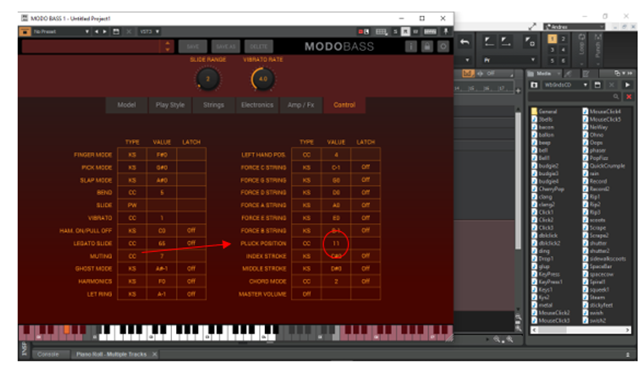
-
I'm not sure that key bindings are locked to specific workspaces... I thought they are a global setting?
-
May be they are already erased, but the lane is still active, because you have not refreshed the PRV. I guess the lane will disappear if you close and reopen the PRV? OR, there is additional controller data ahead out of your view?
-
Question About Audio Enhancements
Andres Medina replied to cubic lights's topic in Cakewalk by BandLab
Well, you probably will head to see how frustrating is to take your hours of work down the drain when you realize that your perfectly well balanced mix is sounding horrible in your car, or elsewhere... not a good experience. I think that the other fine tool for mixing, as John stated before, is your brain-ears training. Listen to Pro tracks in your headphones A LOT and try to get the same overall sound. But the brain is tricky too! Try mixing late at night, with your brain drained after 4 hours of mixing, and finding next day that you made all the wrong decisions.. -
Question About Audio Enhancements
Andres Medina replied to cubic lights's topic in Cakewalk by BandLab
Jeje - I use those same monitors, John. Agree that they are a bit flat and boring, and that at the same time are SO reliable to translate to other systems. 25+ years of use and they still rock. If you are interested, check out the IK Multimedia link. For a long time a dear audio engineer kept insisting me on buying the system, and I thought he was after the sales commission. But I surrendered and tried it, and , man, it literally changed my life. The dull but reliable NS10M sounds brighter and alive, WITHOUT messing with the flat audio response. The system compensates for your audio listening experience to be as flat as possible measuring against a flat response ideal curve. And, bonus track, you can check your mix in multiple virtual scenarios (laptop, TV screen, Iphone, even other common speakers, all within the app, without switching routings or anything.) Worth trying. -
Question About Audio Enhancements
Andres Medina replied to cubic lights's topic in Cakewalk by BandLab
You are welcome! Ufff... I think is beyond a Q&A forum, because of the scope of the subject. .! The basics: you need to optimize your audio setup for getting a flat audio response from your speakers, and it involves all the audio chain, from the audio card+your PC+your DAW+Speakers+your Room (which should be acoustically treated to get said flat audio response). This is a subject that every audio engineer learn, but is really an important but broad and sometimes even complex area. There are lots of info online and in books about the subject. In the plugin domain, here is a tool I found really useful in the room acoustic correction area, that helps a lot, but is not intended to replace a proper room intervention. https://www.ikmultimedia.com/products/arc3/?pkey=arc-system-3-software# -
When clicking in the minus signs you are hiding the controller from view, not erasing them. Another way to do it is using the eraser tool and click-drag on the events that you want to erase.
-
keep in mind that every soft synth plugin has its own (usually) preprogrammed controllers, affecting different parameters. We really must learn as much as possible about the plugin we are using. Nowadays it seems that learning to play an instrument has a lot to do with learning to programme" a plugin...!
-
Question About Audio Enhancements
Andres Medina replied to cubic lights's topic in Cakewalk by BandLab
Your concern is very common: how do I make my music sound good EVERYWHERE? But is not realistic... the listening experience depends entirely on the whole chain from the audio file to your ears (just think how differs your listening experience from a pair of earbuds to another, or to one set of speakers to another, or as you already experienced, just applying those annoying consumer oriented "enhancements", that alters the EQ of your audio) What you can do is be sure that the sound that the audio that comes out of CW is as compliant with industry standards as possible (but this is a whole BIG chapter in audio production)...! -
one track all of a sudden lower than the other?
Andres Medina replied to YNWBUGNAR's topic in Cakewalk by BandLab
Yes, it's not normal at all to see changes in volume after closing and reopening the project. May something else happened before exiting? -
I guess is a matter of what works best for you and the particular project you are in? For me, buses are very handy and use a lot of them, often in a cascade of buses of instruments going to buses of submixes of family of instruments (i.e String Sections, Mallets, Drums, etc), going to pre-master bus and then to the Master Bus... you name it. The way you can manage them in the console view is very practical, and you always can hide or show what you need, color code them, etc. Aux tracks for me are just an additional tool for specific tasks or needs. For example, I found them very useful (and necessary), for configuring remote recording plugins, that needs aux tracks to work.
-
You could check your signal flow to see how the audio is going from one module to the next. There are so many ways to route the audio inside CW...! There are sends, aux tracks, etc- Is worth investing a little time understanding the signal flow inside CW.
-
Not exactly: if you lower the bus fader, the level of what you hear decreases, but the source tracks are not affected. If you want to lower the volume of a bunch of tracks, there are several ways. Two of them: 1. Select all the tracks you want, hit Ctrl and drag one of the levels down. All faders will go down. 2. Group the tracks: select the tracks, right click on one of them, select group, choose a color. All tracks will be locked on this parameter together.
-
How to assign Cakewalk to use all the CPU cores
Andres Medina replied to George D's topic in Cakewalk by BandLab
May be this is what you are searching for: (from Help): "Use Multiprocessing Engine. This option is grayed out unless you have a multiprocessor computer. If you have a multiprocessor computer, check this option if you want Cakewalk to use both processors at all times. If you do not check this option, Cakewalk still uses the second processor for some tasks." More info here: http://www.cakewalk.com/Documentation?product=Cakewalk&language=3&help=0x22B19 -
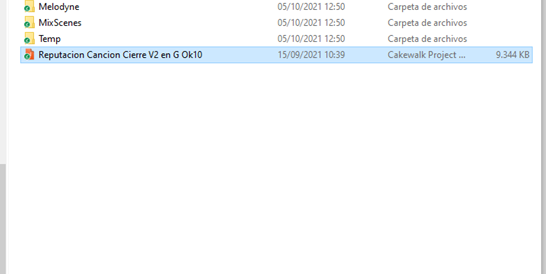
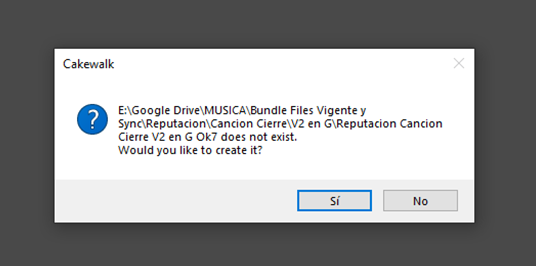
Here is something weird that is happening (may be related to tha last build, not sure): I open a project (CWP), with this name [Reputacion Cancion Cierre V2 en G Ok10], and when loading, CW asks for this OTHER project [Reputacion Cancion Cierre V2 en G Ok7], which is an older version saved with audio in another location...! ... any ideas? - it's so weird -
-
How To Have All Views Fully Open All The Time
Andres Medina replied to Michayl Asaph Myers's topic in Cakewalk by BandLab
Also, you can double click the Tab selector: it expands the module to full size (works with every Tab you have open, PR, etc). See pic -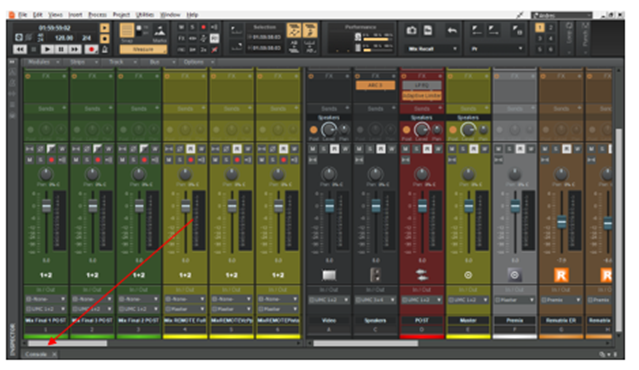
-
How to open Cakewalk interface in Full View?
Andres Medina replied to tdehan's topic in Cakewalk by BandLab
I know. But apparently John doesn't... -
How to open Cakewalk interface in Full View?
Andres Medina replied to tdehan's topic in Cakewalk by BandLab
Didn't know that. Thanks!
