Cobus Prinsloo
-
Posts
216 -
Joined
-
Last visited
Everything posted by Cobus Prinsloo
-
Most definitely. Especially for a bass line, to make it sound more organic. Bass with a constant velocity setting tend to sound artificial. Or, when playing a piano, you want to keep it sound as natural as possible. The velocities don't always translate well when recording Midi play, so velocity adjustments afterward in the piano roll are a must for me.
-

Where are the Cakewalk Studioware panels ????
Cobus Prinsloo replied to lychee's topic in Feedback Loop
Would you care to send a screen shot? -
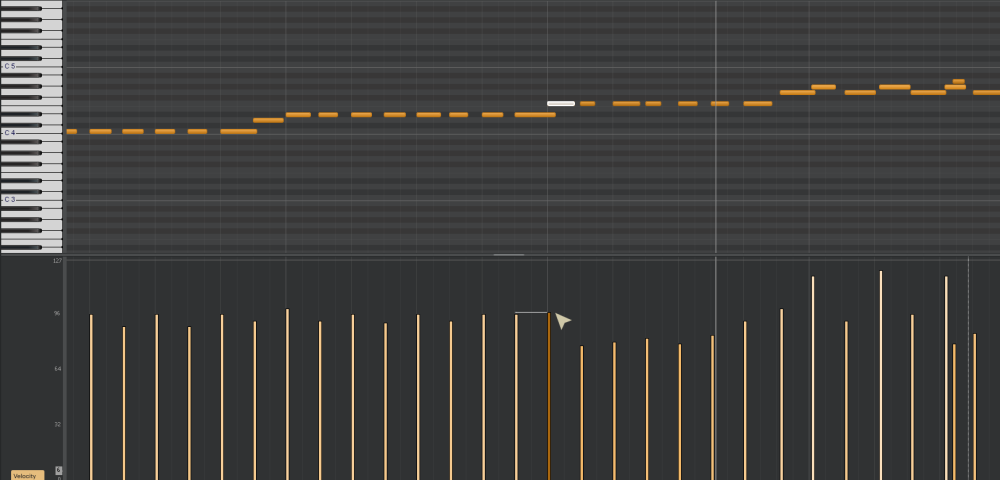
Hi, is there a way to quickly match velocities between notes? I'm thinking of the facility to use "smart guides" as used in apps like Adobe Illustrator and MS PowerPoint. This forces cursor movement to snap to an object in close proximity and greatly increases workflow speed. I included an example that I quickly compiled in Photoshop: you'll see where the cursor is, and a temporary smart guide appears to snap the movement to the height of another velocity bar. If there's no such option, I think it should be added as a feature request. I constantly have to adjust velocities after recording play via my Midi controller, and this will really help with productivity.
-
Changing the sampling rate for a project?
Cobus Prinsloo replied to Cobus Prinsloo's topic in Cakewalk Sonar
Thanks - that makes a lot of sense! 🙂 (blush) -
Changing the sampling rate for a project?
Cobus Prinsloo replied to Cobus Prinsloo's topic in Cakewalk Sonar
Is it better to work with a sampling rate that matches one's audio interface, (which in my case is a Scarlett 4i4 at 48 kHz), or does it not matter? -
Changing the sampling rate for a project?
Cobus Prinsloo replied to Cobus Prinsloo's topic in Cakewalk Sonar
Thank you for the link. I was hoping it would be possible to just change a project setting within an existing project that is still being worked on. -
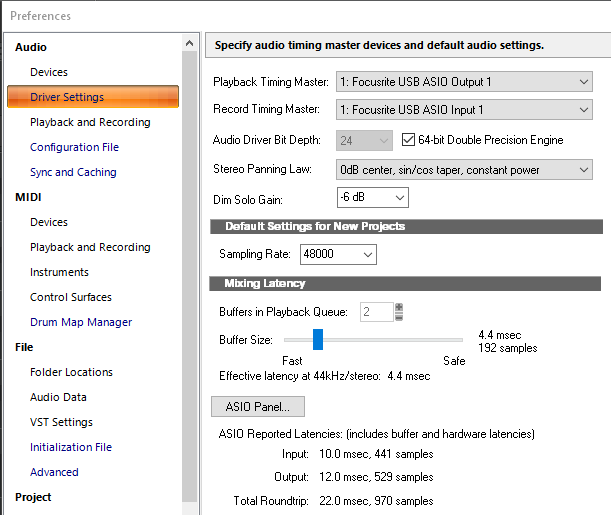
Hi, I've been trying to change the sampling rate for one of my projects from 44 kHz to 48 kHz, because I want to copy wav files from another project file. Now, I cannot copy those wav files because Sonar won't allow files with different sampling rates to get copied between projects. Is it possible to change an existing project's sampling rate? I tried changing it in Preferences (attached) but it looks like the project reverts back to its original sample rate Advice please!
-
Trackspacer by Wavesfactory: $29 @ Plugin Boutique
Cobus Prinsloo replied to MusicMan's topic in Deals
Can one get similiar results with the new Pro-Q4? -
Where's this phantom noise coming from??
Cobus Prinsloo replied to Cobus Prinsloo's topic in Cakewalk Sonar
Thank you -- that is good to know and keep in mind! -
Where's this phantom noise coming from??
Cobus Prinsloo replied to Cobus Prinsloo's topic in Cakewalk Sonar
Oh -- I'm afraid I cannot check because I deleted the synth from my project! It had been sitting there unused anyway. But if I remember correctly, it was one of the presets that come with the free download of A Lab. -
Where's this phantom noise coming from??
Cobus Prinsloo replied to Cobus Prinsloo's topic in Cakewalk Sonar
Luckily it looks like only one instrument (strings), and not the whole vst causing the noise. Thanks for the feedback. -
Where's this phantom noise coming from??
Cobus Prinsloo replied to Cobus Prinsloo's topic in Cakewalk Sonar
True. But in this case, I don't wanna lose it, because it's a good synth with lots of downloadable free sounds from Arturia's website -
Where's this phantom noise coming from??
Cobus Prinsloo replied to Cobus Prinsloo's topic in Cakewalk Sonar
Thank you all for your useful input. I was able to find the culprit - I switched off each Vst one by one in the Synth Rack and was able to pinpoint Analog V! Pity because this soft synth has several nice instruments. But, the noise is not audible, so I guess I can get away with it. Unless this could cause frequency buildups in time? -
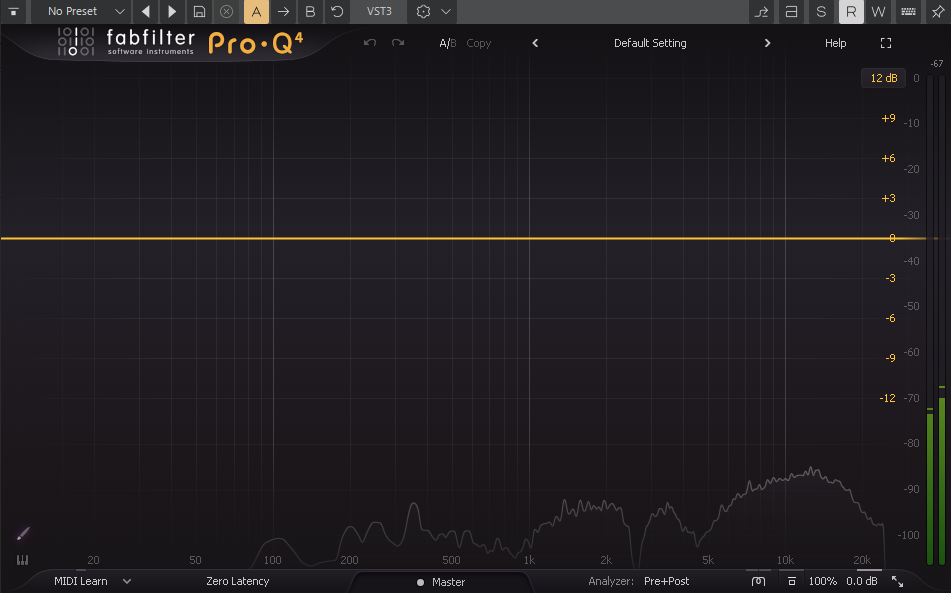
Firstly, Happy New Year to everyone! Now for the unpleasant bit: my EQ (both in Pro-Q and Ozone) is picking up disconcerting background noise even with no audio playing (see screenshot). At first, I thought it might be coming from my computer, on which my audio interface is standing, but when I moved it away, the noise remained. Does anyone have an idea what this could be?
-
Punch recording in Comping mode flaw?
Cobus Prinsloo replied to Cobus Prinsloo's topic in Cakewalk Sonar
I assure you I never touched the Mute tool. These muted clips were automatically created during punch recording. But thank you - at least now I know how to unmute them. -
Punch recording in Comping mode flaw?
Cobus Prinsloo replied to Cobus Prinsloo's topic in Cakewalk Sonar
Hi, and thanks for the reply. I understand the comping workflow pretty well, but this is an abnormality: compare the muted clip (T8) with the abnormally muted clip (T9) below it -- you will notice a difference in the graphic portrayals of these two instances. The normal mute clip (T8) is greyed out as it should be, while the abnormal one (T9) is not greyed out, it has retained the original blue color for its outline, but it has no colored fill. The Comping tool is also useless on this clip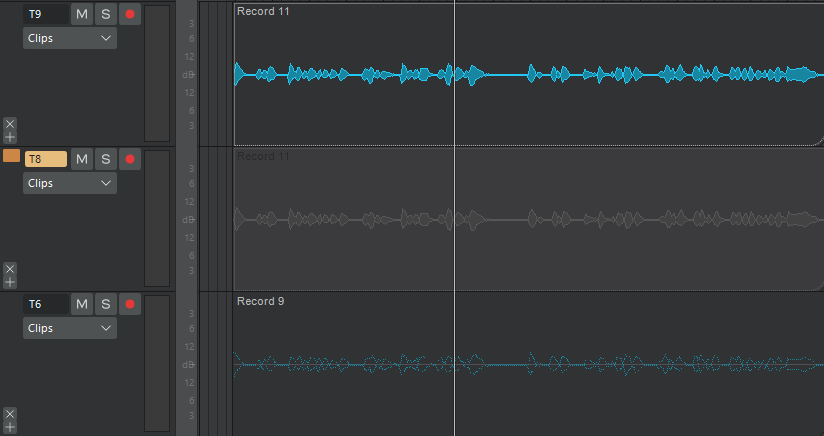
-
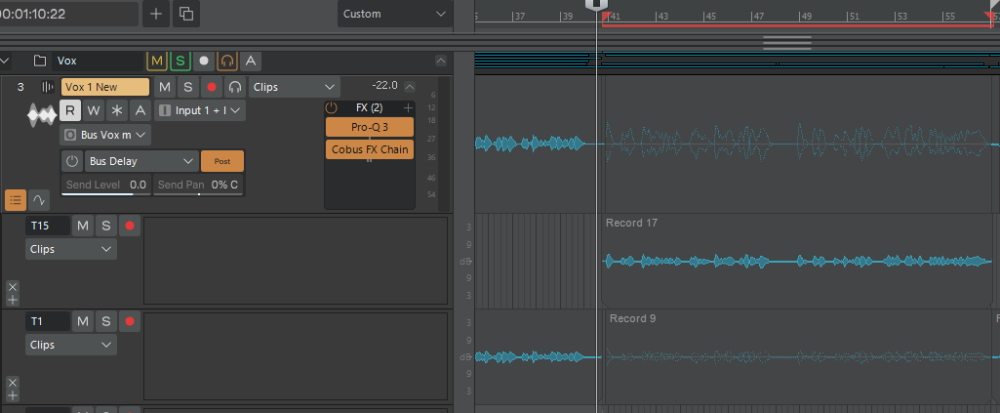
Hi, I'm getting weirdness whenever I punch record a track in Comping mode. When a new recording is done above on top of a previous one, the previous clip/s changes into a weird, muted version that cannot be unmuted. See Record 9 under Take 1. It is also reflected in the composite track (3) - even though another Take (15) is active and unmuted. I've tried to Mute/Unmute it, taken it into other tracks, and Solo-ed this specific Take, but to no avail. This is not an isolated incident - I get the same problem in other projects. Is this a flaw? With this issue, it has become impossible to use punch recording.
-
Thank you for the advice - problem solved! I changed the Input of the track from Midi Omni under "All Inputs", to "2 - Focusrite USB Midi", which is my audio interface.
-
Oh - it's an old one - a Casio WK-1600, but it has functioned well until I started getting those stacked Midid notes about two weeks ago. I didn't change any of the Midi cables, so this is a mystery.
-
It looks like that solved the issue -- thank you! Midi notes still stack doubles in the Piano Roll for some bizarre reason, though.
-
?
-
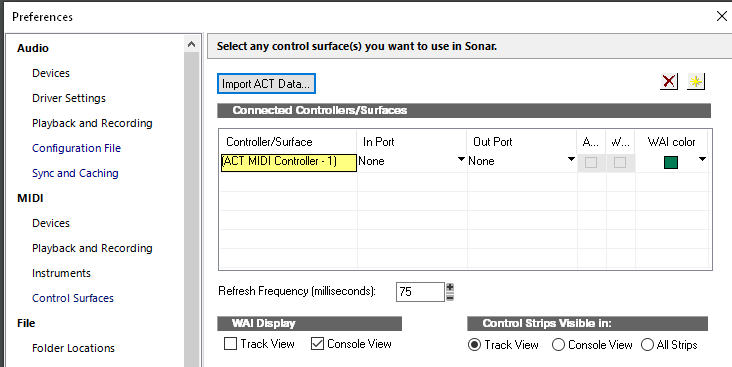
Everywhere Focusrite USB Mide is selected, but there is something else under Control Surfaces. I didn't know what it is. Could this be the reason why notes played via m Midi keyboard generate double notes, i.e. two of the exact same notes stacked on top of each other in the Piano Roll view?
-
Hi everyone. Lately, I have had a notification pop up each time I start Sonar. I have no idea what it relates to because in Preferences, I only have my Scarlett 4i4 selected. It may be related to the fact that one of the projects I have been working on also freezes a while after starting playing back. It plays back ok, but then, with no warning, Sonar freezes. The timer comes up, after which I have to force quit Sonar. I hope someone can give a suggestion or two.

-
That makes sense, thank you.
-
Ah, thank you so much!