


msmcleod
-
Posts
7,209 -
Joined
-
Last visited
-
Days Won
39
Everything posted by msmcleod
-
As you can't buy the iLok 2 anymore, I suspect they're saying iLok 3 just because it's the current dongle available.
-
The MCU Pro works fine with Cakewalk. Mackie are still selling it, so it's still current technology. I personally use the original MCU + XT + C4. Other (probably more popular choices) are: Behringer X-Touch Presonus FaderPort 8 / Presonus FaderPort 16 Both of these have motorised faders. The only thing I'd say about the MCU (and the MCU Pro), is they're quite large, and take up a lot of desk space. They're built like a tank though. If you're not worried about motorised faders, take a look at the Korg NanoKontrol Studio. At just over $150 it's very usable. All of the above support the Mackie MCU protocol.
-
Excellent in every way Bats.
-
Cakewalk has always had latency compensation built in from the early days of Sonar (unlike the cheaper versions of Pro Tools). It's automatic and doesn't need to be enabled. Cakewalk relies on the information provided to it by the driver. As the vast majority of users here don't get issues with latency compensation, I suspect it's your audio driver that is misrepresenting the actual latency values.
-
iLock cloud is where you authorise a "cloud session" rather than a computer, or a physical iLock dongle. Your computer then needs to log into the cloud session to pick up the authorisation. When your computer leaves the session, it's available again. The downside is that your computer needs to be online for joining the session. After that, it's authorised. So you only need to be online for a few seconds. I'm not sure at what point it checks again though.
-
As far as I can remember, either would work (I've not used it for a while either - I've been practicing my "real" drumming). But I tend to keep the groove the same length as the part - so the full 16 bar verse. But this is usually because I've got more complex things going on, like accents in specific places.
-
It's pretty quick to do it just using the clip properties: If you leave the clip properties selected, you can adjust things as you play - just as easily as a dial would be.
-
Not exactly - unlike a humanizer it doesn't just change the timing/velocity of what you give it, but uses it as a basic guide for something new. In other words, it will add hats, cymbals, possibly toms, ghost notes on the snare etc. The rhythm may change in places too. But its "based" on what you give it.
-
The best way to get it to play what you want is to provide it with a MIDI file of just kick & snare. Jamstix will then "paraphrase" your MIDI file in the style of the drummer you choose:
-

Now have Kontakt/Reaktor 6 (free). Safe to remove 5?
msmcleod replied to Keni's topic in The Coffee House
Remember that Kontakt 6 is fairly new. If you buy additional libraries (which are more than likely designed for Kontakt 4 or 5), there's always the possibility that it might not work properly in Kontakt 6. -
Yeah, I've got it on three machines so needed the extra license.
-
Now have Kontakt/Reaktor 6 (free). Safe to remove 5?
msmcleod replied to Keni's topic in Instruments & Effects
Personally, I'd keep them. You never know when some instrument isn't 100% backwards compatible. -
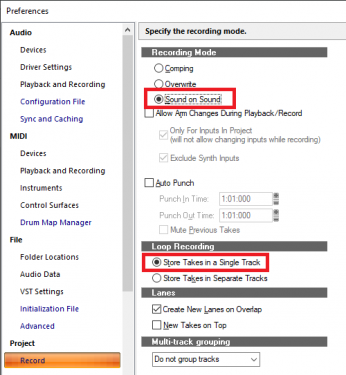
Right click on the transport record button, and make sure the following two options are set: If you've got Auto Punch enabled, make sure "Mute Previous Takes" is NOT checked.
-
If you find the drums are sounding a bit thin, try adding this: https://kazrog.com/products/true-iron/ It's a transformer emulator that really adds girth to the track.
-
If you've got complex routing in your project, it can be a pain when a track automatically has it's MIDI echo on. For example, cases where one synth is controlling another (Jamstix & AD2 spring to mind). Having the track being echoed can have undesirable results when you want to select the track to adjust something else. I normally have this option enabled during tracking, but quite often switch it off for more complex mixes.
-
Things to check: 1. Have you got input echo enabled on your midi/audio tracks or instrument track if that's what your using? 2. Check you've not got any surface controllers defined in Preferences that are assigned to these devices
-
Funny you should mention this, I tried to import a video file whose audio was recorded at 22Khz (a camtasia presentation), and it did exactly the same. I thought that changing the import file depth to match the project depth might help, but it doesn't. Is your .wav file recorded at a sample rate smaller than 44.1Khz? [Edit] - I still can't work out why the import does this, but this is how I fixed it afterwards:
-
The error message is a bit vague, as it's saying either: 1. It can't open the audio device at all; or 2. It can open it, but not at the given sample rate (i.e. 44.1Khz / 16 bit) In either case, it looks like some other program (or Windows) is using your Octa-Capture and/or setting it to a different sample rate or bit depth. So first, check you've not accidentally disabled your Octa-Capture, and that it's definitely assigned to Cakewalk. Then check that Windows isn't using your Octa-Capture (check input devices as well as output devices).
-
If you've got an on-board sound device, make sure that is enabled and assign Windows sounds to that. That way only Cakewalk will be using your Octa-Capture. Your on board sound device may have other output "devices" listed, e.g. a digital output as well as the analogue one (usually labelled "Speaker output"), or an HD output. Disable all of them apart from the speaker output, and make sure the speaker output is what Windows is set to using. I'm unsure as to why ASIO isn't working as well as WDM. Usually, WDM performs far worse than ASIO. But if you are using WDM, make sure Cakewalk is only using your Octa-Capture. You'll now have to work out how to listen to the sound output from your on-board card if you need it. Personally, I plug mine directly into my 27" monitor as it has audio inputs. An external mixer (even a passive one) could work - e.g. previously I had it plugged into the 2nd input on my Mackie BigKnob Passive so I could switch between them, but plugging it into a spare input on your Octa Capture could also work I guess.
-
Yeah, that's the way I use it most. I write the MIDI drum part I want, then it plays it like a real drummer
-
Yes. Think of EZD & SD3 as the sounds, and Jamstix as the drummer. Jamstix doesn't use preset patterns - it uses "models" of real drummers. I use Jamstix to drive AD2. The sounds in Jamstix are OK, but not as good as AD2. IMO they're better than SD3 though. [Edit] - A note of caution though... the learning curve for Jamstix is steep. Until you understand how it works and how to leverage it, you won't be blown away by the results... at least not at first. This guy has done a fantastic collection of in-depth tutorials: http://www.djbolivia.ca/videos.html
-
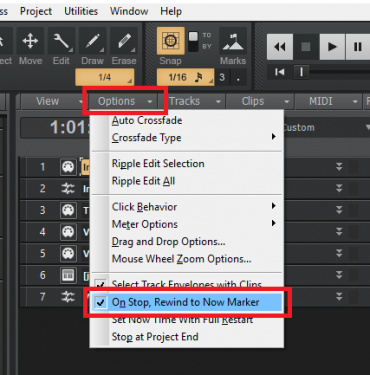
Make sure this is set:
-
Absolutely true.
-
Just noticed the following on Wikipedia: (Note Celemony's "get out" clause in bold) Version 2 of ARA was announced during NAMM in January 2018, introducing new features such as the simultaneous editing of multiple tracks, transfer of chord track information, and undo synchronization with the DAW. DAWs which use ARA version 2 are not automatically backwards compatible with plug-ins using version 1. The first DAWs to support ARA version 2 were Logic Pro (version 10.4, released in January 2018)[6] and Studio One (version 4, released in May 2018). Of course Cakewalk is the other way around - it's a DAW using version 1, which is using plugin version 2. But it does raise doubts about backwards compatibility.
-
I suspect that if and when CbB supports ARA-2, the problem will likely go away. CbB is probably making the same ARA-1 calls it always has. It's Melodyne that has changed, and I suspect as a result, they've subtlety broken ARA-1 backwards compatibility.


