aidan o driscoll
-
Posts
1,691 -
Joined
-
Last visited
-
Days Won
1
Everything posted by aidan o driscoll
-
AI and the future state of music creation
aidan o driscoll replied to Mr. Torture's topic in The Coffee House
Interesting progress in Suno Studio v5. They have upgraded whats called teh Persona's feature to allow you to have consistency where the VOICE is concerned across all your tracks - in essence you can use the same voice now on all your SUNI STUDIO generated tracks. You cannot upload your own voice yet or train it to use your won voice as a persona .. but it appears that is on the way too. https://www.youtube.com/watch?v=pj29TIE9djY Where is all this going? Definitely a huge legal copyright quagmire for one. And then we have FL Studio adding Suno like features into there FL Cloud plans. In there case using millions of samples they have .. it seems. -
To check out what FL STUDIO is doing with integrated elevenLabs AI you need the PRO FL CLOUD sub - at the moment this is €99 per annum - also monthly option, seperate from your FL Studio life time one off fee. PRO FL CLOUD works with any version of FL STUDIO https://www.image-line.com/fl-cloud You also get access to 1 million+ sounds, 85+ plugins, Mastering, Distribution ( DistroKid )
-
TBH - I dont fear AI and likes of Suno. I took out a Suno years sub during Black Friday ( deal ) so I could investigate and see what all this was about. TBH - its quiet ropey to say the least AND the Studio DAW is in constant beta, changing daily. Lots of unusual ways of doing things. You save nothing, its all auto saved in the cloud for you - No doubt everything NEVER gets deleted just in case. I wanted to see was there a way to use Suno with some sort of control over the end result. 1. I uploaded a simple guitar chord riff type thing and without any prompts clicked on Create. It made a whole 3 min instrumental guitar song using my chords. Not bad - for a bit of simple inspiration 2. I uploaded an instrumental version of a track our band has been stuck on for ages. NO PROMPTS USED. However I went into advanced settings and set the 3 settings in a way which basically tells Suno no messing around with the original arrangement, just augment it. I also uploaded the lyric - then pressed CREATE. I was impressed by what it came back with. Male vocal using a very similar melody line to what we had previously used BUT with some ideas we would not have thought of. Bare in mind I DID NOT INDICATE IN ANY WAY what our original melody line was. In both cases I broke up the tracks into the STEMS ( a feature in Suno Studio ). All wavs, but yes you do have some spill over from other tracks. Not the best seperated stems. You also have the option of generating the MIDI for each of the tracks, i did that too. SO - all back into Cakewalk, added some more tracks. Muted the main vocals and await the singer to give it a go. Intention is to replace all the Suno instrument tracks with US playing. I have learned this process is the best use. And a big tip is DONT PUBLISH anything at the Suno platform, keep it private. If you do, other users could use that track and REMIX it. What bothers me most about Suno & all other music generative AI systems is there licencing and copyright. Its the wild west where the rules are a bit .. well .. vague. This is why I am hoping our trusted and tested trad DAW companies come into the AI market like FL STUDIO and by using there own pool of samples you dont end up in this Suno quagmire of legal vagueness. Yes they grant you use with paid models BUT for example if you then release a track done in Suno - even if its your lyric etc - AND someone out there hears your track & says Hey thats like my track ( that might have got scrapped by Sunos learning processes ). If they sue you, you are on your own apparently .. check the T & Cs. Scroll down to the Intellectual Property Rights section, then the CONTENT sub section and beyond under that: https://suno.com/terms-of-service "However, due to the nature of machine learning, Suno makes no representation or warranty to you that any copyright will vest in any Output." Check out this video which discusses such things:
-
Hang on a bit more @craigb .. I reckon ALL DAWS inc Cakewalk will be doing what FL STUDIO are doing re AI in the not too distant future.
-
So - why I say inevitable is the existing big DAWs and DAWs in general HAVE TO respond to the likes of SUNO which as of v5 now has its own inbuilt DAW. Here is the article on this: https://theproducerschool.com/blogs/music-production/elevenlabs-fl-studio-how-ai-is-changing-music-production "ElevenLabs, known for their advanced AI audio models, is bringing their technology into FL Studio's ecosystem. That means FL Cloud Pro subscribers get three months of free access to ElevenLabs' Creative Platform, giving you the ability to generate AI-powered voice, sound, and music directly within your production environment. This isn't just a plugin you bolt onto your setup, it's an integrated workflow. You can generate studio-grade music using natural language prompts, create sound effects, and experiment with AI-assisted production without ever leaving FL Studio. The process is simple: you prompt it, it generates, you tweak, you use it. The partnership is built on a producer-first philosophy." Interesting times, I was waiting for this. I think a difference here is while Suno uses "scrapped", "Free" ( not really, hence that recent case tween Suno and warner ) material from across the net to "Learn" .. I think this partnership above uses sample packs that was already in recent times added to FL STUDIO ( Sort of an alt to loopcloud ). I have been using SUNO .. experimenting with its DAW and its breaking of tracks into stems for export back to eg Sonar. I am dubious about the whole copyright area where Suno and the like is concerned. But, hopefully the guys here at Cakewalk will be watching and might already be looking at something similar for Sonar / Next. As the article states: "This sets a precedent and other DAWs will follow. Ableton, Logic, and others will eventually integrate similar capabilities because producers are going to expect it. " READ THE WHOLE ARTCLE ABOVE FOR BEST CONTEXT
-
Arturia Black Friday Deal - 50% OFF Flagship Software
aidan o driscoll replied to ZincT's topic in Deals
I suppose from V8 ( me ) to 11 pro adds a good bit more - V8 has 30 instruments while V11 has 45 instruments including instruments from 9 to 11. The only ones i would not be interested in are the Augmented instruments - resource hogs. Other than that the Acid V, Pure LoFi and the synth X sound interesting. Update to Piano V3 ( V8 has v2 ) is alot better than V2. Also the Mini V4 update ( V8 has v3 ). Probably other version updates also not included in v8. So $99 sounds OK to me anyway - from v8 to v11. For anyone interested you can break the payment of $99 into 3 over 3 months @ $33 a month. No Interest - using Klarna at the checkout page. I have done this in the past, eases the pain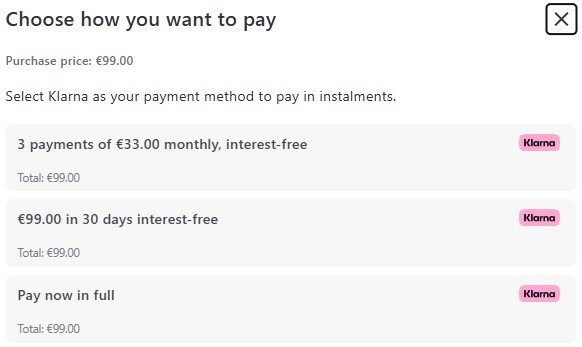
-
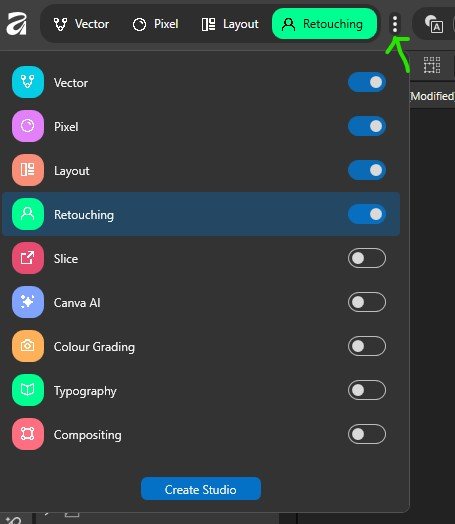
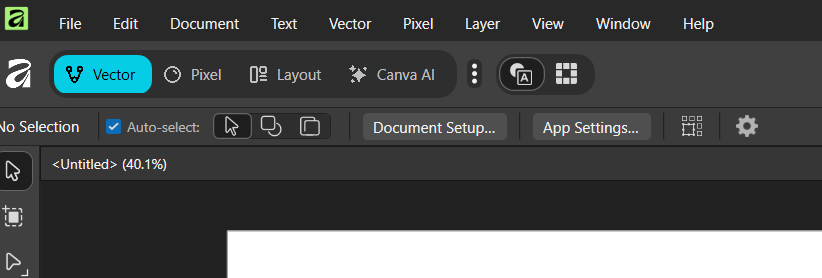
MORE The new Canva Affinity - Up top left where you have the "apps" listed - Vector, Pixel, layout you also have a vertical 3 dot drop down menu called the STUDIO MANAGER. Here you can get rid of the CANVA AI item if you wish BUT you can also add MORE - Retouching, Slice, Color Grading, Typography, Compositing You can also CREATE YOUR OWN "STDIO" layouts via the Create studio button at bottom of image below. I imagine you can then share these with others
-
@Esteban Villanova If thats what people think, then there are other options out there. 1. Back to adobe with a sub 2. Go the open source THE GIMP route. 3. Stick with V1 or V2 of old AFFINITY for life and work away as you always did. If the latter is the road you take then make sure you download the old AFFINITY installers & assets from your old account here: https://affinity.serif.com/en-gb/v2 This of course is all up to each user. No one is FORCING anyone to switch to the new Canva AFFINITY. Of course however, the Canva version will be updated as we move forward while the old V2 will not be, it is as it is now. My 2 cents - You can download and install the new Canva AFFINITY on the same system as the old V2 Affinity and both work away without messing with each other. So really instead of worrying about the future, right now you can have the best of both worlds FOR FREE ( old and new working side by side ) One caveat however, as I stated above - the new Canva AFFINITY saves files in a DIFFERENT format - .af So if opening old Affinity files in the new Canva Affinity App I would SAVE AS a different name for the new version, maintaining the old version. Maybe have seperate data folders for each. Yes a bit of a hassle, but really not that much. If completely paranoid .. make a copy of the old file first, paste into a new Canva affinity data folder and open that one and save it
-
The assets - - brushes etc - you have in V1, V2 and bought which are at the old Serif / Affinity site .. which you can still log into here: https://affinity.serif.com/en-gb/v2 Do not auto install in the NEW CANVA AFFINITY. To install them you can download your assets from above and then drag/drop into the I/F of the new Canva Affinity app. If you have any custom assets, then go to the old v2 app and over right in say the Brushes panel click the downarrow while the asset you want to export is selected, then choose EXPORT Brushes. Save it, then into new Canva Affinity and drag drop asset file to the U/I Another way to do the lot is - at the Welcome panel that pops up when you open Canva Affinity ( if not available, click the big white A top left. Then where your user name is top left of that Welcome panel is a little down arrow. Go to ADVANCED and select link V2 account ( or similar, it will be obvious ). a login box for your old AFFINITY A/C will pop up. Login. Once this is done go back to the Welcome panel, top left, downarrow by your username, ADVANCED and select MANAGE PURCHASED CONTENT. a box will open with all your purchased assets etc and you can either install individually or via the hamburger menu item top right select Download / Install All
-
@Scott R. Garrigus When serif first released and then deveoloped AFFINITY suite, over time many jumped ship from Adobe photoshop because they got pee'd off with the subscription thing. Affinity was always buy it outright, not a sub. Plus toolset wise it was as us muso's say say "close enough for jazz" to photoshop to make the jump worth it.
-
Here is a thing to be aware of from the Affinity Designer facebook group: "The new affinity reads the old v1 and v2 files without issues and gives you a warning that they are files created with earlier versions [similar to v2 on v1 files]. Seeing the new tool has a different file format [.af], files saved here can't be opened with the older affinity versions."
-
Might be worth downloading the latest V2 updates & store away, they are still there ..
-
OK installed and running - indeed all three apps from the traditional affinity suite are rolled in together now: Vector is Affinity Design Pixel is Affinity Photo Layout is Affinity Publisher My old Affinity 2 suite still works fine
-
Just installed it alongside Affinity 2 which was already on the system. Didnt ask any questions about older version. Added a new Affinity icon to desktop. Its Affinity V3
-
@Kirean Just downloaded, not installed yet. Saw this was the case elsewhere. Straight away when I saw the new "deal" I thought of our Bandlab and Cakewalk experience. At the moment the subscription is for extra Canva AI tools if thats your thing: "With Affinity, you’ll get all the professional tools you need for your design, photo editing, and page layout projects, free of charge. If you’re on a Canva premium plan, you’ll also be able to unlock Canva AI tools directly in Affinity for a super-powered workflow." How long this will lastv will be interesting AND how long with the "Standard" Affinity suite be updated. ALSO - they seem to have wound Photo, Designer and Publisher into ONE APP rather that 3 seperate apps. On this page further down they detail difference tween Affinity and Affinity + Canva AI https://www.affinity.studio/get-affinity
-
Out Now: InstaComposer 3 (Your MIDI Copilot) | 75% Off
aidan o driscoll replied to fjz's topic in Deals
Confirmed - reply back from WA "Unfortunately, the upgrade pricing is only available for owners of InstaComposer 2. " I think that message should be changed to "You need to own the PREVIOUS VERSION of this plugin - v2"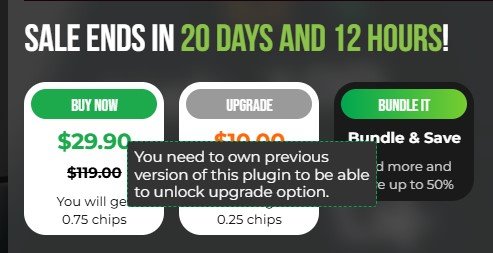
-
Out Now: InstaComposer 3 (Your MIDI Copilot) | 75% Off
aidan o driscoll replied to fjz's topic in Deals
@ZincT I never bought Instacomposer 2 .. just have v1 HOWEVER - when you mouse over the greyed out UPGRADE it says: But I suspect this upgrade price is for V2 owners and they forgot to change that message. im not too worried TBH .. I did send a support ticket. If i get it at $10 I will .. other than that I wont bother, like others I have not been using it much. I would use SCALER 3 much more
-
Out Now: InstaComposer 3 (Your MIDI Copilot) | 75% Off
aidan o driscoll replied to fjz's topic in Deals
I own a previous version of InstaComposer BUT the upgrade to V3 offer is locked. Even when logged into your account. Others finding this too -
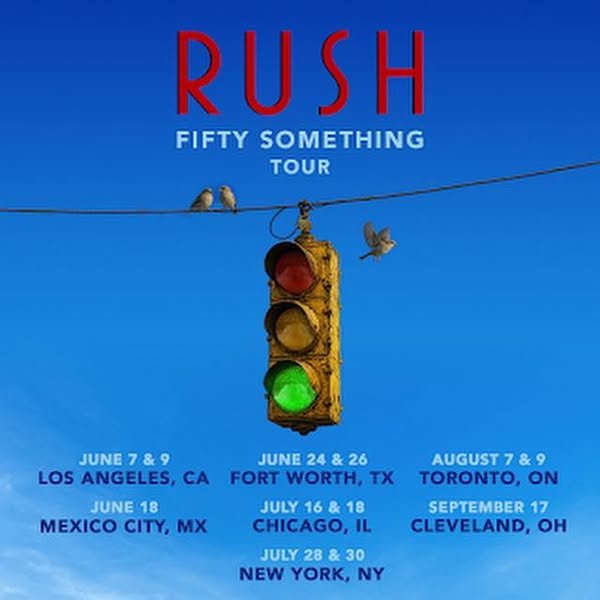
GREAT NEWS - Alex and Geddy just announced that RUSH is back on the road 2026 with every show in part an homage to Neil: Here are the dates SO FAR .. Lucky US people 🙂 .. love the symbolism of the 3 birds in this pic 🧡 AND the new drummer is the amazing ANIKA NILLES .. Check her out live here
-
Bloom Drum Machine Lite FREE - Madonna "Ray of Light" remix competition
aidan o driscoll replied to Wibbles's topic in Deals
@Amberwolf Ill keep ye posted The 80s being a very good time for Madonna I decided to go that route with the "remix" - plenty of distorted overdriven guitar in the chorus. Used UJAM drums - the BM-VICE 80s drum plugin, 4 to the floor with occasional tamberine off beats. We stripped all the EFX off the Maj vocal stem as best we could so I could re effect it with straight forward verb using Echoboy and Raum. With the guitar in the verse I made up 2 new counter lines. Chorus guitar using plenty of whammy and overdrive. So did it this way as a back to the 80s remix, maybe the way it would have been done then, as the track was done in 1998. This rather than the usual "dance2 DJ remix type thing. Not sure if i can post it here, probably not .. However I wonder if people are at Labelradar can they search for an artist and see a comp submission. I am under COLOURTIDE ( www.colourtide.com ) .. Its an originals project since late 80s, same members. Resurgence last 3, 4 years with use of cloud as some members area abroad in US. putting together 12 - 14 new original tracks at the moment. One is at the website above called "GETTIN ON" -
Bloom Drum Machine Lite FREE - Madonna "Ray of Light" remix competition
aidan o driscoll replied to Wibbles's topic in Deals
Not out of it yet .. new notification: "Thank you for taking part in the Beatport presents: Madonna Global Remix Contest - "Ray of Light" Contest! The submission period has now ended and the curators will continue reviewing the entries. You'll receive a notification if you make the finalist shortlist (if you haven't already). Best of luck!" -
Bloom Drum Machine Lite FREE - Madonna "Ray of Light" remix competition
aidan o driscoll replied to Wibbles's topic in Deals
@Nitrate Audio The competition link is: https://www.labelradar.com/contests/madonnarayoflightglobalremixchallenge/portal STEMS link on the right, I think you have to sign into the competition to get them. BUT the deadline has passed so maybe they wont allow stem download anymore -
Bloom Drum Machine Lite FREE - Madonna "Ray of Light" remix competition
aidan o driscoll replied to Wibbles's topic in Deals
About the stems for this Madonna RAY OF LIGHT competition. We found more flakeyness The vocal line particularly is all over the place BPM wise, it changes throughout. We had to use melodyne pro to sort this out somewhat. I dont know if this was from the original recording back in the day 1998 or what. -
Bloom Drum Machine Lite FREE - Madonna "Ray of Light" remix competition
aidan o driscoll replied to Wibbles's topic in Deals
Thanks @Amberwolf - Like I said FLAKEY. Does beatport own labelradar? If not then you would imagine Beatport should have the say as to whether paying LR members get bumped to the top and not much heed paid to the Free people. If it is that way then all there remix challenges are a complete waste of time unless you pay LR. should be an email even to say you are entered subject to review -
Bloom Drum Machine Lite FREE - Madonna "Ray of Light" remix competition
aidan o driscoll replied to Wibbles's topic in Deals
Entered/uploaded submission for this remix competition yesterday. Still have not had any emails or indication I am entered or not. Sounds kinda flakey tbh. Or its very busy I imagine. I wonder is it enough to have it submitted at labelradar? Deadline was over hour ago 11.59pm pt or 6.59am gmt