


tparker24
-
Posts
163 -
Joined
-
Last visited
Everything posted by tparker24
-
If you have ScrollLock on, on your PC keyboard, that's a possible cause.
-
@Chaps thanks for the info. Yes, I'm very aware of Key+. It does work very well, including with Audition in PRV. The big advantage of CSTranspose is that it allows "grouping" of tracks, so that you can then easily do a Global transpose. So for me, it's a trade-off between it working in PRV, and working globally. I think that working in PRV is more important. So, I will probably be switching back to using Key+ rather than CSTranspose.
-
I really enjoy using CSTranspose. However, I've run into a little issue. When I Audition a note (i.e. click on it) in PRV (Piano Roll View) it doesn't seem to transpose. It does play fine with a regular play (but just not with audition). I notice the same behavior with the regular Cakewalk Transpose MFX. I'm wondering if this is a known limitation of CSTranspose. I'm running version 3.0.0.1 7/22/24 415 KB. Thanks, Tom
-
 I suspect that's coming from the Notes field, in the Browser. Open the Browser, usually just "B". Then hover over the icons til you find one that says "Browse Notes". Click on that and you'll see fields for song title, name, artist, etc. You can change any of these by clicking and then typing in. As an example, here's the Notes field for a project I'm working on: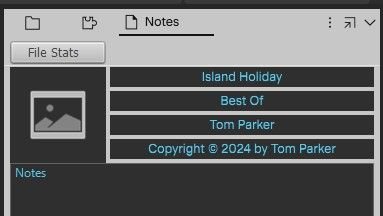
-
I'm guessing he means Right Mouse Button.
-
Sounds like you may have Ripple Edit clicked on.
-
Any way to search across multiple projects?
tparker24 replied to A Tolerable Quietude's topic in Cakewalk by BandLab
Good research Glenn! Yes, it's too bad ProjectScope seems out of date, and so not too useful now, at least for plugins. -
Any way to search across multiple projects?
tparker24 replied to A Tolerable Quietude's topic in Cakewalk by BandLab
There's a free utility called ProjectScope that might be of help. It displays plugins used, along with many other things. And I just found out that it has a Search facility too, so you can search across directories. http://forum.cakewalk.com/FindPost/3218609 http://forum.cakewalk.com/FindPost/3584169 -
An alternative, is to just use the Event Inspector. There you can adjust the Pitch (by any amount) of any selected notes.
-
Has anyone heard from Biodiode (Adrian Earnshaw)?
tparker24 replied to craigb's topic in The Coffee House
scook = Steve Cook One of the most helpful and prolific posters here. Seems to have disappeared a while back (maybe Sept 2023). -
I've been pretty happy with the free player MPC-BE x64 from https://sourceforge.net/projects/mpcbe/ You can adjust speed with Ctrl + Up/Dn arrows. Can also adjust audio sync with Keypad +/- . Also plays wav, mp3, etc.
-
Good one!
-
Good thought, but unfortunately, you can't INSERT an EVENT of type LYRIC. This is according to page 30/101 of the above-mentioned "The Cakewalk Application Language Programming Guide for SONAR". (The only 6 types you can INSERT are: NOTE CONTROL WHEEL PATCH KEYAFT CHANAFT).
-
First of all, your statement: ( if (== Event.TEXT Type) should be: ( if (== Event.Kind TEXT) However, according to some documentation I have, you CANNOT change the Event.Kind (e.g. from TEXT to LYRIC). Here's a quote from Page 17/101 of "The Cakewalk Application Language Programming Guide for SONAR". The constants: “CHORD”, “EXPRESSION”, “HAIRPIN”, “LYRIC”, “MCI”, “NRPN”, “RPN”, “SYSX”, “SYSXDATA”, “TEXT”, “WAVE” allow an “Event.Kind” test to locate these “Events” in a sequence, and yet there are no provisions for viewing, accessing or changing the values associated with them. This makes their use rather limited to merely hunting for this type of event, but not being able to do anything with it, once it has been found, except deleting them! Nevertheless, I list them here mostly because, for many of them, their existence as they relate to CAL is undocumented. These constants are only available in the versions of Cakewalk that support these data types as part of their feature package. BTW, that manual seems hard to find these days. Mine says: The Cakewalk Application Language Programming Guide for SONAR Version: 2.2 Original author: D. Glen Gardenas Editing and adaptations: Ton Valkenburgh Review: Frans H.M. Bergen Febrary, 24, 2010 http://www.MIDI-Kit.nl [this no longer seems to work]
-
What will make me consider buying highest tier of upcoming Sonar
tparker24 replied to Misha's topic in Cakewalk by BandLab
I have Chord Pulse and it's very good. However, I didn't know it did fills. I scoured the website and the online help, but couldn't find any mention of fills. Do you have any pointers to that info? -
What is the best way to remove pops and clicks in audio tracks?
tparker24 replied to Simon Webster's question in Q&A
Check the Youtube video How to Edit Audio in Cakewalk by Bandlab by the wonderful Mike of Creative Sauce. Lots of good info. And starting around 13:00 or so, he specifically covers pops and clicks. His preferred method is to use Auto Crossfades. -
I suggest looking into AutoHotKey. It's a Windows scripting language that can be used in Cakewalk. You can search these forums to see some user-contributed examples. You can google it to download it and to find some tutorials. You may need some programming chops to work with it.
-
The manual is available online at https://www.klimper-plugin.com/pages/help
-
It's a bit tricky. Here's how I do it: Ctrl+A to select all. Then Right click on the Timeline and select "Create Sections from Markers". Then type A to show the Arranger sections.
-
All these EZX have full brush kits, but I'm not really thrilled with any of them. Maybe you will have better luck. - Americana - Big Band - Jazz - Nashville - Singer-Songwriter - Vintage Rock
-
Check out the free Vocal Doubler from Izotope (now part of Native Instruments). https://www.izotope.com/en/learn/vocal-doubler-and-tips-for-mixing-vocals.html You may need to set up an Izotope or Native Instruments account, to get it.
-
FREE BFD Player w/ 5 GB Acoustic Drum Kit; Additional Kits $29 USD
tparker24 replied to PavlovsCat's topic in Deals
I didn' t like what I "had to do to install and use the software". Because I stopped installing, I can't comment on "the sound of the drums". -
FREE BFD Player w/ 5 GB Acoustic Drum Kit; Additional Kits $29 USD
tparker24 replied to PavlovsCat's topic in Deals
My install didn't go very well. 1) I got messages about Windows Firewall. Is this thing trying to "call home"? 2) It requires me to setup an inMusic account. 3) After not liking these, I decided to Uninstall. This thing left a trail of debris all over my ? drive. Maybe it's just my setup, but sometimes with "free" software, you pay in other ways. -
I just use: M


