

-
Posts
8,666 -
Joined
-
Last visited
-
Days Won
30
Everything posted by Starship Krupa
-
Here's another. How you tie the string to the post makes a big difference in tuning stability. I've been using the "luthier's knot" for 40 years, and have never felt the need for locking tuners. I have multiple guitars with Strat-style vibratos, and don't have tuning issues. I do install graphite impregnated nuts on most of my guitars. I'd assume that a high end axe like a PRS would already have a pretty good nut.
-
 I'm in the US and just enrolled in the free updates program. MS says that Windows 10 systems will get updates to Defender at least until 2028, so it seems that there's less urgency to leave Windows 10 behind.
 -
Wow, I didn't know that there was a free option. I'm already using OneDrive, so I suppose I qualify. One thing that the article mentions is that ESU or no, Windows 10 systems will still get Defender updates through 2028. Since the FUD I've seen centers on security, that would seem to address those issues. FUD runs deep, though.
-
What are the options for 30+ year users?
Starship Krupa replied to Tim Godfrey's topic in Cakewalk by BandLab
I recently set up a Cakewalk DAW system for a friend who bought a refurbished Dell Optiplex 7050 i7-7700 system at Amazon for $210. It has both PCi and PCie slots. I installed a Firewire card in the PCi slot. Works great with his PreSonus Firepod on Windows 10 Pro. The Windows 10 Pro license was included. I prefer Pro for a DAW because it allows for more control over the OS. It also came with 16GB RAM, a 1TB SSD, and a 2TB spinner. Quite a loaded little system for DAW work. On my own system, I use a PCie Firewire card with my Focusrite Saffire FW interface. Works great with Windows 10. See my sig for details. So for very little money, you could set up a much more capable and up to date system. Get in there while Windows 10 is still being updated. You can still have your old Windows 7 system as a backup. -
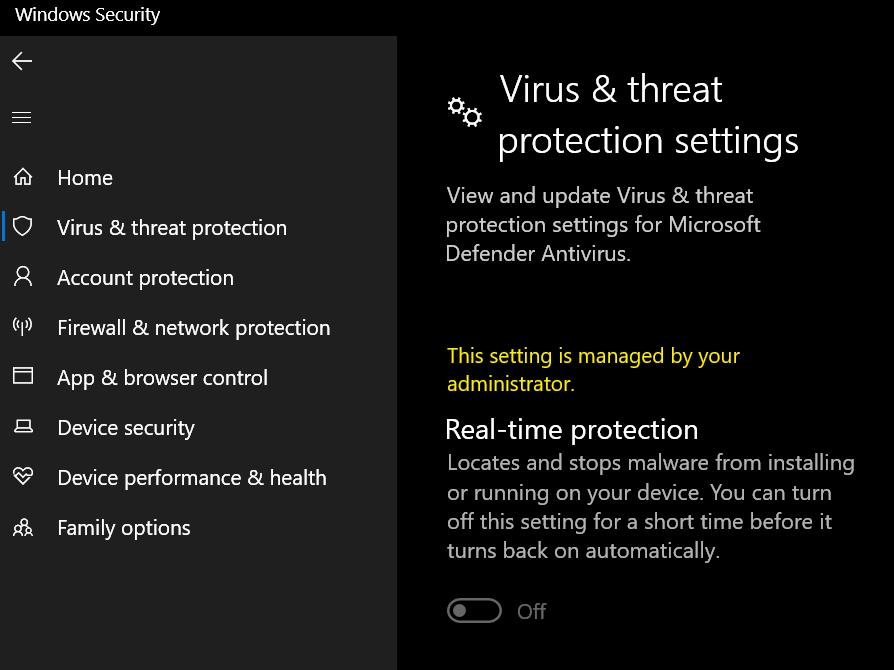
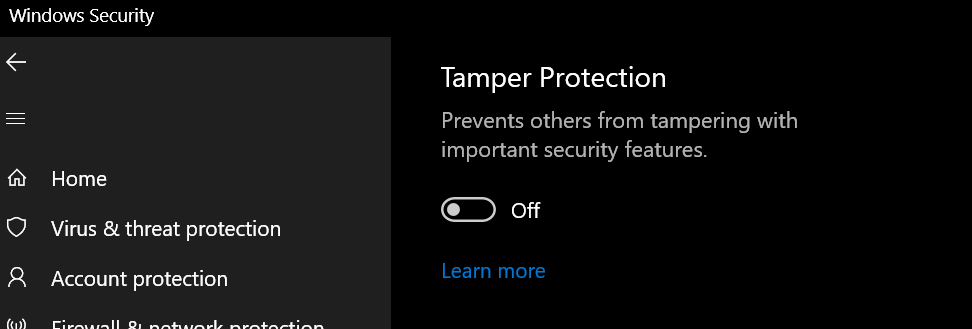
Here's what my Settings page for it looks like: As you can see, it says that it can only be turned off "for a short time." It also says that it's managed by an administrator. It's not true that it can only be turned off for a short time before coming back on, but it is true that it's what will happen if you try to control it from that Settings panel. You have to do it from Group Policy Editor, and you also have to turn off Tamper Protection. If you don't turn off Tamper Protection, Windows will keep turning real-time protection back on. Once you've done that: Open Local Group Policy Editor (type gpedit.msc in the search box) Computer Configuration > Administrative Templates > Windows Components > Microsoft Defender Antivirus > Real-time Protection Enable Turn off real-time protection Restart the computer As you can see, it uses similar logic to certain locations in Sonar where you disable/bypass FX. You don't "disable" it, you enable turning it off. Note that this recipe requires you to be running Windows 10 Professional. Years ago I figured out how to both enable Group Policy Editor and use it to turn off real-time protection on Windows 10 Home, but it's harder to make that one stick. Microsoft kept turning it back on when system updates were installed. So I finally caved and bought a Pro license, which can be had for about $10 if one searches Google Shopping. Defender will still do its downtime scans, it just won't scan every read and write.
-
There are likely differences. I'm running Windows 10 Pro and I've tweaked the heck out of it. One of the biggies is that Defender realtime scanning is disabled entirely. Defender scans during idle periods. If I have any doubt at all about a downloaded file, I scan it manually. You might see less Defender activity at project load time if you exclude C:\Program Files\Common Files\VST3 and your VST2 folder from realtime scanning. On systems that I set up or tune for other people, I exclude plug-in folders as well as the entire Cakewalk Projects folder. When setting Defender exclusions, I noticed that Celemony apparently adds exclusions for the Melodyne separations folder and files. I've made the suggestion to the Cakewalk devs that the Sonar installer could do this as well, but maybe the fact that the user can choose the location of their Cakewalk Projects folder makes that problematic.
-
Verily, it is said to be popular in your field. Lack of volume and pan controls in track headers makes Cubase a no-go for me. I learned about that in one of these "give us back our theming" threads. Still makes me shake my head.
-
Cakewalk teased adding more user options for UI customization about 7 weeks ago on Reddit and in this forum. My guess is that whenever it comes, we'll get more control over colors. From what I understand, changing graphical elements is a different ball of wax from SONAR/CbB. Those programs used static raster images whereas the new UI uses vector images. Custom theming was a feature that helped draw me in to CbB, and I wound up making several of my own extensively customized themes. The thing I most want control over is color. My goals with the themes I made for myself to use were to give them pleasing and more visible colors, make the buttons as flat as possible, and design buttons that conformed better to current industry iconography. 3-dot options menus, turny triangles to open tree menus, etc. Those last two have been taken care of with the new UI, so if we only get color customization, I'll be happy. The biggies for me are Track View grid lines and Browser text. Despite preferring dark themes to light ones, I sometimes use the Mercury Classic color scheme just because the Browser text is blue instead of off-white. Light grey text on a dark grey background just feels to me like it's 1988 and I'm on a monochrome monitor. Although I always at least had green or amber monitors, so it wasn't even grey on grey.
-
Open Task Manager and click on the Performance tab. Down at the bottom of that pane, you'll see a button "Open Resource Monitor." Resource Monitor lets you monitor what processes are using various resources, and things such as file access. Click on the Disk tab, and in there you can see whether there's a lot of disk activity, and if you choose, select one or more processes to specifically monitor. If you're running Sonar, select sonar.exe and then observe what files Sonar reads and writes. I can't remember the name of the process for Defender, but when I discovered this, I had selected the Defender process in the Disk tab, and could see it chugging away every time I hit Play in Cakewalk. I used the same tool to discover that however many takes you have in your project, Cakewalk/Sonar streams all of them on playback, regardless of mute status of the clip or take lane. If, like me, often choose to keep your unused takes around for possible future use, the way to minimize the impact is to move your unused takes to another track and then Archive the target track. Audio in Archived tracks isn't streamed on playback. This is the reason I made a feature request years ago to implement Archiving at the take lane level.
-
By default, Defender scans every file that is read from or written to the drive in real time. That is the reason to make exclusions. I only found this out because I was trying to troubleshoot a Cakewalk issue. I was playing back a project with about a dozen audio tracks and noticed that the the Defender process was accessing the files each time I hit Play. I run Windows Pro, so just turn off realtime scanning entirely, but for people who run Windows Home and/or who do want to have the antivirus scanning every file they read or write, it's a good idea to exclude the Cakewalk Projects folder and VST2 and VST3 and any sample folders from realtime scanning.
-
Setting up Tal Vocoder on Cakewalk help needed.
Starship Krupa replied to carlo's topic in Cakewalk Sonar
Here's my friend Lorene setting it up using the instructions I posted on this forum (in other pursuits, I call myself "Superabbit"): -
AI and the future state of music creation
Starship Krupa replied to Mr. Torture's topic in The Coffee House
That is an excellent analogy. If my music can be equaled or bested by algorithms, then I have no reason for doing them. My goal is always to create something with the stamp of my own personality/taste/creativity. I listen to some genres that to most people, all the songs sound alike. Ambient drone, for instance. And I understand why that is. However, I can be listening to Drone Zone and then suddenly sit up and have to make a note of the artist and song. It just has something. That something is more difficult for an algorithm to do. -
Plugin Boutique sure does. Their BOGO program drew a LOT of my attention to their site. Not as much now as it did years ago, but 5 years ago, wow. The quality of the BOGO's seems to have dropped, so along with the fact that I just have so many ploog'ns already, the program doesn't get as much attention from me as it once did. I have some great products from it, including things from A|A|S, MeldaProduction, and Mastering the Mix. I subsequently spent money with each of those companies, too. Chord and arp plug-ins are some of the only types that I'm still interested in, so thank you @cclarry for posting the original link and thank you @Pragi for posting the Windows link. I'm sure if I dug through my PB account I could find the entry, but like most of us, my PB account has MANY products in it.
-
Wow, so much for treated rooms, you got a darn good sound there.... The Stargate visuals are fun!
-
How the Beatles recorded "I'm Only Sleeping"
Starship Krupa replied to T Boog's topic in Production Techniques
It would wind up in the hands of Alex Mardas, and he'd probably find some way to copy it. What would they call the computer company? International Beatle Machines? Northern Computers? I bet they could come up with a really catchy name for a computer company. Pepper Computers? Yellow Computers? Abbey Computers? Magical Mystery Computers? Linear System Designs (wink wink)? It's right there on the tip of my tongue.... -
How the Beatles recorded "I'm Only Sleeping"
Starship Krupa replied to T Boog's topic in Production Techniques
Not that early, I'm sure. They had so much freedom to try whatever they wanted to try. Paul McCartney got a bit experimental on his most recent album, doing things like overdubbing massive amounts of guitar tracks, but in most cases, once The Beatles split up, they didn't do much of this creative studio stuff. -
All bowsers suck and other "advances"
Starship Krupa replied to kitekrazy's topic in The Coffee House
Your typos are a comedy gift that keeps on giving.... -
All bowsers suck and other "advances"
Starship Krupa replied to kitekrazy's topic in The Coffee House
-
Weird dropout and other behaviors just started happening
Starship Krupa replied to theanalog808's topic in Cakewalk Sonar
I wuz gonna say that if your CPU is getting hot enough to throttle, whatever the CPU load, you need to either repair or replace your CPU cooling system. Looks like you figured that out. My favorite tool for monitoring temperatures, fan speeds, CPU core clocks, etc. is HWinfo. It has 3 different modes, one of which is "sensors only." I keep this running all the time on my main system, as it keeps track of minimums and maximums of whatever it's monitoring over time. The other two modes are system configuration reports, one of which is the most detailed of any such report I know and can tell such things as what devices are plugged into the system's various USB controllers, what date the RAM was manufactured, and so on. Keeping HWinfo's sensors running during your present troubles would reveal your current, average, minimum, and maximum CPU speeds and temperatures. It might be interesting and valuable to check it before and after you replace the cooling system. -
The behavior you are seeing is not normal and definitely not "as designed." $onar will by default replace instances of Sonitus FX with their Core FX equivalents, but it's not "irreversible" under normal circumstances. What's happening on your system is not normal. It's certainly unfortunate that it all played out this way for you. On my systems, CbB and SONAR Platinum and $onar all run fine. I had a scare at first because I didn't realize exactly how CbB needed to be reconfigured; I had to disable the automatic VST3 migration in SPlat and CbB, but that's all. You should most definitely try to sort out the crashes and failures to start that you're having. They're not as designed, and they're not normal, so you should be able to. SONAR and CbB and $onar have always been carefully engineered and tested so that installations of the newest version of the DAW will coexist with the older versions. The only caveat is that if your project uses features from the latest one that didn't exist in the earlier one, you'll have to allow for that when trying to open the project in a previous version. It shouldn't crash or corrupt anything, but you may have to make some changes to allow it to play correctly if it uses new features that would affect that, such as routing options that didn't exist in the past.
-
My guess is that they have their own methods of keeping track of the devices rather than relying solely on the information Windows supplies.
-
Yes and yes.
-
It won't if you follow the instructions in the first post in this topic. The point of this topic is to warn about this and inform users how to avoid it. It isn't irreversible. Don't overwrite your old SONAR or CbB projects after opening them in $onar or SoFT. When trialing new software, it's never a good idea to overwrite the projects you've created in the older version. Always keep a backup copy.
-
How the Beatles recorded "I'm Only Sleeping"
Starship Krupa replied to T Boog's topic in Production Techniques
Wow, that IS truly amazing and inspiring. Instead of taking the usual thought path of "oh we can do that all easily with the tools we have now" he tries to duplicate the methods as much as the performance. To me, it suggests that chasing the sonic tools and techniques used by ones heroes is not as futile as many suggest with the "tone is all in the fingers, maaaan" mantra. Yeah, you DO have to have the chops to pull it off, but getting your gear as close as possible isn't as silly a pursuit as some suggest. Yes, in subsequent decades Paul McCartney, John Lennon, George Harrison and Ringo Starr all sounded unmistakably like themselves no matter what gear they were playing or singing through or who was recording them, but they never sounded like they did on Revolver. I might listen to "I'm Only Sleeping" and hear that they're using a primitive version of chorus/flanging on the vocals, but I would not have worked out that they did it with someone working the speed knob manually. That's a performance in and of itself. Could it be done entirely in the box? When you manually adjust the playback speed of a tape deck, both pitch and speed are adjusted. For every move you make in one direction, you must make one in the other direction so that by the end of the song, they're not too far out of sync. He uses the natural imperfections of the cassette format to approximate it, but that's not the same as controlling it in real time. It's still random. You could try duplicating the vocal track, then putting RC-20 or Needlepoint or whatever on one track and not on the other using their approximation of wow and flutter, but that would only duplicate his process, not the realtime performance of the tape op turning the knob. Is there a way to set that up using a control surface? You'd need to have control over both pitch and speed and be mindful of having to nudge it in both directions. It would be so much trouble to set up and execute that 99% of people would just say screw it and slap on something like Quadrovox and leave it at that. You want vocals that are thickened via pitch shift? You gottit. But that leaves out the effect of having them also become out of sync in the time domain.... -
How the Beatles recorded "I'm Only Sleeping"
Starship Krupa replied to T Boog's topic in Production Techniques
This will be an interesting watch, with the thumbnail implying that they used an advance prototype of a Tascam Portastudio. Flip the cassette over, record the guitar solo, flip it back?