


-
Posts
8,561 -
Joined
-
Last visited
-
Days Won
30
Everything posted by Starship Krupa
-
Windows 11 Pro license from bulk reseller. I bought a Windows 10 Pro license from a similar places and it worked fine. Just Google "Windows 11 Pro license." Even though they seem impossibly low priced at $6 they are legit. I've never heard of anyone running into a problem with these resellers. I think what they are doing is buying in bulk at system integrator prices and then flipping them. Similar to what a local computer shop that does system builds pays. Which lets you know how marked up the consumer licenses are.
-
Yes. Synths and FX with stochastic elements as well as others.
-

File attachment size shrinking drastically?
Starship Krupa replied to Amberwolf's topic in Computer Systems
What I often do is screen grab using Windows' own Win+Shift+S utility then paste directly into a post in order to save time and eliminate needing to open a raster editor, saving an image, then uploading it. I think the forum converts such images to .PNG's for storage, so it could be that my practice of doing that is using up my quota sooner than if I went with .JPG's. So when the time comes that I just don't have enough room to post images of attach minidumps or whatever, I'll ask the powers that be to increase my allotment. If they won't, we start saying goodbye to illustrations that went with my topics and replies over the years. -
It depends on how much extra the people building your system charge for it and whether you want/require the extra control over the OS that you get with Pro. Some people like being able to postpone system updates indefinitely, others (like me) like to completely and permanently disable realtime file scanning for malware for the entire system. Home only allows you to exclude individual folders, not the entire system. It also only allows you to postpone updates temporarily. Since licenses for Pro may be found much cheaper by the consumer than what you'd usually pay for them through whoever's building the system, I'd probably go with Home then upgrade it once the system was in my possession. Because I'm someone who wants the extra control. If the difference between versions is more than about $15, I'd start with Home and upgrade it myself.
-
I'm interested to hear the OP's reply. The only effect that I can think of wanting to print would be compression, and that would only be when using a recording medium with much less range than 44.1KHz allows me.
-
Curious, why do you want to print FX while recording? You can monitor them while recording, then bounce the recorded track and the FX will be baked in just as if you had printed them while recording.
-
Open source licensing for ASIO at last!
Starship Krupa replied to Starship Krupa's topic in Computer Systems
I presume that they have compilers that can generate object code for both platforms, seems like a good opportunity to use one.😄 The project caused me to wonder if the ARM64 push provided a good excuse to finally do some overdue retooling of Windows' audio infrastructure in general. Because if I were Pete Brown, I would have jumped all over that. No matter how quickly ARM64 is adopted/embraced by manufacturers and users, x64 is still going to be the overwhelmingly dominant architecture for a while. And it isn't like Windows isn't long overdue for an audio driver that improves on WASAPI for generic class compliant devices. WASAPI was a great advancement, but it's getting long in the tooth. -
File attachment size shrinking drastically?
Starship Krupa replied to Amberwolf's topic in Computer Systems
It would be nice if the powers that be could ease up on this restriction, I suspect that the cost of resources for the back end has dropped. The issue I run into is that as the forum goes on, I have screen shots and so forth in posts where I presented a solution for someone, and it seems like a shame to have to delete illustrations rather than keep them useful for the many people who hit Google looking for solutions to their Cakewalk issues. The forum has been around for half a dozen years now. -
This question has already been answered, from the hardware standpoint. Yes. From a software standpoint, if RME supply a driver that's compatible with the OS, then yes. And don't confuse "supported" with "compatible." Focusrite's support for the driver and control panel software that goes with my Saffire Pro 40 was ended years ago, but it still works just fine. It depends on what all you want to do with the computer. If you wish to do anything that involves video editing or scoring, a dedicated GPU will make things much smoother. Even a lower end card would suffice, so you don't need to spend a fortune. Just something with at least 8GB of GDDR. If it's strictly audio, then the integrated GPU should be fine. And if you decide to start doing video or gaming with the system, you can add a dedicated GPU later.
-
For anyone who is a fan of Unfiltered Audio or Glitchmachines style creative sound design/warping. It's a wonderful tool for that, built to A|A|S' usual high standard of quality.
-
For precise pinpointing of frequencies, that same MeldaProduction FreeFX bundle also includes MEqualizer and MAnalyzer, both of which have spectrum analyzers that can display the exact frequencies of whatever frequency peaks are in the source material. MEqualizer also allows you to solo whatever band you're currently adjusting to further help pinpoint where the issues are. Big fan of the FreeFX bundle here, I consider it an essential package of audio plug-ins (processors and tools) and you can't beat the cost.
-
That's great. It's also good to list which driver mode you're using. ASIO, WASAPI Exclusive/Shared, WDM, whatever. ASIO is where you want to be, some people who are having issues switch it to one of the other modes to try to fix it and then forget to switch it back.
-
[SOLVED] Cakewalk Sonar Glitches
Starship Krupa replied to thegaltieribrothers's topic in Cakewalk Sonar
If anyone wants to try disabling core parking, Bitsum have a free utility that lets you do it without manually hacking your registry: https://bitsum.com/parkcontrol/ Here's an article that goes into greater detail about what core parking is and why one might wish to disable it or leave it alone. Basically it says if your computer is plugged in, you can turn it off and see what happens with no concern. If it's on battery, you'll run your battery down faster without core parking. That's the tradeoff. https://geartakes.com/disable-core-parking-audio/ -
Oh, I misunderstood what you meant by "r' click." It seems that you meant "right click." Try what Colin suggests and then what I suggested should start working correctly.
-
[SOLVED] Cakewalk Sonar Glitches
Starship Krupa replied to thegaltieribrothers's topic in Cakewalk Sonar
People should be careful when using Google to find system optimization guides. This article, like many others of its kind, repeats at least one piece of myth and folklore that has persisted on the subject despite having been debunked. It's outdated and appears to be incomplete. I didn't read the whole thing, but I got as far as it telling the user to set Processor Scheduling to favor background programs. That myth dates back about 30 years and such people as the Cakewalk developers and Pete Brown of Microsoft have stated that it's not true that doing so will improve audio performance, and will even possibly degrade DAW performance. DAW's are (wait for it) Programs, and setting the OS to favor background processes over programs is misguided. It also suggests disabling core parking via a registry hack. I don't know if this is still or was ever a valid blanket suggestion, but they don't mention the havoc that can be wrought by people using RegEdit. Anyone who wants to optimize their Windows system for audio production would do better to go to the source, Pete Brown, who is the go-to guy at Microsoft for all things Windows audio. This is the first part of his 3 part guide: https://devblogs.microsoft.com/windows-music-dev/unofficial-windows-10-audio-workstation-build-and-tweak-guide-part-1/ There are also multiple topics on this forum that have information provided by people who specifically use Sonar. Check in Tutorials or Computer Systems. -
Pressing the D key should toggle hide/show for your Multidock, which in your case has your piano roll in it. Shift+D to maximize/restore it. If your piano roll isn't in the Multidock, you can click on the Window icon at the left of the Piano Roll view's title bar and select Dock in multidock. But it looks like your PRV is in the Multidock, and the Multidock is maximized. Try Shift+D. If it has no effect, go into Keyboard Shortcuts and make sure the D key hasn't been assigned to some other function. You said that you pressed R to get to your Piano Roll, but R is assigned to record by default. Default mapping to show Piano Roll is Alt+3, so you must have fiddled with your key bindings at some point.
-
[SOLVED] Cakewalk Sonar Glitches
Starship Krupa replied to thegaltieribrothers's topic in Cakewalk Sonar
Indeed. A basic one, recommended by the Cakewalk devs, is to exclude your Sonar projects folder from Defender realtime scanning. This is done in Windows Settings/Security and Updates. I exclude that, as well as my plug-in folders. There are also BIOS tweaks that help smooth things out, also turning off unnecessary services. A standard tool for chasing down sources of glitches is LatencyMon. It will assess your system and tell you whether it's doing okay as far as latency. If there are issues, you can use it to track them down. -
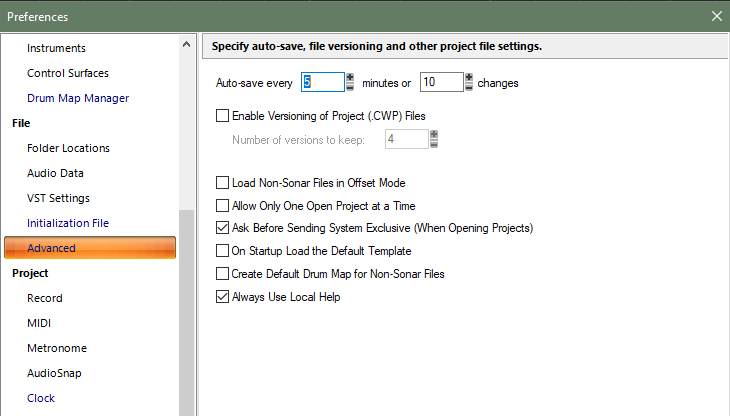
Check your Preferences: By this you mean that it has 8GB of RAM? That's enough to run it, the recommended amount is 16GB. If it's new enough to run Windows 11, it's likely capable of installing more than 8GB RAM. https://help.cakewalk.com/hc/en-us/articles/360021857753-What-are-the-minimum-requirements-for-using-Cakewalk-Sonar
-
Bumping this because it's still a PITA. Having to edit the name of every synth track I create is tedious. I don't understand why it's different between Instrument tracks and Synth tracks.
-
core gate "Pops and crackles" in the Core Gate in Sonar?
Starship Krupa replied to Edward Allen's topic in Cakewalk Sonar
Try using the legacy Sonitus Gate with the same settings you're using for Core Gate. See if the problem goes away. If it does, then the developers would definitely wish to know. -
When requesting assistance with issues like this, it's important to list your system specs. What processor, how much RAM, what audio interface, what driver mode?
-
[SOLVED] Cakewalk Sonar Glitches
Starship Krupa replied to thegaltieribrothers's topic in Cakewalk Sonar
You don't say how you are determining that your audio glitches are due to how many ProChannel FX you are using. ProChannel FX are not demanding of resources. Something to check when getting glitches and dropouts is buffer size. What audio interface are you using, and in what driver mode? The best will be an external interface, using ASIO, and if that's the case, you can adjust the buffer size in the interface's control panel. Another solution is to freeze tracks when you come to a stopping point on making adjustments to their plug-ins. Freeze problem tracks while you work on others. Strategic freezing was a common strategy before computer power increased. Your system is similar in spec to my laptop and my laptop runs fine with Sonar projects. -
Unfortunately, TTS-1 was a product that belonged to another company. It was beyond the control of BandLab/Cakewalk. Sonar isn't "made for" computers of any fixed specification other than that they be running Windows 10 or 11. There is a published "recommended" specification, but it's based on the expectation of present day users who expect to be able to run lots of plug-in FX and virtual instruments without having to freeze tracks. Going silent while playing back tracks is not normal behavior. What are the specs of your system?
-
3 months later, want to bump this. Frustrating that it has been left out of Sonar.
-
An important announcement from Cakewalk
Starship Krupa replied to Starship Krupa's topic in UI Themes
Posting a link in case anyone missed this announcement from Ashwin: I like the sound of "powerful." As a veteran .STH Lord, "easy to use" is much less of a concern.😄


