


msmcleod
-
Posts
7,203 -
Joined
-
Last visited
-
Days Won
39
Everything posted by msmcleod
-
Synthmaster has a bunch of Keith Emerson/ELP patches in their "Nori Ubukata Historical Synth Giants Vol. 2" set. [Edit]: Here's a link to a demo of the sounds:
-
The last two Melodyne updates (4.2.0 and 4.2.1) have broken this functionality. Basically Melodyne now forgets its default detection algorithm, so when you try the drag/drop it causes Cakewalk to crash. The 4.1.x version that ships with Cakewalk works fine. A workaround for the newer Melodyne updates is to create a Melodyne region fx first, re-select the detection algorithm in Melodyne, and then drag the audio clip to the MIDI track.
-
Perhaps he means the ProChannel ? I don't get the red/green thing though, unless it's some custom theme thing.
-
I was just thinking this myself last night. I export all my unfinished projects as .mp3 into a preview directory so I can easily go through them to see if any of my ideas will fit into anything I'm currently working on. There's a few of them I wished I could fast forward through to get to the various sections.
-
The Focusrite 2i2 should run fine at a buffer size of 256. I run mine at 64 with no issues, and my machine is a much lower spec (although it's an Intel not a ryzen) Is Windows using the Focusrite as it's sound device? It may be worth setting Windows to use the internal sound device so that only CbB is using the 2i2. It may also be worth deleting AUD.INI from %APPDATA%\Cakewalk\Cakewalk Core (whilst CbB isn't running). Sometimes this can get corrupted, so deleting it will force CbB to create a fresh version.
-
Sounds like you've got a lense enabled. If you select "none" from the lenses dropdown (in the menu bar, over on the far right) can you see the tracks again?
-
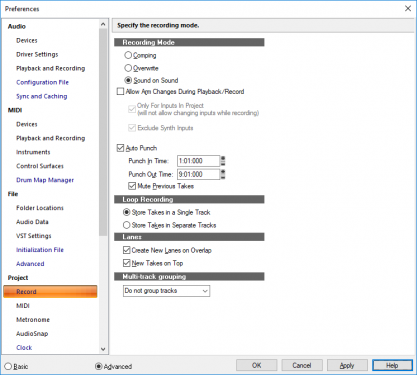
For your solo recording, what I'd recommend is: Setting the record mode to "Sound on Sound", checking "Mute Previous Takes" Enabling Auto Punch (set the punch-in & punch-out to be the same as you've set for your loop) e.g.: When you expand the take lanes, you should see each solo as a separate take. Just solo the one you want to keep.
-
New tracks are always added at the bottom. You can either scroll down to see them, or you can re-order the tracks by dragging the track closer to the top of the list of tracks.
-
FWIW I've installed older versions of Sonar after installing CbB without issue. I think you'll be fine just installing Sonar Platinum from the Command Center. There are however shared components, so you may have to re-install CbB if you run into issues. The Sonar installer should be clever enough to leave them alone if they're newer versions though. Backing up your project files is just a precaution. You should be fine just copying it to another directory.
-
If you've got the UAD version, I wouldn't worry about the Cakewalk CA-2A. Most shootouts I've seen seem to indicate that UAD is the best, with Waves & Cakewalk CA2A begin only slightly inferior. These shootouts are very subjective though, as it all depends on what hardware they modelled it on. After all, no two hardware LA-2A's are the same. There's only two advantages I can see with the CA-2A: (1) The fast reset, and (2) the fact you can use it as a pro-channel module.
-
XLN AD2 only needs re-authorising after major updates, e.g. 1803 to 1809. These are in effect Windows upgrades. The monthly security updates, and other updates shouldn't affect it.
-
Is this happening on all projects or only this one? If it's only this project, you could try creating a new project and dragging the old project on to the track view from the media browser. I find this is a great way of "cleaning up" projects that are misbehaving.
-
The thing I think that will push most pro audio users towards Windows is Apple's decision to ditch Intel in favour of an ARM processor in their next line of Macs. Logic should be fine, as it's an Apple product, but for all the 3rd party DAW's and plugins it'll be a nightmare. They're likely to do some sort of emulator, like they did when they went from PowerPC to Intel, but I can't see them getting the performance needed for plugins from this.
-
 I guess the most famous example is Madonna's "Live to Tell" which uses the D50 "Soundtrack" preset in the intro. The Sountrack patch is a simple fifth interval. There's been hundreds if not thousands of patches since that use that interval, as it's arguably the least dissonant.
 -
If you've solved your issue with CbB crashing on startup, but it's only crashing when opening an older X3 project try this: Create a blank project in CbB Browser to your project using the Media Browser on the right hand side Drag the project on to the track area This should import the old project into your new one.
-
Things to try: Hold shift down whilst opening the project (or opening CbB) to open it in safe mode, to rule out any problem plugins. If it's more of a general problem, then try deleting AUD.INI from %APPDATA%\Cakewalk\Cakewalk Core. Also try re-installing your audio drivers. Check that no other processes are trying to access any of Cakewalk's files or your project files. Common culprits are virus checkers (including Windows Defender) and OneSync or any other cloud sync program. Make sure your the following directories are excluded from any of these programs: All the Cakewalk folders, e.g. Cakewalk global audio folder, picture folder and the folders listed in Cakewalk preferences Your VST folders %APPDATA%/Cakewalk Documents\Cakewalk It's probably worth sending your crash dump to Cakewalk support. The AppData folder is hidden, but you can get to it by pasting the following into Windows explorer: %APPDATA%\Cakewalk\Cakewalk Core\MiniDumps\
-
Have you tried freezing the tracks (with Track FX) before exporting them?
-
I'd recommend "Bounce to clip" after editing using audiosnap.
-
Things to try: Hold shift down whilst opening the project to open it in safe mode, to rule out any problem plugins. If it's more of a general problem, then try deleting AUD.INI from %APPDATA%\Cakewalk\Cakewalk Core. Also try re-installing your audio drivers. Check that no other processes are trying to access any of Cakewalk's files or your project files. Common culprits are virus checkers (including Windows Defender) and OneSync or any other cloud sync program. Make sure your the following directories are excluded from any of these programs: All the Cakewalk folders, e.g. Cakewalk global audio folder, picture folder and the folders listed in Cakewalk preferences Your VST folders %APPDATA%/Cakewalk Documents\Cakewalk
-
The DNS cache doesn't ever flush, unless you explicitly tell it to or you make a DNS/networking related configuration change. DNS records have a Time To Live (TTL) value associated with them which tells a DNS cache how long the particular record is good for. Records in the cache are kept for their TTL, then re-queried. So a reboot isn't enough. Normally this isn't needed, if a website's IP address is changed after the TTL value. But if the IP address is changed before the TTL expires, that's when you need to flush it. If you suspect it's out of date, you need to manually flush it.
- 22 replies
-
- 2
-

-

-
- bandlab assistant fails
- bandlab assistant
- (and 1 more)
-
Another thing to try is flushing your DNS cache. Run the following from a command line: ipconfig /flushdns
-
Have you got any custom firewall software running? It sounds like something is blocking internet access to the BandLab Assistant. Also, have you tried running the BandLab Assistant as administrator?
-
I definitely agree that some knob implementations are better than others. Maybe I came across too strong about the "real" look of VSTs - in fact, if it is an emulation of an existing bit of gear I prefer it to have the real-gear look, because you can use it as if it was the original... and in those cases, a knob makes total sense if it was a knob on the original. And I'm certainly not against good artwork on a plugin, as long as it doesn't affect its usability. There's the other end of the scale too, where the "functional" look is taken too far - take some of the Melda Production plugins for example... some of the GUI's leave me looking all over the place to find the parameters as everything looks the same. I do love the sound of the Melda stuff though. I guess what I'm looking for is a sensible balance between looks and ease of use. With the sonitus stuff, the look is a bit bland, but for me it doesn't affect functionality.
-
For me the GUI of the sonitus plugins is pretty low priority. IMHO there's too much emphasis on trying to make VST's look like "real" gear, often at the expense of usability. Turning knobs with a mouse isn't the most intuitive thing, whereas sliders and graphical envelopes are perfect for a mouse. If anything, making the GUI slightly bigger would be nice, but apart from that the interface works well for me and they sound great.
-
What I tend to do is switch the ProChannel off before freezing, this means that it's not included in the freeze. I can then switch it back on to mix the frozen audio.
