


-
Posts
358 -
Joined
-
Last visited
-
Days Won
11
Everything posted by Jesse Jost
-
We invite you to check out Early Access for Sonar 2025.12. Just head over to the Early Access forum to get the download and read up on a two new, premium features: Signal Probe Theme Editor Hope you enjoy - have a great weekend! -The Bakers
-
- 1
-

-
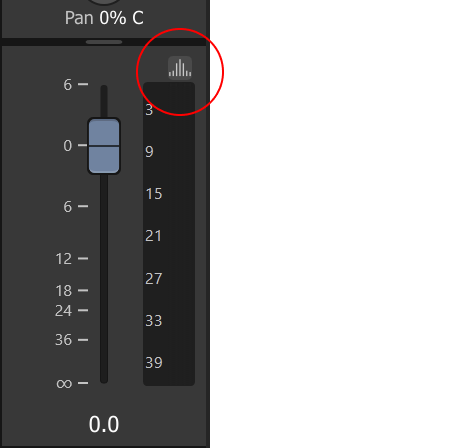
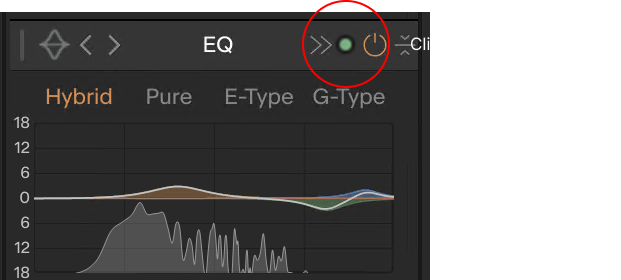
We're excited to have you preview some new features before they go into production - please check out these headliners slated for our next release: Signal Probe Theme Editor Download links 2025.12 Early Access: Download full installer 2025.11 Stable Release (rollback): Download full Installer Membership required Please note that Signal Probe and Theme Editor are available only through BandLab Membership. Signal Probe Signal Probe is a specialized diagnostic tool designed for real-time analysis of audio signals in Cakewalk Sonar, allowing you to analyze signals before or after processing by any track, bus, or plugin. Signal Prove provides three analysis visualizations: Spectrum Analyzer Phase Scope Level Meters Usage Note: Signal Probe is not a plugin. You can access it as follows: For plugins: Click the new "analysis"on any plugin's toolbar. For tracks: Click on the new "analysis" button located on console strips, just above the meter. Toggle the PRE/POST/BOTH switch to instantly compare the signal entering the plugin versus the signal exiting it. Note that you can choose from any combination of analysis modules (spectrum analyzer, phase meter, level meters) to inspect the signal at the tap point, using the Pre, Post, or Both (visualize pre and post signals overlaid). Accessing Signal Probe from the plugin toolbar: Accessing Signal Probe from the console strip: Accessing Signal Probe from the Pro Channel: Note: For plugins, multiple signal probe windows may be opened. For tracks or buses, only a single probe window may be open at a time which is contextual to the track/bus. Signal probe for instruments only allows Post monitoring since there is no input. Color Theme Editor Theme Editor is designed to streamline the color editing process by providing control over the application's entire color theme by adjusting a few core palette colors. Sweeping color changes can be made with just a few adjustments to a small set of core palette colors. To access Theme Editor, go to Preferences > Colors and click Edit. This action will hide the Preferences dialog and display the Theme Editor. When you close the Theme Editor, the Preferences dialog will automatically return. Membership Required The Theme Editor will be available to users with BandLab Membership. Things You Can Try Checkout the included color schemes - they will appear slightly different from those in the current production build, but they should also look better (barring a handful of known color assignment issues we're still working on). Create and save your own custom color schemes. Be on the lookout for UI elements that don't update as you expect, or become hard to see due to low color contrast. DISCLAIMERS The color theming system is nearing complete, but we're still wrapping up loose ends. The default themes included with this release should be considered experimental and will change before the final release. Please be aware or the following: Theme Editor UI is subject to change before we roll it into a stable release. Theme persistence may break during the course of feature preview, but don't worry - themes are very easy to recreate. The feature is not finished and may contain incomplete functionality. Known Issues Some UI elements don't follow theme colors as expected, especially using light-colored themes. Theme Editor Undo and Redo operations are limited in range and may yield unexpected results. 1080p displays may not render some colors properly. Please leave feedback if you using a 1080p display and observe unexpected color rendering. Editor Layout The editor is divided into two main sections: Palette and Overrides. Currently, the core palette is derived from the Dark Theme (our only available base theme in this build). 1. Theme Palette (Core Colors) This section contains the 10 fundamental colors that dictate the entire application's aesthetic. Adjusting one of these colors will propagate across most of the UI. The colors are arranged in five vertical pairs, representing the background and foreground colors for key hierarchical surfaces: Surface 1: Primary application surface, including app title bar, main menu, and overall application background. Surface 2: Primary framing elements, including main structural borders, menus, and top-level toolbars. Surface 3: Secondary toolbar controls and general panels. Surface 4: Tertiary panel displays and view content (e.g., project data display areas). Accent: A highlight color used to draw attention to important information, alerts, or selected items. 2. Overrides This section allows you to adjust specific component color IDs (e.g. Control Bar Background). If you adjust an Override color, you are deliberately deviating from the core palette color normally assigned to it, allowing for granular control. Color Swatch Interactions Click: Opens a Color Editor for precise adjustments. Sonar’s UI will update in real-time. Double-click: Highlight the corollary UI in the application, helping you locate the affected components. Copy/Paste: Color values can be copied from one swatch and pasted onto another. Swap: Exchange color assignments between foreground and background colors. Reset: A small reset button (circular arrow icon) appears when a swatch's value deviates. Clicking it restores the original color. Menu Operations New, Open..., Save, Save As...: Standard file management User themes are saved to %AppData%\Cakewalk\Sonar\Themes Revert: Resets ALL custom color adjustments (Palette and Overrides) back to their original Dark theme defaults. Options: Only one option thus far, Show button backgrounds, toggles the visual state of buttons in the application UI.

-
2025.11 Release Notes Build 31.11.0.068 This build introduces the new Cakewalk Assist feature and includes numerous stability, performance, and workflow improvements. New Feature: Cakewalk Assist Stop diving into menus. Cakewalk Assist is your new unified command palette, designed for speed and productivity. Assist instantly puts the entire DAW at your fingertips, accelerating feature discovery and eliminating workflow friction. Core functionality Instant Command Execution: Type any command (e.g., "Insert Audio Track," "Group Tracks into Folder") and run it instantly, without touching the menu bar. Quick Navigation: Search and jump directly to any setting, preference screen, or view. Unified Discovery: Find application commands, settings, views, and help documentation simultaneously from one place. How to use it Access it anytime by pressing: Ctrl + / Note: This shortcut is reassignable in Preferences > Keyboard Shortcuts Start typing something you want to do, e.g., a command: "Bounce" or a view "Matrix"... A list of associated commands, settings, views and help topics will appear - select the one you want You may discover new features or find your workflow has accelerated 10x. Assist's core capabilities are included in the Free Tier to ensure everyone gets a boost. We hope you use it often - let us know what works for you and what improvements you'd like to see! Plugin Updates TH-U Cakewalk Edition Redesigned, photorealistic amp and effects UI New multi-line sound chain routing MIDI-controllable Polyphonic Transpose Stereo Doubler effect for wide, double-tracked tones. Integrated official Jensen Speakers™ libraries Core Plugins Bug fixes and performance improvements Performance & Stability Fixes This update resolves several issues that could cause instability or sluggish performance, ensuring a smoother user experience. ASIO Hang Fix: Resolved an issue where Sonar could hang indefinitely if the ASIO driver was in use by another application at a different sample rate. Project Save Issue: Fixed a rare bug where saving certain projects could fail with a "Cannot write file - disk may be full" error. Clip Editing Performance: Optimized performance to prevent sluggishness during slip editing when playback is underway. Lasso Selection Performance: Resolved an issue where lasso selection could be sluggish while playback was running. System Idle Crash: Implemented a fix to prevent Sonar crashes during system idle or power state changes by properly suspending and resuming hardware and control surfaces. Crash Fix: Resolved a crash that occurred when clicking between tabs in the Start Screen. Workflow & Bug Fixes Plugin Parameters: Fix issue in which Sonar could potentially send invalid parameter values leading to plugin instability Arranger Track Sync: Fixed an issue where the Arrangement Loop Enable/Disable command was not correctly updating the Arranger Inspector UI. Undo History: Fixed an incorrect Undo History entry; executing a Tempo Offset operation now shows as 'Offset Tempo Map' instead of 'Commit Arrangement.' Audio File Location: Added the "Open File Location" option to the context menu for Associated Audio Files. Double-clicking a file in this view also opens the file location in Windows Explorer. Articulation Fix: Resolved a critical issue where Articulations could be deleted when using the Transform tool in the Piano Roll View (PRV). FX Rack DPI: Resolved an issue where the initial FX Rack window size was incorrect, particularly on high-DPI scaled displays. Loop Browser Drag & Drop: Fixed issues where the mouse cursor would flicker when dragging BandLab sounds and prevented dragging past time zero.
-
- 7
-
-

-
Just a heads up, we have introduced the Early Access program for Sonar. EA builds and related information can be found on Sonar’s Early Access sub-forum. When an Early Access build is available, you’ll see it in Cakewalk Product Center (v1.1 and above). You may also get in-app notifications in Sonar as well. We encourage you to check out the latest EA and provide any feedback you may have — thanks in advance!
- 1 reply
-
- 5
-
-
-
2025.11 Early Access Release Notes Build 31.11.0.065 This build introduces the new Cakewalk Assist feature and includes numerous stability, performance, and workflow improvements. New Feature: Cakewalk Assist Stop diving into menus. Cakewalk Assist is your new unified command palette, designed for speed and productivity. Assist instantly puts the entire DAW at your fingertips, accelerating feature discovery and eliminating workflow friction. Access it anytime by pressing: Ctrl + / Shortcut is reassignable in Preferences > Keyboard Shortcuts Core Capabilities Instant Command Execution: Type any command (e.g., "Insert Audio Track," "Group Tracks into Folder") and run it instantly, without touching the menu bar. Quick Navigation: Search and jump directly to any setting, preference screen, or view. Unified Discovery: Find application commands, settings, views, and help documentation simultaneously from one place. Installation and Rollback You can use the following links or (preferably) try it in the latest version of Cakewalk Product Center. Get the full installer here. Or get it through the latest version of Cakewalk Product Center: To see Early Access builds, click the Early Access toggle switch Then click Download/Install button on the Early Access version item. Need to roll back? Get the current stable release installer here, or find it in the latest version of Cakewalk Product Center. Feedback Please! Assist's core capabilities are included in the Free Tier to ensure everyone can work faster. Use it often and let us know what works for you and what improvements you'd like to see! Performance & Stability Fixes This update resolves several issues that could cause instability or sluggish performance, ensuring a smoother user experience. ASIO Hang Fix: Resolved an issue where Sonar could hang indefinitely if the ASIO driver was in use by another application at a different sample rate. Project Save Issue: Fixed a rare bug where saving certain projects could fail with a "Cannot write file - disk may be full" error. Clip Editing Performance: Optimized performance to prevent sluggishness during slip editing when playback is underway. Lasso Selection Performance: Resolved an issue where lasso selection could be sluggish while playback was running. System Idle Crash: Implemented a fix to prevent Sonar crashes during system idle or power state changes by properly suspending and resuming hardware and control surfaces. Crash Fix: Resolved a crash that occurred when clicking between tabs in the Start Screen. Workflow & Bug Fixes Arranger Track Sync: Fixed an issue where the Arrangement Loop Enable/Disable command was not correctly updating the Arranger Inspector UI. Undo History: Fixed an incorrect Undo History entry; executing a Tempo Offset operation now shows as 'Offset Tempo Map' instead of 'Commit Arrangement.' Audio File Location: Added the "Open File Location" option to the context menu for Associated Audio Files. Double-clicking a file in this view also opens the file location in Windows Explorer. Articulation Fix: Resolved a critical issue where Articulations could be deleted when using the Transform tool in the Piano Roll View (PRV). FX Rack DPI: Resolved an issue where the initial FX Rack window size was incorrect, particularly on high-DPI scaled displays. Loop Browser Drag & Drop: Fixed issues where the mouse cursor would flicker when dragging BandLab sounds and prevented dragging past time zero.
-
Welcome to the Sonar Early Access Program! This program is your chance to test drive the latest features before they go live to the general public. Your participation provides us with critical real-world test coverage and helps ensure our official releases are rock solid. Is Early Access right for me? Early Access builds are released after beta testing is complete, but before the final seal of approval. You get new features roughly a week before everyone else. Note: Active testing is still underway. If you are working on a project with a strict production deadline, we recommend sticking to the stable release to avoid any potential workflow interruptions. How to Install All Early Access builds are delivered via the Cakewalk Product Center. Open Cakewalk Product Center. Flip the Early Access switch to On. Look for the Sonar (Early Access) entry in the list and click Download/Install. How to Roll Back Need to return to the stable version? No problem - simply use the Rollbacks toggle within the Cakewalk Product Center to download and reinstall the current stable release. How to Provide Feedback We love feedback! If you find a bug or have a suggestion: Navigate to the specific forum topic for the version you are using. Reply directly to that topic with your feedback. Please Note: Do not submit tickets to standard Customer Support for Early Access builds. Please keep all discussion within this forum so the development team can see it immediately. Happy testing! The Bakers
-
- 5
-
-
Azure service health is good, all BandLabs services have been operational for 12+ hours. Update 4:55 PM ET: Azure services affecting BandLab functionality appear to have been restored in East US. Sign-in and other API services are operational. Hopefully clients in Europe, Asias and other territories will be seeing the same shortly, if not already. Update 3:25 PM ET: Azure service restoration in progress. Some services are restored, but auth requests may still be failing depending on where you are. Microsoft Azure services are experiencing a critical outage, affecting cloud service companies around the world, which unfortunately includes BandLab and sign-in authorization. You can monitor Azure service status here. I'll update this post when we see services are restored. Hopefully not too much longer!
-

Sonar asking for Sign-in, but Sign-in is timing out
Jesse Jost replied to Steve Moddelmog's topic in Cakewalk Sonar
Microsoft Azure services are down, which is affecting BandLab services. You can monitor Azure service status here. Unfortunately this is affecting companies around the world. Hopefully it will come around shortly. -
Cakewalk Core Plugins Feedback
Jesse Jost replied to Noel Borthwick's topic in Instruments & Effects
@Angus Sites We have a couple of these in the backlog already, but we're always happy to consider more. Thanks for the requests! -
Cakewalk Core Plugins Feedback
Jesse Jost replied to Noel Borthwick's topic in Instruments & Effects
Thanks for the feedback. While the plugins are designed for resizability, we're currently limiting which plugins can resize, until we have implemented optimal constraints for various sizes. -
We're excited to share that both Cakewalk Sonar and Cakewalk Next now have free tiers, bringing world class music production tools to creators everywhere. With Cakewalk Sonar, we've worked diligently to bring extensive improvements and enhanced performance to our legendary DAW, trusted by pros for band recording, songwriting, film and game scoring, full album production and more. If you've been using Cakewalk by BandLab, transitioning to the improved and actively supported Sonar platform is now seamless. Rest assured, projects created in CbB are fully compatible with Sonar. Cakewalk Next is now free for all creators seeking a fast, intuitive way to make and share music. Its clean, easy-to-use interface keeps you focused on creating with minimal distractions. But don't be fooled by its approachable design. Next is built on a forward-thinking, high-performance audio engine to meet the demands of modern music production, with more exciting innovations to come. Both DAWs provide a solid foundation for serious music production, with no cost and no trial limits. For those who want more, BandLab Membership unlocks premium plugins, exclusive tools and growing content libraries across both platforms. Thank you for being part of this journey with us. We're excited to continue bringing you the best in music production as we look toward the future. Learn more in our FAQs: Cakewalk Sonar FAQ Cakewalk Next FAQ
-
- 7
-
-
-

-
Correct - this refers only to Sonar's upsampling tool. Any processing behavior within the plugin itself would be unaffected by this restriction.
-
Where is the rollback installer for the last (stable) version?
Jesse Jost replied to Aaron Doss's topic in Cakewalk Sonar
@Aaron Doss A hotfix has been released that hopefully resolves your issue. As Ben stated, please test with GPU acceleration enabled to verify, and let us know the result. Update installer Full installer Thanks! Jesse -
Product Center not reflecting correctly the updates installed for Next
Jesse Jost replied to Shaan's topic in Cakewalk Next
@Shaan FWIW a new version of Next will drop today that fixes the issue. -
Indeed, a countdown to the flash sale. Thanks for the feedback @reginaldStjohn, I passed it on to marketing.
-
Feature Request: "Unquantize" or "Reset Quantize button"
Jesse Jost replied to Jaime Ramírez's topic in Cakewalk Next
Thanks for the request @Jaime Ramírez! Let's see if I got this right: you want to restore some notes of a MIDI clip, usually from a MIDI recording pass, to their original, natural version. Would you also find it useful to select a region of notes and apply a "humanize" command to softly randomize start times and duration? Which of the two is preferable? -
Thanks for the report. ASIO4ALL rarely bodes well for anything. We should pop a warning when it's detected! Glad you're back in action.
-
Nope! It's been a while since our last update, but development is in full stride in order to support some critical, bigger feature releases throughout 2025. Look for an interim release within a week. Next is for anyone who wants to minimize the time it takes to create. Less experience and familiarity is required to get up and running than with a traditional DAW. For more experienced users, it's just another way to create. We built project interchange with .cxf to make it easy to move between the Next and Sonar, as an ecosystem perk. Many new CbB and Sonar users who discover Next prefer its simpler UI, so we felt strongly about supporting project migration into Next too.
-
It was only a matter of time before we would introduce Cakewalk Next to the Cakewalk forums! The purpose here is to provide a discussion compliment to the Discord discussion group that has been in place for a while now. A recurring Cakewalk theme is that of project continuity, allowing users to migrate work between Cakewalk Sonar, Cakewalk Next and BandLab Studio, so it makes sense to nurture discussions of all Cakewalk products under a single umbrella. We don't view Cakewalk Next as being a mutually exclusive to other DAWs and invite you to try it out, even if you're a dyed in the wool classic DAW user. There are times when you may be more focused on creation than engineering, in which case you may find it well suited for the job at hand. While there's a lot to like about Cakewalk Next UX, it has a performant audio system and a sophisticated mixing elegance that could make it a lot of fun for the mix engineering mindset as well! Obviously you'll find updates and news about Cakewalk Next here, but we also look forward to the great discussions that lie ahead! ~The Bakers
-
- 4
-
-
The time has come to introduce new product forums for our newest products, Cakewalk Next and Cakewalk Sonar. The purpose of the Cakewalk Sonar forum is to improve the clarity and quality of our product discussions by properly delineating between the two lines. Cakewalk by BandLab has been, and will continue to be, a trusted tool for many. The team has worked incredibly hard over the past 5 years to make the software the best it can be. Cakewalk Sonar, as the latest lineage that builds on the excellence of CbB, and SONAR Platinum before it, aims to break new ground in performance and usability the landscape of the modern DAW. As Cakewalk Sonar represents the lion's share of our new development focus, this forum is where you'll first see news about new features and other improvements. Even though CbB will see less frequent updates, the CbB forums will continue to serve as it otherwise has done over years, and any information for CbB updates will be posted to that forum accordingly. We appreciate everyone's support to date and look forward to ongoing discussions as we continue to improve products we love! ~The Bakers
-
- 18
-
-
-
-
Hey John, you're on the right track here. More products will be made available through CPC over time, but there are no plans for this to become a legacy product utility or a 1:1 replacement of Command Center. There is a possibility we may reprise from some components from the past to make them available to customers through CPC, but I can't commit to specifics at this time.
-
? thx for the clarification!
-
Just so I'm clear, when you "touch" do you mean finger + touchscreen or with a mouse? You're referring to this view's scrollbars by window sliders, right?
-
@paulo would you be able to post a screen shot of this?
-
Any additional info you can provide about the hang would be useful. Any chance you can post an image of what this looks like? Yep, I totally get wanting to operate offline. And of course you can, but currently if you're restarting often then of course you'll get the screen. But as I said, I'm sure we can make refinements to improve this use case. Any plans that will would affect CbB's future availability would be clearly communicated well in advance on these forums and Sonar home page. CbB will never just "stop working" without plenty of advance notice and a viable alternative.
