


-
Posts
6,015 -
Joined
-
Days Won
1
Everything posted by user905133
-
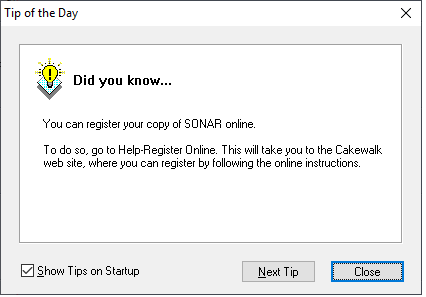
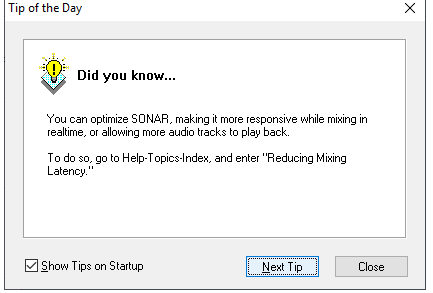
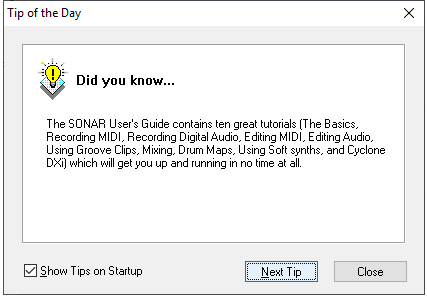
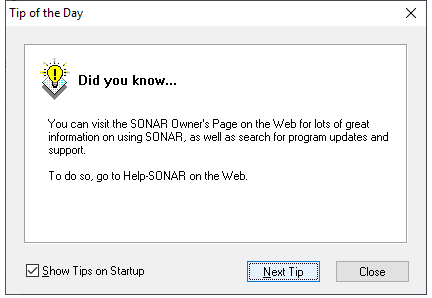
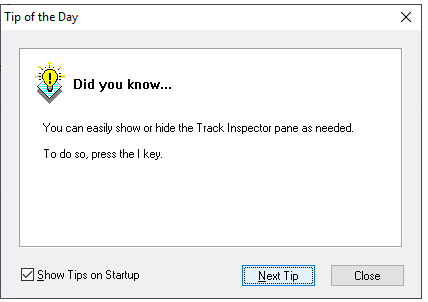
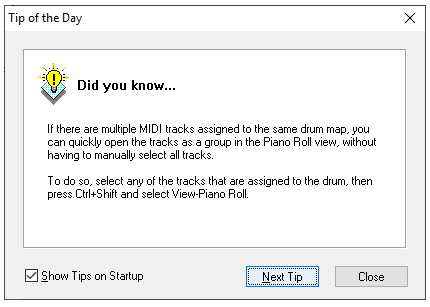
Good point, IMO. I know I tend to be overwhelmed by new things (e.g., software) but once I take things step-at-a-time (i.e., getting over the initial humps on the learning curve--which often looks so steep I doubt I will make it) I find the knowledge I have gained through the process becomes second nature. Once on that plateau for a while, I am rested enough from climbing to venture up the higher hills of complexity. Based on your observation, I am wondering if just like users can choose from a variety of templates for new projects, perhaps first time users can be given a choice of starting places for their initial Cakewalk Desktop. And perhaps (to borrow from a different thread) beginners (and others) can choose to opt-in for automatic tips ([ ]once a day, [ ] at launch, [ ] after idling for ____ minutes, [ ] never). Perhaps based on the first use and the response given, the configuration might default to a sort-of-basic lens with the first tip being something like "Since you self-identified as a first-time user, Cakewalk has been configured to start with a beginner's 'Lens.' You can change to a more advanced lens or choose other "Screen Sets" to completely customize your Cakewalk Desktop." Maybe tips for first-time users could be on by default. Perhaps a one-at-a-time Tips Viewer could be integrated into BandLab Assistant, rather than bringing them back into Cakewalk. Just saying that there are things that could be done to make the learning curve less initially daunting for new users--so they are not overwhelmed, frustrated, agitated, turned off, etc. Who knows, maybe the good people at BandLab are already working on it. Sample tips from Sonar 3 (yes, extremely outdated, but IMO easy to update--from the reference guide, on-line documentations, and maybe even from the many excellent power user tips in thus forum):
-

Tracks playing back through speakers not headphones
user905133 replied to RICHARD HUTCHINS's topic in Cakewalk by BandLab
Its a long shot, but have you tried Windows 10's Sound Troubleshooter? It might not show your audio device without the drivers installed, though; not sure. Also, does the sound card have a configuration utility? If so, maybe there's something there which might help point to a solution.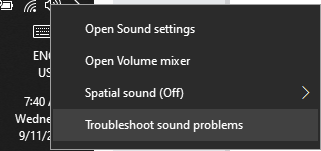
-
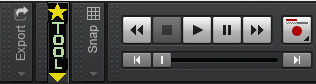
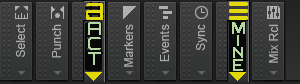
For me, the customizability of Cakewalk is a blessing. I don't regret having spent the time modifying the graphics to meet my specific visual needs. Having re-sizable fonts would not have helped me. I had already lowered the size of my monitor's resolution to make everything bigger. Using collapsed modules on the Control Bar with my easy-for-me-to-see graphics allows me to do music again!!!! As for clutter, Cakewalk has long had many features/options for making the work space as cluttered or as basic as many different users want at different times to meet specific needs. You can have single components of the software cover an entire monitor or even spread out over several monitors. I have found for me having a small synth rack pane allows me to open/select various softsynths which I often place on a second monitor with a different resolution than my main Cakewalk display. I would really hate to see Cakewalk get rid of its flexibility. BTW, at a time when I thought Cakewalk was gone for good, I bought another DAW (highly recommended by many user from what I have seen) and despite many hours of problem solving, it was never able to give me access to the full range of my sound card's ASIO I/O channels like Cakewalk does. Not every DAW is for everyone.


-
Tracks playing back through speakers not headphones
user905133 replied to RICHARD HUTCHINS's topic in Cakewalk by BandLab
reboot the computer? or reboot Cakewalk? reinstall on the system/PC level? or enable them in Cakewalk? Addendum: (1) What audio i/o device does Cakewalk see when you reboot [whichever reboot you mean]? (2) Are you using/Do you routinely use that device? (3) If not, have you tried disabling it? (I ask because I see some device I/Os under Recording that say "Not Plugged In and am wondering if you have another audio device under Playback that it might be defaulting to if not disabled. Just guessing as to possible causes based on my experiences with two resident E-Mu PCI cards and a mobo card/chip. ) -
How to add a Title to a Print out of the Staff view
user905133 replied to Ian Scanlan's question in Q&A
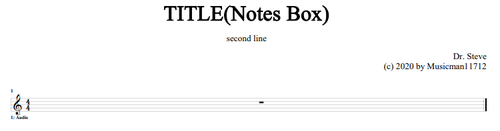
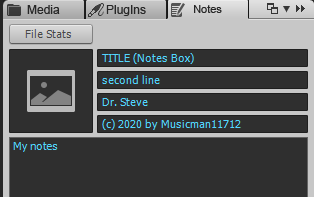
For me, Sonar/Cakewalk used to print out the name of the file. Not sure if that has changed in the new Cakewalk or if I did something special. Have you saved the project with a name? Are you using the print button from the Staff View screen? Just tried it; not sure how to get rid of ".cwp" though. Not sure if there is another solution. UPDATE: Put a name in the name box in the Notes Browser.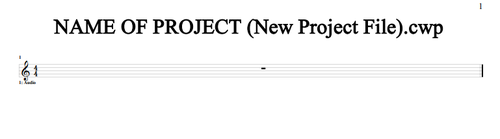
-
This is an interesting thread to me as I might want to do something like this at some time. Clarification: Are you talking about a two-pass process or a one-pass process? Two pass = (1) Record audio/midi track, (2) record tempo/conductor track. One pass = Record audio/midi track and while making the recording using a controller of some sort to change the tempo. If you are talking about a one-pass process (recording notes/audio and at the same time recording tempo changes), I can imagine how it might be possible using CCs, PB, etc. "To slave Digital Performer, you’ll need to generate values of 392 or higher — you send a 392 value by going precisely to it, but also by going past it." Is this what you meant by "real-time?" I did not get that at first because you said "you can record the tempo track while you listen to . . . " not while recording the MIDI or audio track. In either case, thanks for the discussion.
-
Best Way To Get Started In Midi For Audio Editors
user905133 replied to HappyRon Hill's topic in Cakewalk by BandLab
A few decades ago, I used some Roland "Intelligent Arrangers," with a midi track consisting of chords going to the Roland's chord recognition midi channel. The boxes would then "orchestrate" the chords based on various arrangement algorithms (aka "Styles"). It had some options (choice of a basic or an advanced arrangement, fills, etc.). Not sure if that's the kind of thing you have in mind, but if it is, maybe someone knows if there are plug-ins which do something like that. Just a thought. -
Thanks for the clarification. It help me to see that there's a two-part question that I think someone more expert than I am needs to answer to help you out. Basically, (Part A of the question:) if you combine all of the installation files from the X1, X2, and X3 folders into one folder to preserve as a backup and retain only one copy of the files that are duplicates (100% duplicate), if you later need to reinstall any of those 3 (X1, X2, X3), will that present problems for the installation? For example, the DimPro setup and expansion pack installers seem to be the same size as do the three Loops and One-Shot files, so if they are 100% identical (byte for byte) I am guessing someone with more knowledge that I will say, "No, having only one set of those in a common X1, X2, X3 installation backup folder will not cause any problems." (Part B:) If you combine all the other installers and content (unique to each of the three--X1, X2, and X3) to a common installation backup folder, will that present ay problems for installing any of the three should you need to do that at some point? My guess is no, but before I'd combine these into a common folder, I'd want another opinion. If it were me, I'd put the installation patches in the same folder. I thought you previously deleted the duplicate patches (e.g., the ones that have (1) and (2) in the file name when you already have the same file without the number), but I see them there in the screen shot you posted; so maybe not. Hope this contributes to your making successful archival copies of the installation files. Steve
-
I am confused by this thread. Is there anything different than was discussed here in another thread? If so, maybe you can hone down the questions. BTW, if it were me, I'd take Chuck E. Baby's suggestion: Reorganize the backup installers on another medium--usb thumb drive, backup HDD, writeable DVD medium, etc.
-
I can see that this feature might be useful. Perhaps it might go along with a flexible Go To / Song Position Pointer feature (and maybe other Transport Control features--including the use of a standalone wi-fi controller someone requested in another thread). If it all can be done with markers, that seems like one possible option. I have not done anything with MCI Commands, and I am not sure if this is even possible, but perhaps if the Cakewalk transport apparatus could be treated as an MCIcmd controllable sequencer (or perhaps if it could have a sophisticated MIDI/SysEx Control), the automatic stop and related functions would be useful to a wide assortment of DAW users. Just thinking out loud because it opens up a number of possibilities (assuming it can't already be done). Steve
-
Instruments sound terrible in BandLab Cakewalk compared to Cakewalk Sonar 3
user905133 replied to tdehan's question in Q&A
Thanks, tdehan, for the question; it makes me want to try to install all my versions of Cakewalk/SONAR to compare my old midi tunes before I just start updating them in the new Cakewalk. And thanks, Matthew, for the comments on Roland's VSC. I have been wondering where mine is (and if it would work with the new Cakewalk), because if I recall correctly, there are some sounds my older tunes used that are not in TTS-1. Tdehan, just saw your reply to Matthew and wondered if Sonar 3 installs on Windows 10. If so, I might give it a try (gotta find my Roland VSC* for a few old tunes I did in the '90s for a few patches!). *Update: I just found a *.cwp file from a few years ago--evidently it was branded as "Edirol" not Roland. -
Tracks playing back through speakers not headphones
user905133 replied to RICHARD HUTCHINS's topic in Cakewalk by BandLab
Not sure if you tried disabling all but your preferred/default Sound > Playback device. Not sure, but maybe that will help? [image from 3 years ago showing disabled devices deleted to reclaim space] -
Another option for entering and editing midi data including notes is the Events List. The problem with that is the tendency to micro-manage data down to the level of ticks, but it is an option. (That is, its not a tool for perfectionists because of the minute level of editing possible.) For more information, see http://www.cakewalk.com/Documentation?product=Cakewalk&language=3&help=Views.27.html
-
I know you said you are " . . . not interested in addressing or having feedback . . . ." However, you do not seem to be just writing notes for yourself, you are proclaiming what you think is wrong with Cakewalk in a public forum. Perhaps I am the only one customizing Cakewalk's visual elements to accommodate a vision impairment, but for me the Theme Editor is a blessing. Likewise, I have found the customizing abilities of Lenses very helpful in organizing Cakewalk workspaces--from very easy to see what's there (simple/basic) to cluttered, but I know where everything is (advanced). I have only recently started using the Theme Editor, but even with lowering my monitor's resolution (i.e., making everything bigger thereby taking up more space), I have found I can change the control bar to make it work for me. See examples below. For some people, tweaking track icons might be helpful. For others, different customizations might be helpful. For my eyes having the names of tracks based on type (MIDI, Audio, etc.) in different colors is more efficient.
-
legacy multi voice chorus/flanger
user905133 replied to mark skinner's topic in Instruments & Effects
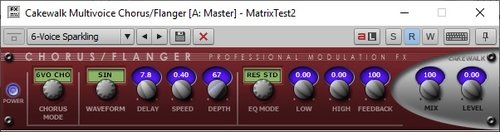
Thanks for mentioning this plug-in. (Is it the one below?) I have never used it before, but I am wondering if it is "safe" to use in the new Cakewalk (on a 64-bit system)? [Are DX FX problematic and should not be used?] Thanks.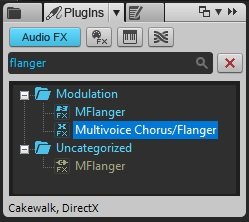
-
Dell Inspiron 5748 Sound Card Upgrade Suggestions
user905133 replied to Neil Cummins's topic in The Coffee House
This thread was started in an attempt to find a solution for a specific set of circumstances. Is there a thread of a more general nature (here or elsewhere) to discuss such things as noise, noise floor, performance, etc. of MOBO sound chips, PCI sound cards, firewire and usb external audio devices, etc. (i.e., not opinions on specific devices, but more along the lines of (1) what to look for if changing/selecting audio devices and (2) factors to consider in deciding (a) to change and (b) to not change. 2 images showing approx -130db noise floor deleted from ancient post -
https://www.youtube.com/watch?v=COZzsTwDghQ Chambers Brothers - Time Has Come Today [Decades before "More Cowbell" became a "meme!"]
-
TY for the retro-link.
-
How to record MIDI data after notes have been placed in PRV?
user905133 replied to sadicus's topic in Cakewalk by BandLab
Just to clarify: I had sent a PM. "I am assuming the suggestion of using separate tracks for your per track CC data didn't help." was a reference to that which I thought would elicit a public clarification. It didn't. My bad for mentioning that. It will be utterly confusing to anyone reading your reply if I try to reconstruct the whole interaction because the narrative will have overlapping time frames. So I will delete that from my post. -
Non-Problem/Solution content and OT aside deleted
-
Having paid quite a bit over the years (multiple hundreds of USD, maybe more), this thread has made me realize that I need not be jealous of people who are now able to get Cakewalk for the cost of setting up an account, downloading the software, and updating it periodically--I have some wonderful softsynths and many FX plug-ins that I have acquired as part of my Cakewalk/SONAR purchases!! ?
-
Thanks for raising the issue. It prompted me to play around with the step sequencer to make make drum patterns. As a tool for entering midi data into tracks based on visually tidy measure/beat/step divisions, I can integrate it into my workflow. As you noted, it might not be the easiest tool to enter notes of different durations into a single track since that seems to require changing the number of steps for each different duration. Although the "traditional" method of music notation (staves, notes heads, stems, rests, etc.) is a few centuries old and some might say "outdated," it is somewhat logical and can be learned with a not-too-steep learning curve. However, to change note/rest durations in staff view, you would still need to change settings using the data entry tool. Sorry the step sequencer doesn't integrate well into your workflow., but I am glad you pointed me in its direction.
-
Help me understand CW by BL please
user905133 replied to Gary Edelman's topic in Cakewalk by BandLab
This might or might not be useful info to you; just thought I'd mention it in light of your comments. If you still have "ancient" *.wrk files, they should open in the current Cakewalk by BandLab (mine do). With SONAR a few years ago, I re-did some of my old midi -> hardware tunes. I tweaked them a little bit, including sending then to softsynths and re-orchestrating them. It should be the same with 2019's Cakewalk. As scook noted, BandLab--the web-based software--and Cakewalk by BandLab are presently two very different things. I for one am very glad SONAR/Cakewalk has been rescued from becoming orphaned / legacy software. I still have 8.5 and X3 on my current PC (Win 10), but have been enjoying updating my personal knowledge base along with reinventing old performance modalities and "ancient" tunes. Below: 1997 WRK File (MIDI) opened in 2019 Cakewalk [image from 3 years ago deleted to reclaim space] -
Having started with Cakewalk for MS-DOS, having updated a number of times since then, and having stumbled onto the new and improved Cakewalk by BandLab in June, I am able to use almost all (if not all) of the Cakewalk plug-ins I purchased over the years. I have also been able to use many of the free plug-ins I have acquired. Some 32-bit plug-ins have been problematic. I had 8.5 and X3 installed on my current computer; so when I installed the current version of Cakewalk, those plug-ins successfully migrated properly. If you have the original media (CDs/DVDs/Downloads) that include 64-bit versions, from what I have seen others report, you can still install those. Fortunately for me, I still have hard copies of my serial numbers--including ones from before the older ones were migrated to the newer Cakewalk Command Center. Perhaps you printed out yours and still have them somewhere in case you no longer remember your password for the Command Center? Hope you can figure out a way to get your old plug-ins installed. I have really been impressed by the new Cakewalk software and the support that is available via the internet. Steve Addendum: By the way, one of my favorite plug-ins from ten-twelve years or so ago was the version of z3ta+ that included z3ta+ FX. I was very delighted to find that those (the synth and the FX plug-ins) successfully migrated to the new Cakewalk and were immediately available to me. So far, they have worked for me quite well. Again, hope you can get your old plug-ins working.
-
Different problem, then. In that case, recording the note data and looking at the midi events won't show anything useful. Thanks for clarifying.

