-
Posts
119 -
Joined
-
Last visited
Everything posted by bmarlowe
-
Thanks Promidi. Am I comfortable going into the registry - not so much just yet. It appears that I want to run regedit - is that right? When I start that I get the warning message -- "Do you want to allow this app to make changes to your device." At that point I said "no" - but perhaps there is no harm in saying "yes?"
-
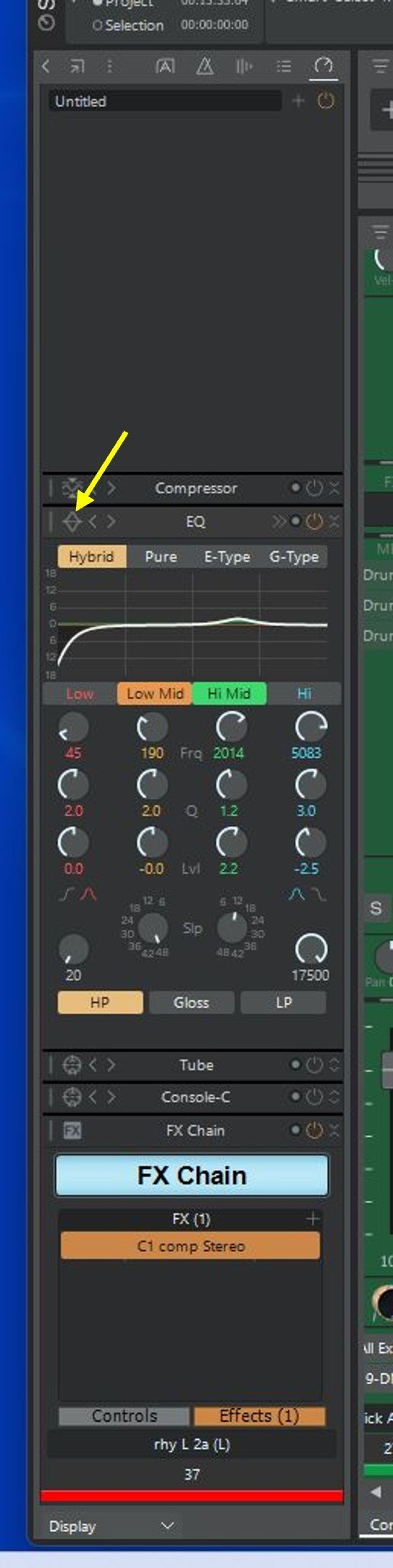
There are some pcp files in the folder C:\Cakewalk Content\Sonar\ProChannel Presets\. What I do not see are the much larger number of ProChannel EQ presets that I can see when I click where the yellow arrow indicates below. I have no idea where those are. Also I guess my user profile is at C:\Users\Owner\. There are no pcp files there.
-
I can't figure out where the ProChannel pcp files are stored on my Windows 11 computer. Thanks for any help.
-
Nice fingerstyle sound. I know there aren't many gear questions in the song threads, but curious, guitar? mike? piezo?
-
Thx much for the info !
-
bats brew - Thx much for the details. I noticed the Direct Drive SS on your pedalboard. Impressive sounding on youTube videos I may get one.
-
Very nice - a lot of interesting things in the mix and I liked the vocals.
-
Great guitar tones and everything else.
-
I listened and it sounds awesome. Your selection of of differing left/right distortion tones at the start go together really well. I usually struggle to achieve that.
-
That guitar part right from the start really gets your attention. Great sounding tracks.
-
Really nice melodies and sound. You inspired to get the Valhalla verb, even though the last thing I need is more plugins.
-
So I tried it so far with Line6 Pocket Pod, DOD FX-65 Chorus pedal, and Digitech Valve Fx rack mount, all with std guitar instrument inputs. Works great for all of them.
-
Box arrived today and it works great, well worth the $99.
-
David Baay's post is on point for me. I just ordered a Radial Reamp HP from Sweetwater just for the reason David describes. I have had no problem when the external unit has line level inputs fed by my Focusrite 8i6 line outputs (like my ancient Alesis Midiverb III), but for external units with guitar instrument inputs (pedals, my old Digitech Valve FX, any Amp I have), the result is not good. The recommendation is to feed the Radial box from the Focusrite headphone output (right side only). We'll see how this goes.
-
>> I think you must have added the maps via the Inspector after creating the Instrument track... no? Yes. Having separate midi and associated synth audio tracks is really not a problem for me.
-
One thing here though, if I do it via the split track method, I retain the AD2 map in the PRV. If I do it by changing the output widget tab in the Inspector, I no longer see the AD2 map in the PRV.
-
"..You can add a drum map to a simple instrument track using the Output widget on the MIDI tab of the Inspector..." Understood and that does work for me. Thanks so much.
-
the cwp is attached two posts up - can you see it?
-
I think that answers my OP question. Working with the stripped-down cwp, if I split any of the individual tracks, I can then freeze that particular associated AD2 synth with no problem. Thanks much.
-
cwp attached. Keep in mind that this is a very simple drum track. I chose it from a very simple song I did way back on Cakewalk Pro Audio 9 because it was simple and I just wanted to experiment as a first time AD2 user. There are 6 AD2 synths. There are also 2 SI-Drum synths for crash cymbals that I used to layer with the AD2 crash cymbal to get a particular sound. Note that freezing the SI synths works fine. If you delete tracks leaving only 1 AD2 synth, you still can't freeze it. AD2-4_stripped.cwp
-
OK - it went quicker than I thought. I have the stripped down project ready.
-
My preference is to go the Mark Morgan-Shaw way and I agree with all of his reasons - that is close to what I initially did. I do have a lot of processing power, but would still like the option of freezing individual AD2 synths. Mark said: "Simple freezing/bouncing – Each drum’s audio is frozen independently, so I can commit parts without printing the whole kit." Well, I still can't do that. I'll add that I don't have a single master midi track. I have individual midi tracks per drum instrument. Anyway, I will go forward with David Baay's suggestion for creating a stripped-down project (thanks David). It will take me a while, but I am not sure of the best way to share. Dropbox? A *.cwb file?
-
First, the answer to the above question is the drum map files for Sonar go here: C:\Users\Owner\AppData\Roaming\Cakewalk\Sonar\Drum Maps\. As for my initial question, as Jonesy said, I can get what I want with just one instance of AD2.
-
Thx to Max, Bristol_Jonesy, Sailor55, Amberwolf, David & Colin for the comments and helpful suggestions. I have another perhaps related AD2 issue. As I said, all works fine except freezing. When I started this project, using CbB, I used the AD2 Standard drum map downloaded from Mike Enjo (Creative Sauce), AD2 Standard.map. For each Cakewalk AD2 drum track I created a new map using the Cakewalk Drum Map Manager: DM1-AD2 Standard, DM2-AD2 Standard..... These DM*- maps are associated with the project, so they are there after the switch to Sonar if I open that same project. Here is the issue I have. If I open up a new project in Sonar, create an AD2 synth, then go into the Drum Map Manager-->presets, the AD2 Standard map is not listed there. I figured that was because I had not copied AD2 Standard.map into C:\Program Data\Cakewalk\Sonar\Drum Maps. But even after I do that, I still do not see the preset for AD2 Standard. Keep in mind that in CbB, I do see it.
-
As I said, Nothing bad happens, they just will not freeze. Press the snowflake, nothing happens.