jkoseattle
-
Posts
380 -
Joined
-
Last visited
Everything posted by jkoseattle
-
@msmcleod Thank you so much for that explanation. I know that took a significant chunk out of your day to type up. This is pretty close to my understanding, but my experience has not mirrored that exactly. If I insert a new soft synth, my options are for Cakewalk to either create One Track to Rule Them All, or else a separate track for every potential output. If I choose the latter, then I get a shovelful of tracks, most of which I won't be needing. Yet. So I hide them, not knowing how many of those tracks I might need later if I add instruments to the soft synth. Once I have done this, however, Append Instrument Track is grayed out because CW has already made all the tracks so there's no more room. But if those tracks were hidden, you might forget they are there and try to Append. But wait... THIS one I'm looking at right now has Append Instrument track grayed out, yet Track Manager doesn't show all these supposed other tracks, so it's clearly NOT filled up. I have to then manually add another track. PITA. Also, it's cute how CW wants to help out by creating all these tracks, but it's actually more of a time suck than just Appending tracks as needed, because YOU CAN'T RENAME THE SOFT SYNTH FROM THE DIALOG. So all these lovely tracks CW makes for you ALL have to be renamed eventually. Not to mention you can't assign the audio output to a bus until after you've created the track, which means manually setting every one even though they are all coming through the same soft synth.... ??? Oh, and even Appending Instrument Track does not respect the output routing of the track you are appending from, so no matter how you slice it, you have to set the output bus one by one by one by one.... You said "the clips view shows the MIDI part, and the track view shows the Audio part". This confuses me. I'm using instrument tracks almost exclusively, and in Track View I have never seen the audio, only the Midi clips. It sounds like you're telling me there's a way to see the audio on these tracks? Lastly, while we're on the topic of soft synths, what's the diff between VST2 and VST3. My plugin has both versions but I don't perceive any difference.
-
Oh, THAT thing. An old friend for years. Yeah, I couldn't live without that.
-
I don't know where you are talking about. Sounds worth looking at, could you explain in more detail? Where do I drag it?
-
Seems like at one time I could select a track or three and then jump to PRV and PRV would understand what I had selected and display just those tracks in PRV. But I've done something whereby I select tracks in TV and then hit D to jump to the Multidock and PRV, but the displayed tracks are not the tracks I selected in TV, but whatever was last displayed in PRV. I don't have time to mess too much with this this week, but after this deadline is passed I should spend some serious time re-configuring everything including all these setup things. But I'm hoping maybe there's a quick answer for this. What I think I really need is to have someone sit down with me and help me get everything the way I used to have it. Again, post-current deadline.
-
@Noel Borthwick @John Vere Noel, perhaps this is an opportune place to explain a little about Append Instrument Track, which I am finding most useful in this whole multichannel world. However, John didn't know about it, and says it is always grayed out. For me, I have one set of tracks which share a plugin instance in which Append Instrument Track is also grayed out, mysteriously, and the other tracks which share different instances in the very same project have the option available. I can't see any difference, so why are some grayed out, or in John's case, why are they ALWAYS grayed out? As I understand it, all it does is create another empty instrument track using the same ins and outs. I just change the channels on the new track and I'm good to go.
-
Wow, yeah, interesting problem. Like I said, I've been an exclusive Cakewalk/Sonar/Cakewalk/Bandlab user since 1989, when I bought my very first 286 tower with Cakewalk 3.0 for DOS as my very first installation. So when I say there are certainly workflow grooves I have gotten into, I'm not kidding. My knowledge of Cakewalk is like this fine hardened swiss cheese. Firm and substantial, but with these huge empty holes. Maybe an approach like "Here is a thing I'm going to teach you about. This is what that thing is. Now, there are 9 ways of doing this thing. These are my two preferred ways. And if you are interested in the other 7, I will go over them very quickly at the end of this video." Also, I wonder if the folks at Cakewalk are hoping to deprecate some of those ways, and would be eager to point you to the ways they consider "best practice". Being a Cakewalk native so to speak, and also a newly minted instructional designer after decades in customer support, I might be pretty enthusiastic about helping you out any way you might need. Sounds like a fun project.
-
I think you're right about that being some sort of bug. The only evidence I have is that corrupted file and a vague understanding of what I was doing leading up to it. Doesn't the Undo History get saved with the file? No clues there?
-
All right, well I'm moving on, thanks for all the help. fwiw I followed a lot more closely to your video than you seem to think. BUT... I did NOT set the output channels. That was the problem. As is the case for 92% of all problems in my entire life, it turns out to be my screw up. However, constructive criticism: If you are going to scold someone for not following your video properly, might want to ask why that might be. This stuff is hard, man! I've been using CW as my DAW exclusively for 32 years, and I still only know what about half of the features do it seems.
-
@John Vere OK so I really am trying to get this multichannel e thing working, but I'm running out of patience. Now I've learned than adding an Audio FX to a track operates on all tracks associated with that instance, regardless of channel. So, how do I get around this?
-
Semi-related: In the Insert Soft Synths Options dialog, I have it set to Instrument Track Per Output. So - Why isn't there a way to name the soft synth right here, so I don't then have to go manually change every created track??? And why do the instances all HAVE TO HAVE a number after them, even when I rename it?
-
Well I can tell you that I was working on a new technique, wherein I load multiple instruments into a single Play instance, and assign them to different channels rather than load a bunch of separate Play instances. Having dismissed the Insert Soft Synth dialog long ago, I wasn't getting separate tracks for each instrument, so was making them manually by choosing "Append Instrument Track" off the track initially created with the synth, and just changing out the Midi channels. So there was probably a bunch of experimentation going on in that realm. I would strongly suspect something I did in that area would be the culprit, if that helps at all.
-
@Noel Borthwick No, I just started it last week. As it turns out, I've been re-recording the few parts I've gotten done and I like these new performances better anyway :-). But it sure would be nice to know what caused it so I can not worry about it anymore.
-
.
-
@Noel Borthwick Project file is included in previous post. I updated last week at some time, and after I was having the problems, updated to the latest again this morning. Same issue both versions.
-
@msmcleod I've only got a handful of instances, and have used many more than that in previous successful projects. What's different with this one is this is the first time I'm adding multiple instruments to a single EastWest Play instance and setting them to different Midi channels. I am trying to recreate my project atm because I wonder if this project is corrupt. Specs here, project file attached. Device name JIM-SURFACE Processor Intel(R) Core(TM) i5-1035G4 CPU @ 1.10GHz 1.50 GHz Installed RAM 16.0 GB (15.6 GB usable) Device ID 0CE4C994-68F9-4C76-892D-5A40B403AF26 Product ID 00342-23734-03541-AAOEM System type 64-bit operating system, x64-based processor Pen and touch Pen and touch support with 10 touch points Variations on an End CORRUPT.cwp
-
Also, Cakewalk is not completely crashing and terminating ALL THE TIME when I start playing around in Console. Something is seriously wrong here. And yes, I just installed the most recent update.
-
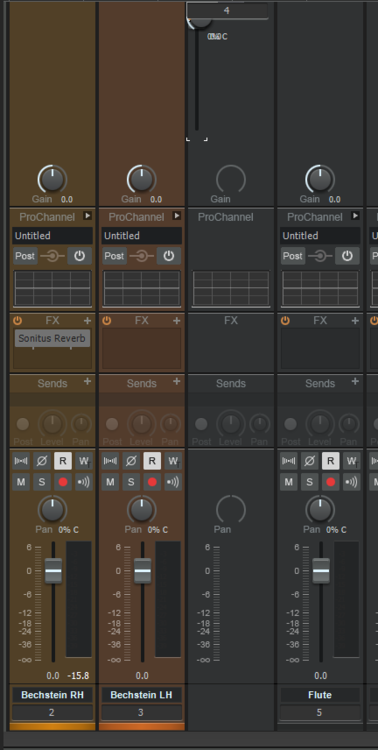
@John Vere Perhaps you can help withSince I have determined that my problems were not multichannel-related, I have organized my ensemble into just a handful of soft synth instances, setting each instrument to a different Midi channel. All's well. HOWEVER< I'm seeing this bizarre looking thing in the Console, where this mysterious strip is in place of the actual track 4's strip. What is that, and can't I get my regular strip back?
-
Here is the solution from EastWest support. Like I said, not multichannel at all: The long sounds in the Hollywood Orchestra rely on Midi CC data to set dynamics/timbre - Cakewalk has a very strange default that resets CC data to zero on playback so it makes the instrument disappear. Go to Cakewalk's Edit >> Preferences >> Project >> MIDI. The options to uncheck are called “Zero Controllers When Play Stops” and “MIDI Event Chase on Play”. Then reload your project once and you shouldn't have that issue going forward.
-
The problem is with the EastWest Play instrument. Has nothing to do with multichannel stuff. I load the instrument, plays great. Hot space to playback, as soon as playback is paused, instrument stops playing. So a different problem entirely.
-
Yeah, well that gets me back to the question of how to bring that dialog back! I have no option to choose multiple outputs lol!!
-
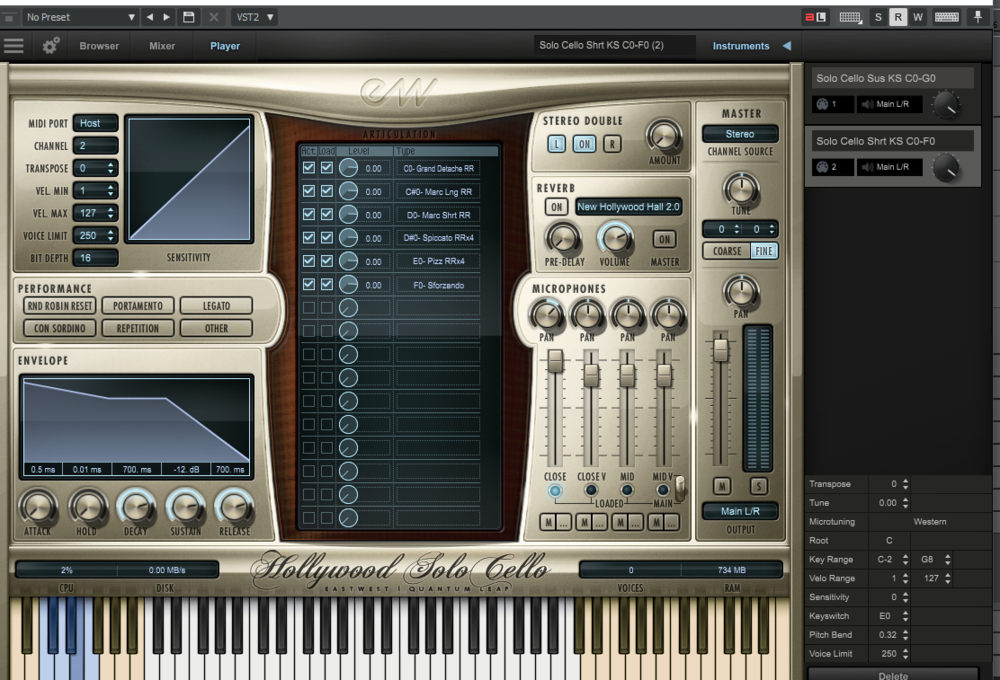
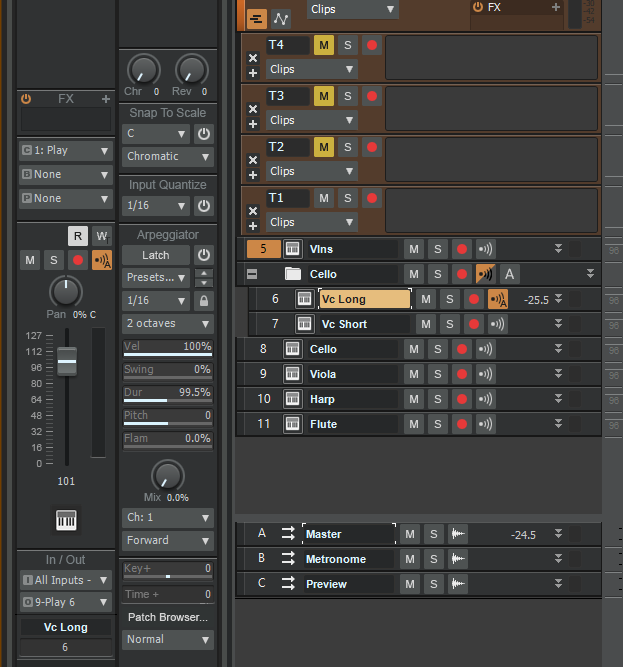
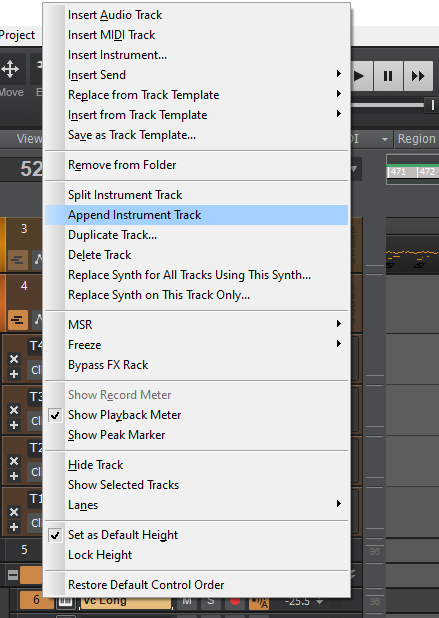
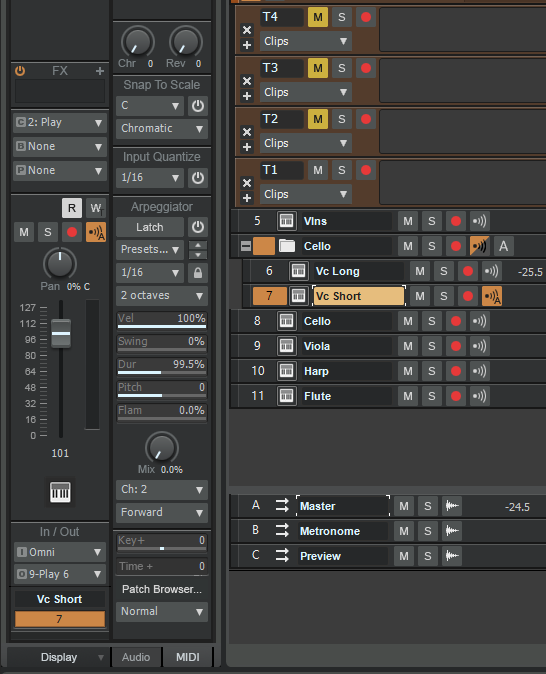
@John Vere I do think your video is clear enough as far as it goes. I am actually an instructional designer in my day job, so I can provide a little feedback from that perspective. Listing 9 different ways to do something is overwhelming. If they are essentially accomplishing the same results but through different methods, it would be much more effective to limit yourself to the couple that cover all the bases. Where appropriate you can mention "Oh by the way you can also accomplish this by doing such and such". If one unchecks "Ask This Every Time", then they're not going to get the dialog again. Explaining how to bring it back would be useful, especially for those users who may have unchecked it a long time ago, maybe back before they completely understood what they were doing. Such is the place I find myself. Lastly, the option is called "Append Instrument Track". When I add a soft synth, I get the single instrument track including both Midi and Audio. Right-clicking on that track affords me the option of Splitting the Instrument track, and then right beneath it, Appending Instrument Track. Appending just makes a new instrument track, from which as I understand it (which may be wrong) allows me to have multiple tracks that use the same soft synth. And then I can change the input channel of each track. Here is the UI for my soft synth: You can see on the right that I have two patches loaded, Cello Sus and Cello Short, and that each is assigned a different Midi channel. Here is the main track I originally created when inserting the cello soft synth, "Vc Long". You will see that the input is set to Midi channel 1 (not "None") I the right-clicked on Vc Long and selected Append Instrument Track. This created the track immediately below it, which I named Vc Short. For this track I set the input to channel 2, corresponding to the midi channel selected for the corresponding instrument in the soft synth also set to channel 2. My issue is that while at first this works great, and each track only plays the instrument loaded for that Midi channel, after a few minutes, the first one (Vc Long in this case) stops playing. I can record into both tracks, so oddly this is not a Midi input problem, but only the second of those two tracks can be heard. I hope this makes sense. Let me know if it's still not clear.
-
Thank you!! At some point I must have deselected the Ask This Every Time option because now I don't get it. How do I turn that back on? Also, the video explains what is going on under the hood, but doesn't really give me an idea why I'm having the aforementioned problem.
-
I am using a plugin which lets me load multiple instruments into a single instance. I have done this, and set each instrument to Midi channels 1 and 2 respectively. In CW I then Append Instrument Track, set the original track's input to channel 1 and the appended track's input to channel 2. This way, I can play off the single plugin instance but switch between sounds just by using different CW tracks. I am currently using this for a cello. One channel is arco, the other is pizz. But I can really see how useful this would be for building a drum kit from scratch, for instance, so I'm keen to figure this out. Couple questions: First off, this works great when I set it up. Then I'm playing around with it and maybe going to other tracks too, and every time, after a few minutes the channel 1 instrument no longer plays. It receives input fine, so I can record, but no playback. This is also true within the plugin's own window. Simply reloading the errant instrument immediately fixes it, but again, only lasts a couple minutes. This is true regardless of the instruments I am loading. It's always the original instrument, which I set to channel 1, and the appended track which is set to channel 2, continues working. What am I doing wrong here? Second question, while it seems intuitive that this is a better way to build my sounds, what's really the difference between doing it this way vs just inserting two separate instances of the plugin and not messing around with channels at all?
-
Hey, when recording in a loop, creating many takes in a single recording, didn't there used to be a way to tell CW to not play back the takes you just recorded? I distinctly remember creating my loop, then trying all sorts of different improvisational ideas within that loop, and only hearing them all played on top of each other if I stopped the recording and played it back without muting any takes. Today I'm trying to do that, but while recording, I am hearing all the other takes right away.
-
Well no, cheating is cheating! But I slow things down all the time because it's faster than doing take after take until you get it perfect. I CAN play it, but I don't have all the time in the world either. But that is my rule for auto-tuning vocals. I use it all the time to prevent wasting my vocal cords on 20 takes. If I COULD sing it, I am permitted to auto-tune myself. If not, then foul!!