


Colin Nicholls
-
Posts
1,907 -
Joined
-
Last visited
-
Days Won
2
Posts posted by Colin Nicholls
-
-
The call was coming from inside the house!
-
 2
2
-
 2
2
-
-
On 12/5/2025 at 10:21 AM, Starship Krupa said:
it would be 1992 and I'd be running GeoWorks
Goddammit I understand this reference
-
1
-
1
-
-
On 11/29/2025 at 4:53 PM, Colin Nicholls said:
Bum. I had no idea. I love Crow Hill both as a company (respect for Mr Henson and what he does) but I had no idea the app needed the service, although I had my suspicions that "something was up" because every time I come out of Standby/Sleep on my DAW, that fricken' Crow Hill App is running and I KNOW I closed it.
I'm going to try disabling the service and see if that app starts itself up again by itself. DISAPPOINTED! </hercules>
It made no difference. The App still appeared this afternoon, coming out of sleep.
I've raised a "request" under the Support page of the Crow Hill Company web page, with my complaint. I'll post back here if I get any clarity on what is going on.
-
 1
1
-
-
Snap to grid settings? Try toggling those to see if there's a difference. I usually ensure that "Snap To" is OFF and then use SHIFT-DRAG on a clip to lock the start time, but that might be habit
-
Quote
I think we are talking about semantics here.
Well, of course it is semantics. "Theme Editor" has a very specific meaning, given that we already have an understanding of what a "Theme Editor" would be expected to look and function like, thanks to the precedent set by the existing Cakewalk by Bandlab Theme Editor.
Knowing that the coming "color customization" feature cannot possibly match those features is exactly why we shouldn't use the term "Theme Editor" for it, in my opinion.
Of course I'm looking forward to the color customizations in later versions of Sonar, but also be mindful of how we refer to them.
-
Okay this thread needs a reality check. There is no promise of a full-featured "Theme Editor" coming any time soon.
We have, however, been given the following:
QuoteColor customization
We are in the process of refining our existing themes and bringing new color theme customization capabilities. We look forward to posting more about this soon!
"color theme customization capabilities" could refer to many things, any of which are not near the functionality of a "theme editor".
-
1
-
-
On 11/28/2025 at 11:58 AM, Starship Krupa said:
Very nice products, and it's hard to beat the price, but why oh why do we have to install yet another service just to install the product(s)?
Bum. I had no idea. I love Crow Hill both as a company (respect for Mr Henson and what he does) but I had no idea the app needed the service, although I had my suspicions that "something was up" because every time I come out of Standby/Sleep on my DAW, that fricken' Crow Hill App is running and I KNOW I closed it.
I'm going to try disabling the service and see if that app starts itself up again by itself. DISAPPOINTED! </hercules>
-
1
-
-
Update Notes:
- Version 5.0.0 for Mac (Intel/M1/M2/M3/M4/M5 native Mac builds – ready for Tahoe) and Windows available
- New Sirius reverb/echo mode
- Previous / next arrows for mode selection
-
2
-
That's the clip menu icon. All clips have them, it's not random.
-
9 hours ago, sjoens said:
It's like I was never here.

Sorry! I missed your post earlier. Either way, we know it is working as designed and, although confusing, isn't an easy "fix". I, too, am looking forward to the colorization update to see if there is a way to mitigate this.
-
The original bitmap-based themes in CbB and original SONAR made this issue a lot less of a problem. Most people never even noticed it.
Now that the vector-based theming uses a more visually distinct technique to signify "lit" and "dimly-lit", it is more annoying.
-
3 hours ago, msmcleod said:
Here's one...
(gif url)It don't workIt works for me if i use the right computer! -
"Any color you like... so long as its white"
Yeah try selecting a blue color for the track, and you'll see the selected notes turn white (instead of blue)
-
Huh. I just tried this with one channel on my Presonus Quantum 2626 and I think I'm seeing the same thing.
If I record a constant tone pegged at -27 db on the input meter; on playback via Output 1 I am seeing -21 db on the output meter.That's 6 db louder. Is this a case of mono tracks getting autopanned center and panning laws applying? Or something?
...yeah could be. If I pan track 1 to be 100% left (instead of the default center) then playback is now -27db, matching input.
My panning laws are set to "0db center, sin/cos taper constant power"
Ok, not sure what is going on. How have you panned your tracks?
-
It's clear to me you've routed each track to the corresponding hardware output of the interface- I am not sure why folks are getting hung up on that.
Your levels should not be doubled up - there is some kind of loopback taking effect here, perhaps? almost certainly specific to your Audio IO hardware/driver.
I agree that you should disable the record arm during playback just to restore things to a more normal, expected state.
This is an example of a valid use-case - essentially treating Sonar as a tape recorder, N tracks in and N tracks out via the hardware. We'll get to the bottom of this!
-
Closure! Thank goodness
-
1
-
-
Yeah I see the Smart tool won't recognize it is hovering over a note when the clip is locked. But the Select tool or any other method of note selection works.
@Kurt Barkdull, what methods are you using to select notes? Could your clips be locked as @David Baay suggests?
-
1 hour ago, David Baay said:
possibly due to the clip being locked.
It makes no difference for me whether the clip is locked (data or position). I can still select the notes with the right-click lasso or swiping in the track view; notes get highlighted (actually turn white) in the PRV.
So I don't think that is it.
-
I don't see this in Cakewalk Sonar. The behavior appears to be unchanged from Sonar Platinum, or Cakewalk by Bandlab.
I'm not sure that I've selected any unusual settings here - I'm using the Tungsten theme for what it is worth.You might need to post a short video or something to demonstrate the issue.
-
On 10/25/2025 at 7:13 PM, Scott said:
Hello All: I'm having an issue when Recording and Playback. I'm getting broken up sounds here and there. Both my audio interface and buffer size within Sonar was set to 128. Then, I set them to 256. Same issue. Could someone with more experience than me give me some guidance?
Thanks
Click the "ByPass all FX" button in the Mix Module and see if the problem goes away
If it does, great! At this point, with FX disabled, I would start varying the ASIO buffer size from absurdly small to wastefully large, so that you build intuition for what a variations in ASIO buffer size should feel like: delays in start/stop, latency on virtual instrument (key press -> sound); clicks, pops, all the way to complete dropout.
Okay, now you can re-enable FX and tune the ASIO buffer - if you're not seeing ANY changes (good or bad) as you vary the buffer size, then the problem might not be related to the buffer at all. -
20 minutes ago, Kurt Barkdull said:
Colin Thank you you are correct . I cant find the second picture you posted that shows enable floating, etc. How do you get that screen "cloud_chamber.cwp ?
That window is the un-maximized ("restored") Piano Roll View window. The top-left corner (icon) should be the regular Windows standard "window control menu", that Microsoft have made such a hash of in recent Windows OS releases.
If the Window is active, then Alt-"minus" should display the window control menu, or clicking on the window icon in the top left corner should also display the menu.Looks like Alt-Space and Alt-Minus are not available. One of my pet peeves is windows application developers using MDI windows, but breaking keyboard shortcut conventions.
That ship has sailed, to our detriment, as you are discovering.
-
1
-
-
3 hours ago, Kurt Barkdull said:
when i click view piano roll in a midi track its full screen. Cant drag or find a way to dock it under track screen. It used to be under my tracks and somehow it's undocked and fills up screen. There is no way to drag piano bar that i can find to undock.
Hi Kurt.
I believe your Piano Roll view is in the following state: It is undocked, disabled floating, and maximized.
Click on this window control button to restore:.
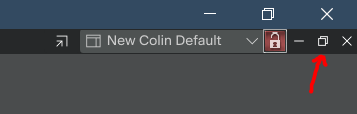
Then decide whether to "enable floating" or "dock in Multidoc" using the window control menu:
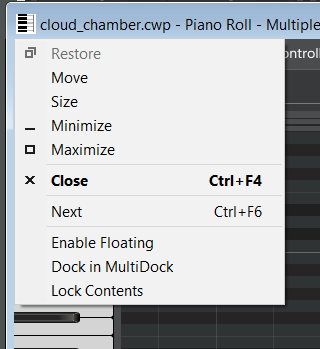
Then you can follow the instructions suggested by others in this thread.
-
How the heck did I miss that!
-

Ok can we talk about The High Note (Dakota Johnson)
in The Coffee House
Posted
Thanks for bringing this movie to our attention; I hadn't heard of it until now.