
Eusebio Rufian-Zilbermann
-
Posts
1,112 -
Joined
-
Last visited
Everything posted by Eusebio Rufian-Zilbermann
-
Not bad, considering it can be 15% off on top of already discounted prices. Or use it for "small developer" products like Fathom synth https://www.kvraudio.com/marketplace/fathom-synth-by-seaweed-audio
-
 Heads-up, the latest Samplitude is X7 and what's included in this bundle is X6 (I'm not saying you need X7, but if you get X6 you'll get the upgrade ads from the very first launch, and for getting and older version you may want to wait for a Humble Bundle)
 -
Good opportunity to get the iZotope Everything Bundle Crossgrade for $199 minus coupons, cross off anything iZotope from the wishlist, and sell any duplicates on kvr/knobcloud/etc
-
Computer Music sub from Zinio for under $17
Eusebio Rufian-Zilbermann replied to kitekrazy's topic in Deals
You may want to compare it with https://www.magzter.com/magztergold ($49/year) and check if they include the magazines that you want -
He is not listing them, you can see them in the daw screen at various points Because of how Pro Tools abbreviates the names, I am not sure if "phoenixd" is Phoenixverb or something else, the 3D reverbs by exponential audio would have been stratus or symphony, not pohoenixverb so I don't know where that "d" could be coming from (but I don't know either other plugins with names that start with phoenix)
-
7 new plugins that I'll get because they've been added to Mercury. 4 of them in my "wants" list, 3 in the "if they're cheap" list. Updated scalable UIs for a few plugins that I regularly use. A lottery ticket for more new plugins added to Mercury over the course of a year. I'll bite.
-
APU Software - new approach to Compression/Expansion?
Eusebio Rufian-Zilbermann replied to mibby's topic in Deals
Interesting idea. Maybe a 3-stage compressor limiter, first stage RMS for fast "color" compression, second LUFS for slow "leveling" compression, finally true peak for limiting? And maybe add detection of lowest input frequency and show where the separation between slow and fast compression should be -
I used the vst inventory tool that was posted in these forums quite a while ago, I think it was written by @scook The latest version of the inventory tool is available from https://docs.google.com/document/d/1eiVH_I1clbbRtWFh4-3Mo7HANjCxR8SwqHJtYXy19gw/pub (in the Utilities section towards the end of the page)
-
I came across this video where Trevor Horn shows his DAW session for the Yes track "Owner of a Lonely Heart" . Of course, the choice of plugins did catch my eye. Soundtoys, Altiverb and many Waves, (Puigtec 660, Puigchild MEQ5, Vintage compressor, C4, SSLComp, L2, Kramer HLS, RVox), and a phoenixd that I'm not quite sure what it is (phoenixverb?)
-
We can provide valuable opinions regarding what are good acquisitions for a plugin collection My collection is getting close to level 6 ? (see list in signature)
-
Since it is an open source project, you may want to try compiling it for macOS and see if it works (it's quite possible that the developer didn't make a macOS version simply because he didn't have a macOS machine, so if you get it working maybe you can send the update to the original developer) Nowadays that chatgpt is "smart enough" to make VST plugins, maybe it can add a macOS build to existing plugin code ?
-
Steinberg Spring Sale - save 40% on selected items
Eusebio Rufian-Zilbermann replied to Frank's topic in Deals
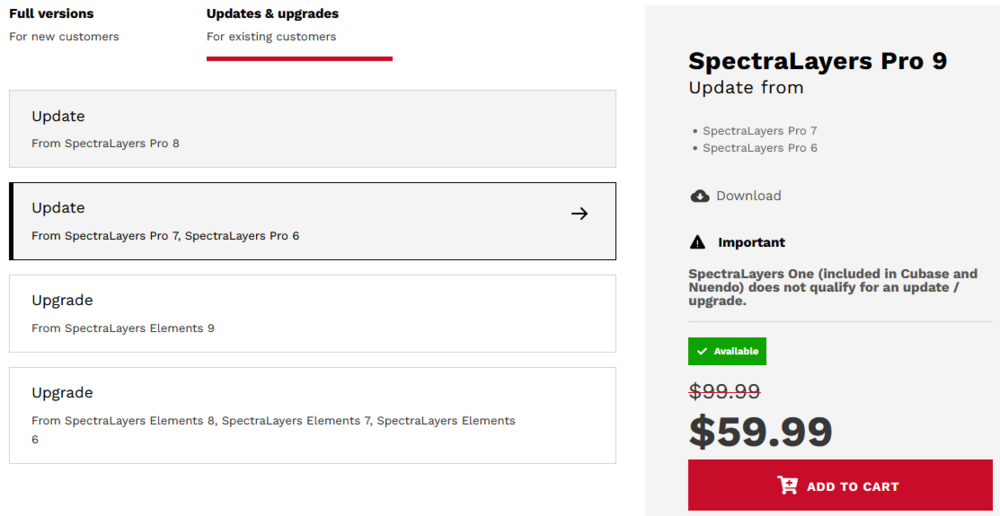
The different sales for different items sometimes result in really strange pricing. Right now It's cheaper to update from an older version than from a recent one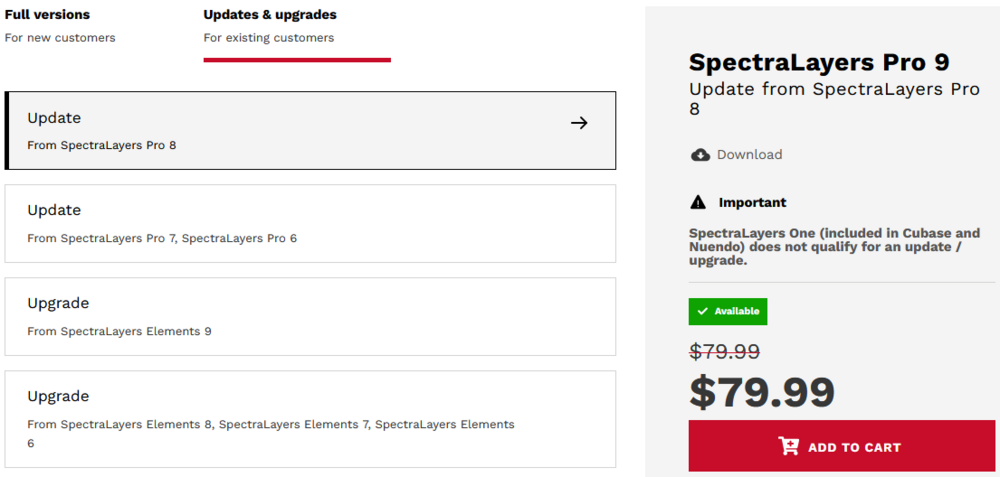
-
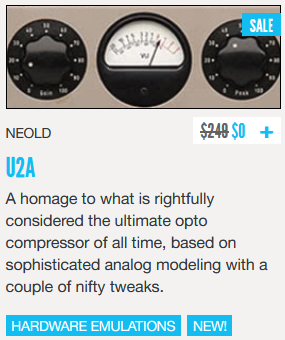
It was a tongue-in-cheek comment. I have the "2023 new plugins bundle" (and so far it looks like it's going to end up a pretty good deal for $224 after vouchers, PA is keeping their promise of frequent new releases). Earlier in the year getting it applied was more confusing, but I like how they do it now, showing a $0 price
-
I couldn't resist the price... Installed!
-
Speaking of DAWs, Synthesizer V Studio Pro is VSTi only, no AAX, but I was just trying it out in Pro Tools, hosted in the AAX version of PluginGuru Unify and it seems to be working well.
-
They obscure it by describing it as "hype" and "magic" but it seems to be a narrowband saturator
-
Free $10 Cymatics gift card, no minimum purchase required https://cymatics.fm/pages/immortal-walkthrough I would play the video for at least 30 sec so that YouTube registers the view but, for reference, the code is IMMORTAL10 Fwiw, I use Cymatics coupons primarily for getting a few more samples for my XO library
-
- 4
-

-

-
You may want one of these, for the future https://www.newegg.com/cyberpower-cp1500pfclcd-nema-5-15r/p/N82E16842102134
-
I never expected Audrey & Kate (Japanese rocksmith youtubber girls) to be reviewing plugins but...
-
Free Waves StudioVerse
Eusebio Rufian-Zilbermann replied to Eusebio Rufian-Zilbermann's topic in Deals
I've been playing around with it. The workflow is similar to iZotope Ozone and Neutron. You let StudioVerse "listen" to the track and then it comes up with a list of suggested plugin chains that you can tweak. Some differences with iZotope are: Instead of one chain, it presents many possible chains, and you can easily one-click-switch from one chain to another and listen to the difference (but note that this switching can sometimes get very CPU intensive) The chains have "macro" knobs, to easily tweak the main parameters instead of having to dig into each plugin to tweak the settings (similar to how presets work e.g., in Analog Lab and many other synths) You can refine the "AI Listen" results using tags, name or id. You can also skip the "AI" part and just search in the whole collection. Sure, if you don't have many Waves licenses and/or have crossed out Waves from your list of plugins to use, this will be of little use to you but, if you have a large collection of their plug-ins (Mercury, etc) this is a really nice freebie. This is the "AI version" of the "make your mix sound like Chris Lord-Alge/Greg Wells/Tony Maserati/etc" that Waves has been marketing for years -
Somewhat lost in the noise of the subscription-only-fiasco, Waves announced the new StudioVerse for using AI techniques for creating plugin chains. After the "both subscription and perpetual" was announced, I've been waiting to see how much they asked for StudioVerse and, pleasant surprise - It's free! From https://www.waves.com/studioverse/about StudioRack has been a free-of-charge license for quite a while. If you don't have it (or have an older version), it's price still seems to be $0, but the purchase functionality at waves.com seems to be a work-in-progress and not functional yet Note: Like many other plugin chainers, you need to have licenses for the plugins being chained. If you don't already have a good collection of Waves plugins, StudioVerse will probably be of limited or no use.
-
Oh, I know and that's why I haven't purchased it at $34/plugin. But, suppose a typical WUP sales at 25% off ($180 cap), and 3 new plugins between now and when that happens. Then it would be $18 per plugin, that's why I'm saying "it's getting close". My point anyway is - do the numbers instead of flat out dismissing it (as I see people often doing). Price per plugin is just an approximation. When a new Arturia collection comes out, I assign a value to each of the new plugins for how much I'd reasonably like to pay, and then compare the total to the cost of the upgrade. If it's good then I get the upgrade, if it isn't then I wait. For WUP it's the same process, what do I get and how much is it worth to me.
-
There are 7 plugins that have been added to my bundles and I don't have yet, it's getting close to the point where the $240 will be worth it for me just for the new plugins I'll be getting. It's not that different from e.g., Arturia charging for an upgrade to V collection.
-
If you want to stay under the $240 cap you want to: 1) Unselect products still under WUP (select the "group by expiration" in the dropdown to quickly identify these products) 2) Unselect duplicates, e.g., multiple copies of a freebie (select the "group by product" option in the dropdown to quickly find them) Note that selecting products still under WUP can be an interesting option when WUP is on sale (or you're expecting prices to rise). E.g., when WUP is on sale for $180 it lets you buy 2 years of WUP for $360
-
All 3 Hit'n'Mix RipX modules now 20% off for Spring Sale.
Eusebio Rufian-Zilbermann replied to cclarry's topic in Deals
Sina is not a software reviewer, nearly all she posts is music videos, primarily cover versions of classic rock songs. She removes the drums from the original song (e.g., using RipX, as shown) and then makes a video with her own drum playing. She also makes videos with her own songs, multi-tracking herself or collaborating with other musicians (which she is also using in this video, to show the comparison between soloing tracks in the DAW vs. using Ripx). This is the only "technical" video I've seen from her.