

-
Posts
226 -
Joined
-
Last visited
Posts posted by petemus
-
-
At least you can copy your bus FX Bin effects by dragging, with Ctrl pressed, one by one, to the new bus FX Bin. No need to save presets to get them to the same settings. Helps some.
-
 1
1
-
-
10 hours ago, David Baay said:
There have actually been a number of issues over the years that were locale-specific. This could definitely be one.
Yeah, my Win 11 UI is in English but the regional settings are Finnish.
It would be nice to know what happens after insertion of a bus, in the Console view code. If you only insert a new object into a "bus array", one would expect the UI just redraw. But here something must explicitly set the horizontal scroll position to zero, I think
-
Maybe being located in Finland screws things up: the Nordic snap to leftmost scroll position. 😂
-
Hmm, it's different, if I select Insert -> Stereo Bus from the main menu. The scroll position then stays the same. Then the new bus is created as the last bus, though, and not inserted after the selected bus.
I usually insert a bus with right-click a bus -> Insert Stereo Bus. Then the bus is created after the (possibly) selected bus, but the scroll position is reset to the leftmost position.
It seems it's somewhat inconsistent.
-
Strange. For me that jumping after creation is constant. Video was captured with Console view abt. 2/3 tracks, 1/3 busses. Only the buss part in the video, though.
I have no workspace active, display setup is one display at 2560 x 1080 resolution, no scaling whatsoever.
-
Can we have a fix for this:
https://drive.google.com/file/d/1ffYpQDXxqL_mo1Au7LwqGqt8bJCd4DP4/view?usp=sharing
When there's a lot of busses in the Console, it's annoying to always lose the view scroll position and scroll back to where it was. Why does the scroll position even have to be changed when adding a bus?
-
Maybe a right-click as the first operation in the envelope area doesn't set the focus to it (and clear it from the FX Bin), like left-clicking would?
A very easy omission, if you ask me, having been a UI dev for decades... 😂
-
 1
1
-
-
I've learned to be careful when using the Del key (don't know if that's used for deletion here).
If a plugin has the brackets around its corners, as it might have if you've clicked it recently in the FX Bin, and press the Del key to delete something somewhere else, the plugin with the brackets gets removed. For me this happens when deleting selected envelope nodes. You think your keyboard focus is in the envelope editor only, but if a plugin has the brackets around it in the FX Bin, it gets deleted along with the envelope nodes. If I remove the plugin focus in the FX Bin, Del key leaves the plugins alone.
I've suggested improving the keyboard focus management. In my case, when I work in the envelope area, the keyboard focus should move to the envelope and the plugin focus should be removed.
-
1
-
1
-
-
-
Just updated my Waves pluggies and the issue came back. Curves Equator doesn't crash Sonar, but fails to load.
Luckily, deleting the preset file mentioned above (Goh Hotoda-Electric GTR clean (adjust Thresh and Tilt for Clarity and Punch).xps) makes it work again. 😁
-
On 11/29/2024 at 7:46 PM, J THE GAMER said:
Hey guys, I've been having this problem with the latest version of Cakewalk. Today I just bought Equator and every time I ltry to load it up in a project it all crashes. I can open other waves plug ins like clarity vx and waves tuner but not equator. Any insight?
Don't Andy Partington's instructions above solve the issue? I haven't had a crash after deleting that fishy preset file.
-
Mine's healed as well!
-
I reinstalled my Waves stuff and repaired all my VC Redistributables as well, but still I experience the crash when opening a project with Curves Equator. Other Waves plugins seem to load fine.
-
There's also this:
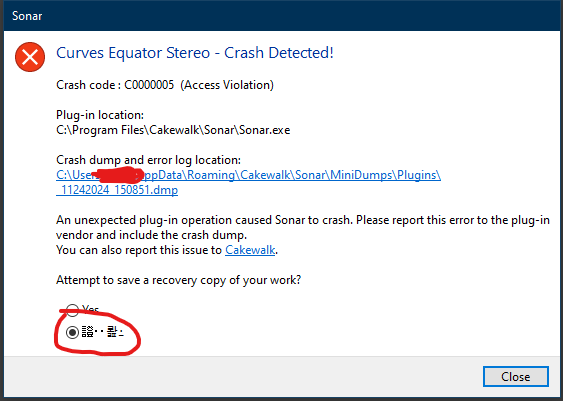
Clicking the Cakewalk link takes me to bitly.com for some reason...
-
Reported the bug. The Sonar dump seems to say the crash is in Sonar.exe, didn't submit a CbB dump.
In Sonar, you can add the plugin to the project and save, but reopening the project crashes Sonar.
CbB crashes already when you insert the plugin to the FX bin.
Anyone else encountered this?
-
On 11/18/2024 at 12:39 PM, Wookiee said:
Have you reported it either via the report page or directly to support@cakewalk.com?
Such a persistent problem should be reported with a sample project, no need to include an audio.
Left a bug report with minimal project I could reproduce the issue with; an empty project with three instances of different problematic plugins.
-
1
-
-
It's not that the entire Sonar UI would freeze, just certain plugin UIs. I have a feeling that they are all using OpenGL. Not sure, though.
For example, all Waves, Voxengo, iZotope, Brainworx and Melda plugins work. Ones that stop working are TDR Prism analyzer and Magic7 reverb.
-
Would it by any chance be possible to enable some debug output from Sonar to catch with WinDbg? I can't currently see any.
-
Not yet.
Would this condition perhaps be caught in a memory dump? Since it's not a crash, I could probs pause Sonar in WinDbg and save a dump. Don't remember if that's possible, but I'll have a look. -
Well, not quite gone away, I'm afraid.
Anyone else experiencing these plugin UI deaths after desktop locking/hibernate?
-
Aaaannd... as it many times happens, the issue has gone away by itself, at least for now. Hibernation, nor screen locking, no longerr kill the UIs. I hope it stays that way as well. 😁
A few reboots, some tinkering with nVidia control panel... Can't say exactly what I did, sigh.
-
Again, the plugin UI worked, until I left home for errands and locked the Windows desktop. Coming back after a couple of hours, after unlocking the desktop, the Magic7 UI no longer worked. This UI death happens on certain types of plugins, I don't know if the common factor is OpenGL or not.
-
Here's a video of a recent occurrence: https://drive.google.com/file/d/1PRqJ35ieXVAnZo6Yq8AGv6KCyPHWZiIa/view?usp=sharing
The plugin worked fine for a while. Then I switched to use other apps, leaving Cakewalk in the background. The desktop migh've been locked for a while. When I went back to try the Magic7 plugin, no popups work in the plugin UI. Controls on the main UI work ok, but no pupus are shown. The Waves Curves Equator still worked just fine. Again, deleting the plugin and undoing the delete restores the plugin functionality.
I'm still on Win 10, everything up-to-date, including the display driver.
-
PLEASE change insertion of buses into Console view so that if a bus is inserted to the left of the selected bus, the new bus just appears to the left of the selected one and the horisontal scroll position doesn't change! It's very frustrating to add busses, especially towards the right end of the console view, because the scroll position is reset to zero after inserting a bus.
Thanks in advance! 😁
Odd distortion recording multiple tracks.
in Cakewalk Sonar
Posted
Would it be having the "Remove DC Offset During Record" checked? I had strange sound issues when I had that on...