


-
Posts
30 -
Joined
-
Last visited
Posts posted by IainThompson
-
-
Thanks Mark. I knew there was a simple solution somewhere, and I checked all the preference settings but because I didn't have the advanced button selected at the bottom I didn't see it. All sorted now!
-
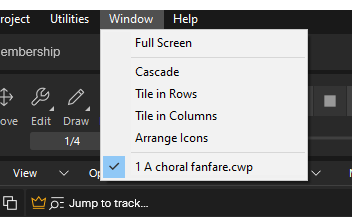
I'm pretty sure this is a basic question, but here goes. Is it possible to have more than one project open in the free version of Sonar and switch between them using the Window drop down? I used to do this all the time in the old Cakewalk program but now in Sonar when I open up a second project it seems to close down then first one and so on the Window drop down I only ever see one file open.
-
Just providing an update, in case it helps someone else in the future. I asked for help from Bandlab and they suggested the following:
1. Sign out and back in – Fully sign out of Sonar (and Cakewalk Product Center if you have it installed), then sign back in with the same BandLab account that owns your Sonar license. This can often reset the activation.
2. Reinstall via Product Center – If signing out/in doesn’t help, uninstalling Sonar and reinstalling it through Cakewalk Product Center can clear up any activation hiccups.
Step 1 didn't make any difference for me, but the reinstall (step 2) sorted things out.
-
I was using Sonar (free version) yesterday with no problems. Today I get the message that I am not activated and the error message says "Sonar experienced a problem with activation. Please contact support. (20, 800b0100)". Does anyone know what this means and know how I can sort it out? If I use Sonar at the moment the save option is deactivated.
-
Once again, thanks for the advice (TracingArcs and Wookie). My order for a Scan 3SX is now placed with a spec very similar to Tracing Arc's!
-
 1
1
-
-
Thanks for the feedback and the recommendation for Scan computers. I had come across their website but didn't make the connection back to your spec at the top of this post. It looks like I will end up with something similar, although even a few months later some of the components seem to have changed (so now it is the Ryzen 7 9700X 8C/16T CPU instead of the Ryzen 7 7700. I have no idea how much difference this makes in the real world! Thanks, once again.
-
I'm in the same boat of trying to source a new PC for Sonar, and it is 10 years since I have had to do it. I don't need 200 tracks open at once!
On the ready built options (from computer specialist UK) I come across this spec for £679. I know there is some lack of detail on make or RAM, motherboard, cooling, etc. The sales blurb is theirs, not mine.
An almost impossible question, I know, but how would this perform compared with TracingArcs spec above?
Office Business PC – Intel Core i7-14700 | 64GB DDR5 RAM | 1TB M.2 SSD | Windows 11
⚡ Intel Core i7-14700 – 20-core processor with superb multitasking
⚡ 64GB DDR5 RAM – For demanding office & creative workloads
⚡ 1TB M.2 SSD – Ultra-fast boot and load times
⚡ Windows 11 – Fully installed and activated
⚡ Ideal for: Business, data analysis, programming, design, and multitasking
⚡ UK-built, plug & play, upgradeable and efficient
💼 Professional Power for Demanding Workflows
This office powerhouse PC is built to meet the needs of professionals and business users who demand top-tier performance. Featuring the latest Intel Core i7-14700 (20 cores, 28 threads) and an incredible 64GB of ultra-fast DDR5 RAM, it’s perfect for multitasking across dozens of browser tabs, Excel sheets, programming tools, databases, virtual meetings, and even light creative software.
With a 1TB NVMe SSD, startup and file access are near-instant, giving your business efficiency and speed where it counts. Whether you're in finance, development, creative services, or high-demand remote work, this PC is ready to power through it all.
CPU: Intel Core i7-14700 – 20 Cores (8 Performance + 12 Efficient), 28 Threads
RAM: 64GB DDR5 (2x32GB) – Blazing-fast multitasking
Storage: 1TB M.2 NVMe SSD – Fast OS + file access
OS: Windows 11 Home or Pro (customizable)
Connectivity: USB 3.2, HDMI, DisplayPort, LAN
Build: Clean, quiet, professional case – low power and high airflow
-
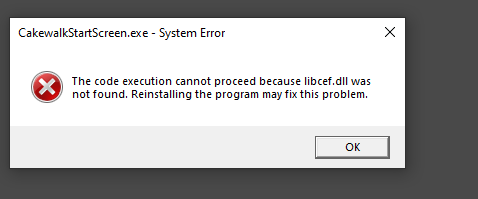
Many thanks for this helpful reply. Although I used the latest version of the installer from the Bandlab site, the libcef.dll file was missing from the folder that you referred to. (The installer did give an error referring to this file). I copied the file over from another PC that has Cakewalk on it and now everything starts up OK. Once again, thanks for your help.
-
1
-
-
Evening All. I needed to do a clean re-install of Windows 10, and hence I had to re-install Cakewalk by Bandlab ( as in the free one). I got a few error messages on the re-install of which the most persistent one is that I get an error message on starting Cakewalk saying that "the code execution cannot proceed because libcef.dll cannot be found". I've raised the issue with Bandlab, but as yet have not had a reply. Any ideas from the great and the good of the Cakewalk community? I've been a long term user of Cakewalk ( and had the original lifetime subscription for Sonar), so have used the software on this machine without any issues previously.
-
I had a similar problem a few days ago (see thread "Cakewalk not opening - Solved"). For me it came down to a corruption in a control surface file, caused by trying to install a new controller. The crashes are probably creating dump files ( .dmp) and these can be sent to Cakewalk technical support ( see details in the other thread ). My experience was that they were pretty quick to try and help, so this might be a better route to go before major re-installation of Windows etc.
-
2
-
-
14 hours ago, msmcleod said:
@IainThompson - I didn't realise you were using the nanoKONTROL 2... it could be that your control surface settings file has been corrupted.
Try renaming ctrlsurface.dat to ctrlsurface.old within %APPDATA%\Cakewalk\Cakewalk Core\And that, my friend, wins the prize! Your suggestion worked, so I have updated the thread title accordingly. Many thanks.
-
Thanks Will and scook. I saw the article from Noel, hence I found the dmp files. I have sent them off, following the link in Noel's article. I've been searching my mind trying to think what might have changed. I did try to install the drivers for a Korg NanoKontrol 2, so may be this caused a problem. The only reason I discounted this was because my Windows restore point was set before I downloaded the Korg drivers, and on return to this set point the problem didn't resolve. Hopefully the Cakewalk tech team will be able to help.
-
Some further investigation shows that the crashes are creating so call mini dump files (cakewalk.exe.XXXX.dmp where X = numbers ). Can these be interrogated to investigate this problem further? They are 10Mb files though, so I can't attach them here.
-
10 minutes ago, parboo12 said:
Any chance you have another monitor hooked up and it's starting in that one?
I do have a second monitor, and had already checked for it being in that one (but it isn't). When I have task manager open I can see cakewalk appear in the Apps list and then instantly disappear as the program appears to shutdown.
-
Thanks Will. Unfortunately it still doesn't open, having taken the steps you mentioned. I also thought it might be something to do with an antivirus, so had disabled this already. It didn't open in safe mode. I had a restore point from a few days ago, which I went back to, but still the same issue with Cakewalk. Any other suggestions?
-
When I launch Cakewalk the program tries to start and then just disappears again. Specifically, I get the Cakewalk by Bandlab banner and the program tries to open on the screen then it just disappears before it gets the screen where you can open existing projects etc. No error message appears or anything ... it just completely disappears. I have the latest version installed and it was working fine last week. I have re-installed the latest Cakewalk version but have the same problem. On a separate machine it is still working fine. Any ideas out there? I'm running Windows 10, 21H2 version on an i7 machine with 16 GB of RAM, so I don't think there should be any problems with the PC spec.
-
Thanks John for the confirmation. Your workaround is close to what I was planning to do, which is to duplicate the midi track and use the volume automation lane to control the output from each of the inserts of the VST. My only hesitation is that my piece is for double choir ( SATB x 2 ) so that will be a lot of duplicated midi tracks!
-
1
-
-
I have a user question about the Originals Epic Choir ( as I think quite a few people on this post have actually bought the VST ). If I have a single midi track with sections of legato and staccato singing, is it possible to switch between the “long ahh” and “short staccato” of the Epic Choir without splitting up the midi track and using multiple inserts of the VST. As far as I can tell, it is not possible to use an articulation map in CWB to drive the changes from a single midi track. Is this correct ( and if so, is there a smart way to automate the changes in singing style)?
-
Many thanks for the quick responses. You gave me the clues I needed to sort this. I had forgotten that I used an external drive for the IK downloads ( to prevent my SSD becoming full during the group buy! ) and this wasn't still connected. Once I reconnected it, the updates worked. As ever, this forum is the business.
-
2
-
-
Hi there. Does anyone else have a problem with getting the IK Product Manager to install the updates. I see that an update is available ( orange "Update" is visible ) but when I click on it nothing happens and eventually I have to just close down the product manager. Any help gratefully received.
-
Some great recommendations in this thread. I don't think I have seen any vocal recommendations though. Any thoughts on good options ( involving Kontakt if necessary) for chamber choir type of music (so SATB arrangements ). Obviously there is the Eric Whitacre material from Spitfire, which probably sets the gold standard, but are there good free / nearly-free examples out there?
-
1 hour ago, abacab said:
The full Studio One template for BBCSO Core running in Studio One 5.4 here is using up about 12GB RAM. I only have 16GB, so if you plan to work with a full orchestra template you may want to have 32GB available.
But the author of this template also provided a "slim" template, with smaller sections.
I also hesitated because of the resource pull. Does anyone on the forum have experience of using the Eric Whitacre voices with only 16GB of RAM. I know it is a 160GB download, which is another issue, but I don't want to invest only to find it a problem on my machine (Intel Core i7-4790 CPU @ 3.60GHz with 16GB RAM)
-
I'll try not to disrupt the thread, but I see others asking for advice on their purchases / freebies. I got into the GB by purchasing ST4. All is working fine, but what I notice is the volume automation on my midi tracks in Cakewalk is not impacting the volume of the instruments selected in ST4. In Kontakt there is an option in the instrument settings to " accept standard controllers for volume and pan" which basically "tells" Kontakt to use the volume automation from the midi track ( or not, as the case may be ). Is there a similar setting somewhere in the depths of ST4 that I have not been able to find yet?
-
On 10/4/2021 at 3:25 PM, Fwrend said:
Correct. For me, it is C:\Users\<my name>\Documents\IK Multimedia\IK Product Manager as shown but you may also want to look in C:\Users\Public\ Public Documents\IK Multimedia\IK Product Manager folder which I think is the default?
BTW, this is also a great time to copy the .zip files to a backup drive so you don't have to pay IK $10 to renew downloads when they expire.
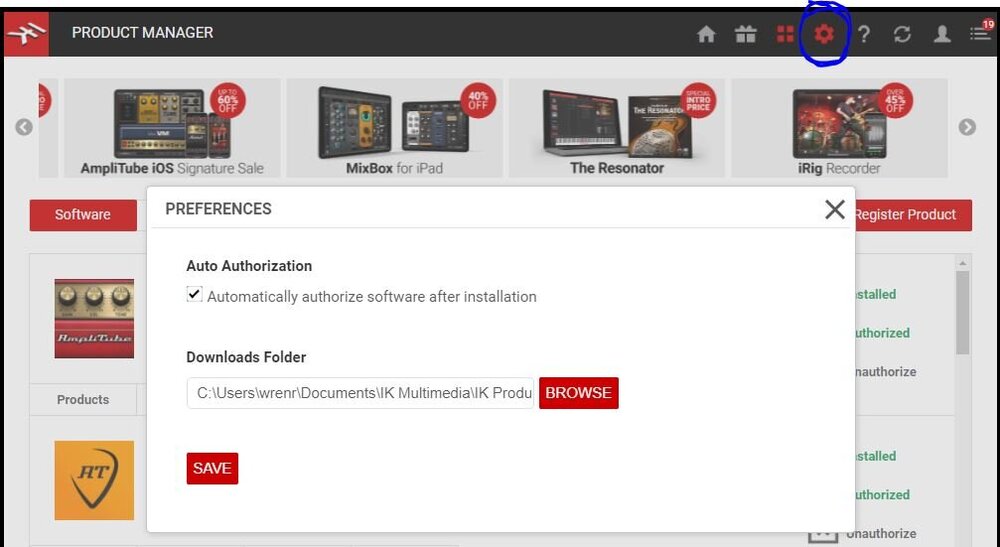
Fwrend ... I've been following the advice you included in the above post (many thanks for this ), and all is now working well. I now want to tidy up my disc space, but don't want to mess up at this final point. Am I right in thinking that the large zip files that are now in the IK Product Manager folder on my SSD can now be transferred to an external drive and deleted from my SSD? I think that is the logic you express above. Also, do these samples actually expire at some point, or is it only if you want to download them again after the 180 day period would the back ups be usefu?

Activation Problem
in Cakewalk Sonar
Posted
Just for the avoidance of doubt, I have only ever taken updates from the official site, so if the exe was "not legit" then the non-legitimate file came from Bandlab. If the file became corrupted on my system, which I guess could have happened in the update process earlier this week, then this is a bit different from concluding that the file was not legitimate in the first place.