


JazzP
-
Posts
18 -
Joined
-
Last visited
-

Dithering keeps reverting back from Pow-r to Triangular
JazzP replied to JazzP's topic in Cakewalk Sonar
Thanks for looking into it and fixing it! For the export dialog/presets the saving into the presets can be a good remedy. Also, be aware that the export dialog is not the only functionality where dithering can be applied. The dithering setting applies to any process in Cakewalk/Sonar that involves bit rate conversion, like importing audio files with a different bit rate as the current project. -
Dithering keeps reverting back from Pow-r to Triangular
JazzP replied to JazzP's topic in Cakewalk Sonar
That's corrects, my default (customized) .cwt template file is saved in the Templates folder (C:\Cakewalk Content\Sonar\Project Templates). FYI: even before opening a new or existing project the setting already has reverted back in the preferences (no project loaded at all). In CbB the setting would always remain at Pow-r 3, so this behaviour seems to have changed in Sonar. -
Dithering keeps reverting back from Pow-r to Triangular
JazzP replied to JazzP's topic in Cakewalk Sonar
Yes, I have save the setting of coarse. Not sure what you mean with the default template; do you mean the default project template? This setting is the global setting in the application preferences, not a project setting. Anyway, just to double check I re-saved my default project template after setting the dithering to Pow-r 3, but upon the next Sonar restart the setting reverted back. The issue is not with the export dialog, but with the global application settings, so not following you with this one? -
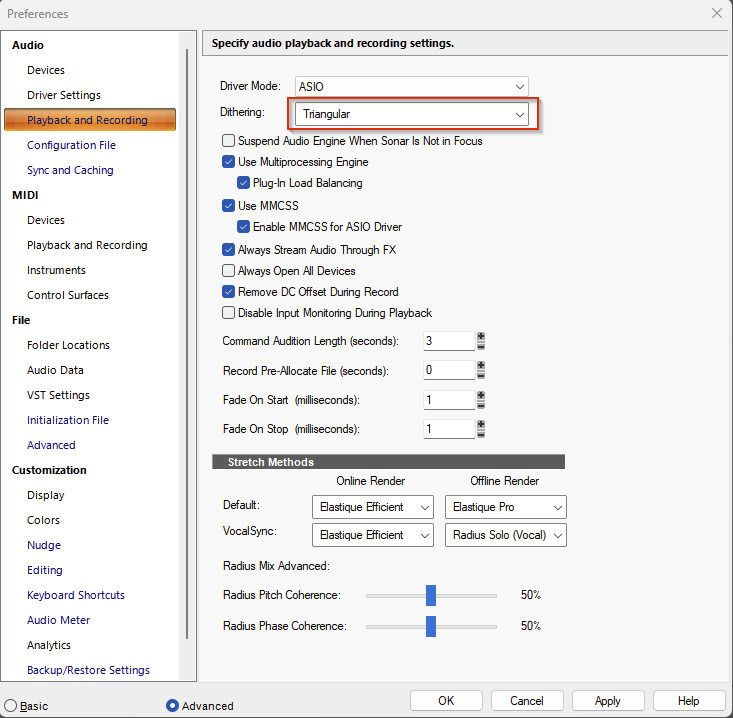
The Dithering setting in the Playback and Recording preferences keeps revering back from Pow-r (1,2 or 3) to Triangular after each restart of Sonar. I have a paid Membership, premium options are unlocked. Any idea what might cause this and how to fix it? Sonar 2025.09 (Build 038, x64) on Win 11 25H2 Pro, RME HDSPe MADI FX soundcard. I can't tell if this behaviour was the same in older versions as I switched from CbB to Sonar only recently, although I remember seeing this issue with the previous build as well.
-
Can't see figures (pictures) in Cakewalk Documentation
JazzP replied to LNovik@aol.com's topic in Cakewalk Sonar
Same issue here, since a couple of weeks pictures no longer show up (using Firefox on Windows 11) -
I don't.... that's your interpretation of my question it seems (no offence meant). As I stated in my opening post, I'm just curious to know whether I can verify that Sonar's process is getting the right priority. As you can read in my opening post, Sonar seems to be running fine for me (same settings as CbB) for what I have been doing with it in the last couple of weeks and I'm totally not complaining about performance, and you don't have to convince me that the Sonar engine has been improved compared to CbB. My curiosity would like to know whether the assumption is correct that I am getting the best out of it.
-
Yes, there is a lot of info about the performance improvements, of which I read a lot, thank you. And then I'm still wondering if there is a quick way to verify that Sonar is getting the right priorities on my machine in the same way as I could in CbB. None of the post/articles that I found gave me a clear answer on this, so maybe you could be so helpful to point me towards the right post if you are so sure that this info is out there?
-
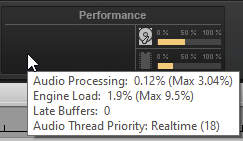
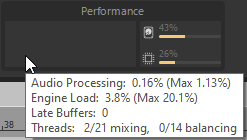
Is there a way to find out what the Audio Thread Priority of Sonar is? Hoovering over the Performance indicator in CbB would give info on the Audio Thread Priority the audio engine has in Windows (with Realtime (18) being the level): However, in Sonar the information is different: So far Sonar seems to be running fine, but I'm just curious if it is running optimally; most of the settings (including config file) were imported from CbB, but then there might be some very old settings in there that might even work counterproductive? Any insight on how I should read/interpretate this performance info in Sonar and verify whether it's performance is as it should be?
-
Win 10, 11 and authorisations across machines
JazzP replied to Murray Webster's topic in Cakewalk Sonar
Cakewalk projects should be completely agnostic to the Windows version they were created on. As long as Cakewalk/Sonar can run and opens the project you should be fine. Whether all the same plugins/softsynths etc. are present on the other machine that's a different story... -
Preserve existing SonitusFX user presets on installation of Sonar
JazzP replied to JazzP's topic in Feedback Loop
That's indeed how the presets in the ini file and the preset manager works. However, if you are not aware of this, and have not backed up your presets using the Export before you update or install another Cakewalk product, there is still the risk of losing your custom data; in my opinion that is not acceptable. I learned about the Sonitus:FX presets being overwritten the hard way durin a Sonar upgrade which included new versions of the Sonitus:FX plugins.... -
Preserve existing SonitusFX user presets on installation of Sonar
JazzP replied to JazzP's topic in Feedback Loop
I am not sure how this will solve the overwrite issue as not all these options apply to the Sonitus:FX plugins. - Give custom preset custom names: Sonitus:FX plugins are DirectX, and the internal preset option stores the presets in an .ini file (the one that is being overwritten). So if I give it a custom name, it is stored in the same file as the factory presets. There is that Other cakewalk preset button thing in the toolbar, but that one is horrible to work with, and I have no idea where those are stored (not in Content folder, not in AppData etc. Maybe in the register?) - Define your own content folder: the plugins are installed by default in the Shared Plugins folder, of which the location is determined during the first Cakewalk installation on a pc. Afterwards, this folder is being used by all other Cakewalk products, and there is no way to influence this. Maybe you can elaborate on your suggestions on how to exactly apply them to this scenario?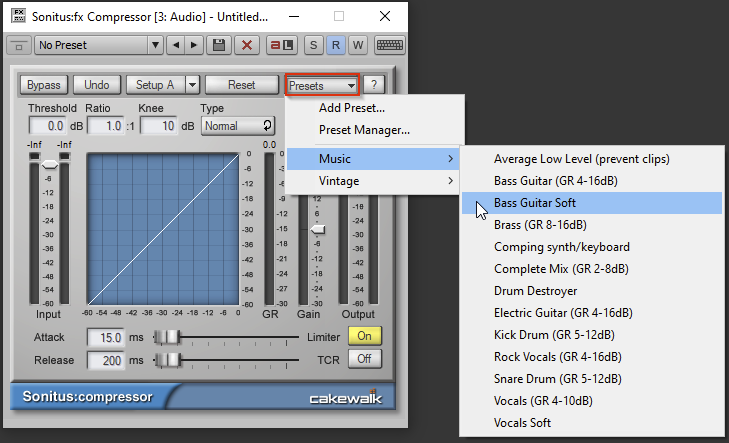
-
I asked if there is a way to fixate the vertical grid line resolution without turning of the smart grid 😉 But thanks for your contribution, at this point it is not possible the way I would like it.
-
I don't want to turn of smart grid, otherwise I would already have gone for that solution.
-
I have observed this behavior before with other Cakewalk versions, but now it happened again when I installed Sonar 2024.11 for the first time next to an existing installation of CbB: The SonitusFX plugin preset files (FxCompressorDX.ini etc.) in the Shared Plugins folder (C:\Program Files\Cakewalk\Shared Plugins) are being overwritten by the default files when SonitusFX is being installed by another, thus loosing all saved user presets (not wanted!). The installation of Sonar did not let me choose a different folder as it was apparently already fixed as default location by CbB. I was prepared for this and had backed up the files before, but it is still annoying. So please fix that the Cakewalk Sonar installer preserves SonitusFX .ini files with a newer date found in the Shared Plugins folder.
-
You're right, its indeed in the colors in CbB. I thought I already checked for this, but apparently I was searching for the wrong entries before. The "Vertical Beat Lines" and "Vertical Measure Lines" I had changed to the same color as background. Now waiting for the color editing in Sonar to become available again...

