quattj
-
Posts
45 -
Joined
-
Last visited
-
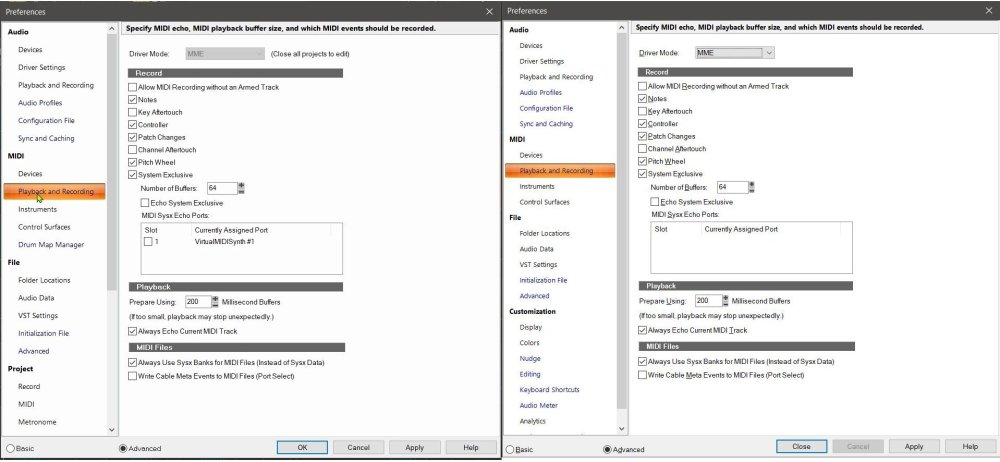
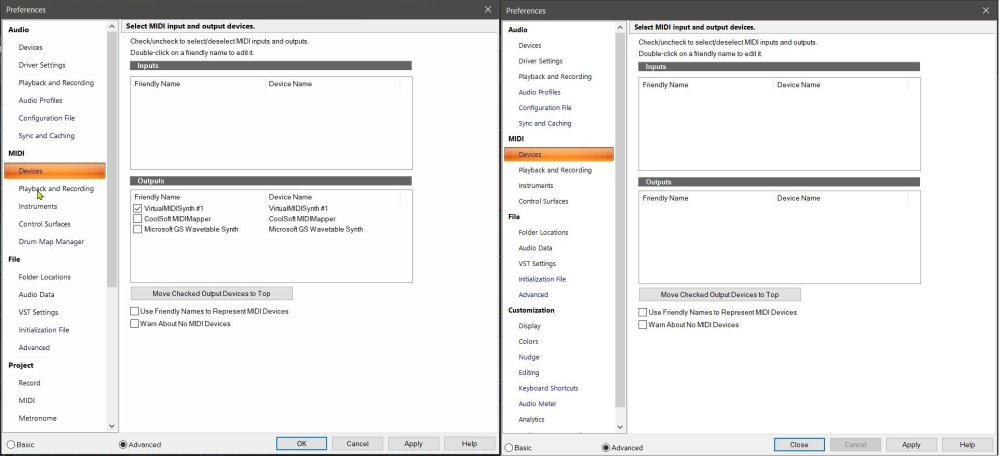
It plays only through what it can, and no, VirtualMIDISynth does not show as an option with UWP. MS GS Synth is the ONLY option, and ONLY in UWP mode, and even then it stutters and is awful. It still plays MIDI somehow in MME mode, even though NO devices are shown, but again it is awful and does not run through VirtualMIDISynth, which I have set as the default Windows MIDI playback device on my system. VirtualMIDISynth is essentially a "complete" implementation of GS MIDI support (and fairly complete XG support within the limitations of soundfonts), while the Microsoft version is very basic in its support, and many commands simply have no effect. In Cakewalk, VirtualMIDISynth showed as a device as displayed in my screenshots above. In Sonar, it does not, with no other changes to my computer.
-
I did a recording of creating one of my soundtracks, and luckily I had an issue where I ran through all of the settings to check them, so I was able to pull screenshots of Cakewalk settings from the video to compare with Sonar. Both programs have "WASAPI Shared" selected under Audio->Playback and Recording I've attached screenshots of the comparison of Cakewalk vs Sonar for the MIDI preferences for ->Playback and Recording and ->Devices. Cakewalk on the left, Sonar on the right. All setting are identical, except that all devices are missing in Sonar.
-
Even if nothing was removed, something is not working the same in Sonar as it did in Cakewalk for MIDI playback devices. With MME selected as the MIDI driver mode, no inputs or outputs are shown. If I switch the MIDI driver mode to UWP, I can then see Microsoft GS Wavetable Synth as an output. However, either way it completely ignores/bypasses any of my system MIDI settings to use Coolsoft VirtualMIDISynth as the playback device, and playback sounds like garbage. I believe VirtualMIDISynth showed up as a separate device in Cakewalk, but now I have no way of checking. I do know that it played back properly as expected in Cakewalk, as no matter which app I played back with, it was and still is correct except for in Sonar. Changing the driver mode in the audio section has no effect on the MIDI section. Nothing has changed on my system (Windows 10 Home 22H2) since the last time I successfully used Cakewalk to edit my MIDI files on September 24th, except that I have now had to install Sonar.
-
I've submitted a bug report. I hope they fix it. I used Cakewalk solely for features I could not find elsewhere for editing my MIDI files. I've tried many other MIDI editors and DAWs and none are sufficient for what I need to do. I need the exact configuration I use on my machine, so VST SynthFont will not work as a complete substitution. I have tons of stacked soundfonts that I change and modify regularly, depending on the soundtrack I am working on at the time.
-
I've just installed Sonar for the first time after my Cakewalk activation finally expired. I use Coolsoft VirtualMIDISynth for my MIDI playback. It worked fine in Cakewalk. No MIDI devices are showing in Sonar preferences, and it defaults to using (I assume) the horrible Microsoft GS Synthesis. Editing MIDI files it literally the only thing I use(d) Cakewalk for because of the CAL script and file trimming functionality. Without proper MIDI playback my long-term project will suffer. How can I make it cooperate?
-
New release July 7 2025 Gradius III
-

CAL script for removing same event type on same tick?
quattj replied to quattj's topic in Cakewalk by BandLab
I realize it's been a while, but I am about to try this script again on my current soundtrack. However, I can't wrap my head around CAL. I modified it to have a tick duration of 1 instead of 15, which is fine. I'm going to switch it to 0. But, if I have 2 of the same events that are on the same tick, is it the first one that is removed? That is what I need for this particular soundtrack. EDIT: Actually, welp, I tried it out on a file using a resolution of 0 and 1, and it completely obliterated the file, removing all controllers within the resolution except the first one. For example, with a resolution of 1, this: 3: 2 |Controller | chan= 1 | contr=Volume H | value= 73 |Controller | chan= 1 | contr=Volume L | value= 17 |Controller | chan= 1 | contr=Pan H | value= 43 |Controller | chan= 1 | contr=Volume H | value= 80 |Controller | chan= 1 | contr=Volume L | value= 39 |Controller | chan= 1 | contr=Pan H | value= 64 124 |Controller | chan= 1 | contr=Volume H | value= 94 |Controller | chan= 1 | contr=Volume L | value= 67 |Controller | chan= 1 | contr=Pan H | value= 37 125 |Controller | chan= 1 | contr=Volume H | value=103 |Controller | chan= 1 | contr=Volume L | value= 91 |Controller | chan= 1 | contr=Pan H | value= 64 186 |Controller | chan= 1 | contr=Volume H | value= 90 |Controller | chan= 1 | contr=Volume L | value= 74 |Controller | chan= 1 | contr=Pan H | value=106 |Controller | chan= 1 | contr=Volume H | value= 63 |Controller | chan= 1 | contr=Volume L | value= 32 |Controller | chan= 1 | contr=Pan H | value= 64 189 |Pitch Wheel | chan= 1 | bend=100 |On Note | chan= 1 | pitch=G 2 | vol=100 got nuked in to this: 3: 2 |Controller | chan= 1 | contr=Volume H | value= 73 124 |Controller | chan= 1 | contr=Volume H | value= 94 186 |Controller | chan= 1 | contr=Volume H | value= 90 |Controller | chan= 1 | contr=Volume H | value= 63 189 |Pitch Wheel | chan= 1 | bend=100 |On Note | chan= 1 | pitch=G 2 | vol=100 As you can see, all Volume L and Pan got stripped. No bueno 😪 -
Split single instrument to multiple tracks/channels
quattj replied to quattj's topic in Cakewalk by BandLab
I'm still open to any cal scripts that might be able to automate at least part of this. I did end up doing almost exactly what was suggested using Sekaiju. I cloned the offending tracks, and deleted alternating notes on each, as well as pitch bends and expression changes that were also causing some glitches. One track only had issues between major sections of the track, so for that one, I just bulk deleted everything in one major section per track, alternating of course. It sounds loads better now. -
I have a MIDI file that was created with a converter. It makes extensive use of pitch bend. I am running in to an issue where the release from one note is being modified by the pitch bend for the next note. It sounds awful. I tried testing monophonic mode, but that sucks the life out of the song. So what I would like to do is split the instrument to alternate notes between two tracks/channels any time there is a new pitch bend, thus giving each note the proper time it needs to fade away without being improperly pitch bent. The corresponding pitch bends themselves would also need to be moved over to the alternate track. I'm attaching the file, in case you want to mess around with it. I've already gone through and manually removed roughly 50% of all the pitch bends, as the converter file resolution is very low (240 TPQN) and it sounded even worse with sometimes doubled or even tripled pitch bends of differing amounts within 0-2 ticks. I also attached the previous version without those bends removed. 28 Continue clean repair GS mod3 smoothstart mod fix2 unbend56.mid 28 Continue clean repair GS mod3 smoothstart mod fix2.mid
-
New release January 22 2025! Super Tetris 2 + Bombliss
-
New release November 25 2024 Super Tetris 3
-
Thanks, and yikes. My files are too varied for this to be feasible, especially since I don't know the exact number the volume would be after running the find/change. Events should be events. 😑 I worked around it by adding volume modification in to my own editor that I wrote for the project I am working on.
-
I am running a find/change for controller 7 Volume with value range 1 to 127 and replacing with value 40 to 127. In the resulting MIDI file, no volume should be below 40 unless it is 0. However, in 10 of the songs on the 31 song soundtrack I am working on, the volume remains at 28 because it is set at the very beginning of the track and there are no further volume changes in most of them to later boost it up. This can be confirmed in the Event Viewer, where that original volume of 28 setting does not appear in the list of events. I am using Cakewalk 2022.11. Can anyone confirm that this is either fixed or not fixed in newer versions? I am attaching a sample file. To replicate the issue, load the file click in any track and press CTRL-A to select all run Process -> Find/Change Select only Control: Number Min 7, Max 7; Value Min 1 Max 127 then press OK Set Control: Number Min 7, Max 7; Value Min 40 Max 127 then press OK Save the file. Then load it in an alternate editor/player/decompiler/whatever and check the volume values for Channel 7 and Channel 8. 16 Final Space noperc clean repair MERGE GS mod5.mid
-
I have been working on a project for the last several years remastering my favorite soundtracks from the Super Nintendo Entertainment System (SNES) as high quality GS MIDI Files, and uploading the completed soundtrack videos to YouTube, as well as having the MIDI files available for download. Cakewalk plays an important part in the process after the MIDI files are entering their final completion phase. I use it to trim each file down to 2 complete song loops, and add a 10 second fade-out at the end of each song using a custom CAL script. There is a "making of" time-lapse included at the end of the project playlist (though the process as a whole changes over time as I learn more and improve my techniques and workflow). New release July 5 2024! Super Valis IV The full SNES MIDI Remaster Project playlist can be found here: https://www.youtube.com/playlist?list=PLzNFPVjo8upworyQq0DXDTiCZzPP29Frw Soundtracks currently remastered: Axelay https://youtu.be/YJC4pmL1hGU Battletoads and Double Dragon: The Ultimate Team https://youtu.be/bt8FIzJuIu8 Legend of Zelda: A Link to the Past https://youtu.be/IknXcaQYxaY Prince Of Persia https://youtu.be/cFp1Dos_ltM Super Double Dragon https://youtu.be/6ICJpRNXzaM Super Castlevania IV https://youtu.be/r0-P66UJDzY Super Castlevania IV (Prototype) https://youtu.be/PPQJMg3UVng Super R-Type https://youtu.be/3ApAJHJDjc4 (new!) Super Valis IV https://youtu.be/I_UBQWP0OGI Bonus: Making of SMRP https://youtu.be/DKRim0JcXVg More info about the project/documentation can be found at https://drive.google.com/drive/folders/1op35g2ALiWenpXUNndyuHikq6ZlfmQuG?usp=drive_link with additional per-soundtrack info located in the video descriptions.
-
[snarky reply deleted] Got it. Thanks. ? Perfect, I will give this a shot. Thank you! ?