RobertWS
-
Posts
835 -
Joined
-
Last visited
-
MIDI is alive and well. The MIDI 2.0 standard was unveiled on January 17, 2020, at the Winter NAMM Show in Anaheim, California. Microsoft's first major update to MIDI in more than 40 years is finally here. It's called Windows MIDI Services, and it features MIDI 2.0. Feb 6th, 2025 https://windowsreport.com/microsofts-first-major-update-to-midi-in-more-than-40-years-is-finally-here/
-
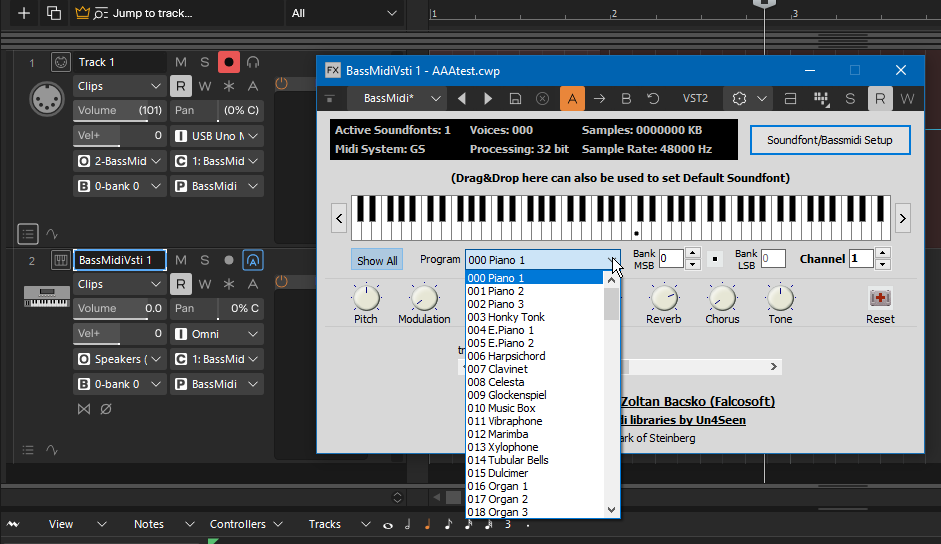
I am also not happy with that change and was forced to jump through hoops to work around it. I installed BassMidiVsti. Then, add an "Instrument" track and select BassMidiVsit. When you open the BassMidiVsti's setup screen, you can select sound fonts (and save them). Every time you add a MIDI track, you have to make sure its output is BassMidiVsti. And, you don't get a list of instruments to choose, just patch numbers. It has really made CakeWalk much more difficult and much less enjoyable to use. I still use VitualMidiSynth MIDI converter to do the final renderings of the MIDI file (which has to be exported). I prefer raw MIDI because I don't want to be held hostage by a project file format.
-

What are the 4 white dots in a MIDI track view?
RobertWS replied to RobertWS's topic in Cakewalk Sonar
No, I mean the little clickable icons disappear. 😀 Previously, I only worked on pure MIDI files, but Cakewalk removed some features so now I have to use their project files to work. At the end though, I revert to a MIDI file. "FWIW, Separate clips on one track can be set to open different editing views." Yeah, I noticed the little icons changing based on the popup menu selection. -
What are the 4 white dots in a MIDI track view?
RobertWS replied to RobertWS's topic in Cakewalk Sonar
I'm surprised because 'pure' midi tracks don't have the concept of clips. Just a sequence of notes and midi commands. It must be something CakeWalk superimposes on the track when cutting and pasting. EDIT: I found you can select all the MIDI notes in a track, select "Bounce to Clips" and the clickable icons disappear (except for the last one). PS: Happy Thanksgiving! -
What are the 4 white dots in a MIDI track view?
RobertWS replied to RobertWS's topic in Cakewalk Sonar
Ahhh. But setting it to nothing does not remove them, it disables double clicking. A single click still pops up a menu. Now that I know what they are...they don't bug me. -
I spent 40 minutes trying to find the answer but couldn't. In MIDI tracks, what are the four white dots (circled in red) that appear, apparently at random, in MIDI tracks?

-
Subscriptions?
-
BassMidi VSTI is missing instrument names/patches
RobertWS replied to RobertWS's topic in Cakewalk Sonar
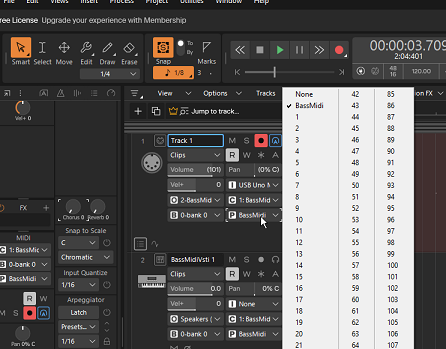
Thanks for that, I had found it but it involves several extra mouse clicks...the horror. It'll probably be easier to print out the list of patches and numbers! EDIT: I found another workaround. Select Microsoft GS Wavetable synth as the output...you get the patch names. Choose a patch and then switch back to BassMidi. -
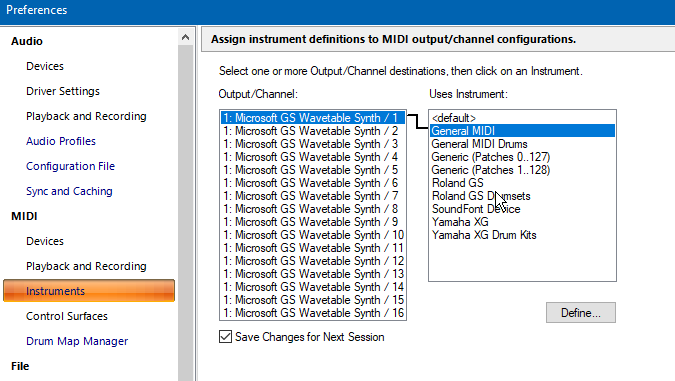
I got and installed BassMidi VSTI to use with Calkwalk Sonar. It is playing the loaded soundfonts correctly. However, the patch names are not showing up in Track view: BassMidi HAS the instrument names, they appear in the BassMidi configuration window: I tried to import or design an instrument definition file but BassMidi isn't in the list...only Microsoft GS Wavetable: What do I need to fix this? Thanks.
-
I only listened to it to hear you botch the octave plus a minor 3rd interval (the 2nd, "Where do....."). But you nailed it!
-
The only thing that causes inflation is pumping additional money into an economy.
-
If a song has multiple key changes, there will be multiple scales.
-
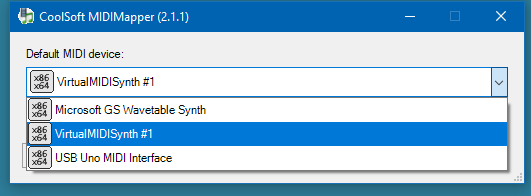
There used to be: Microsoft MIDI Mapper. It's gone now. All is explained here and they have a substitute: https://coolsoft.altervista.org/en/midimapper
-
All present and accounted for....SIR!